
20-Seat Minimum
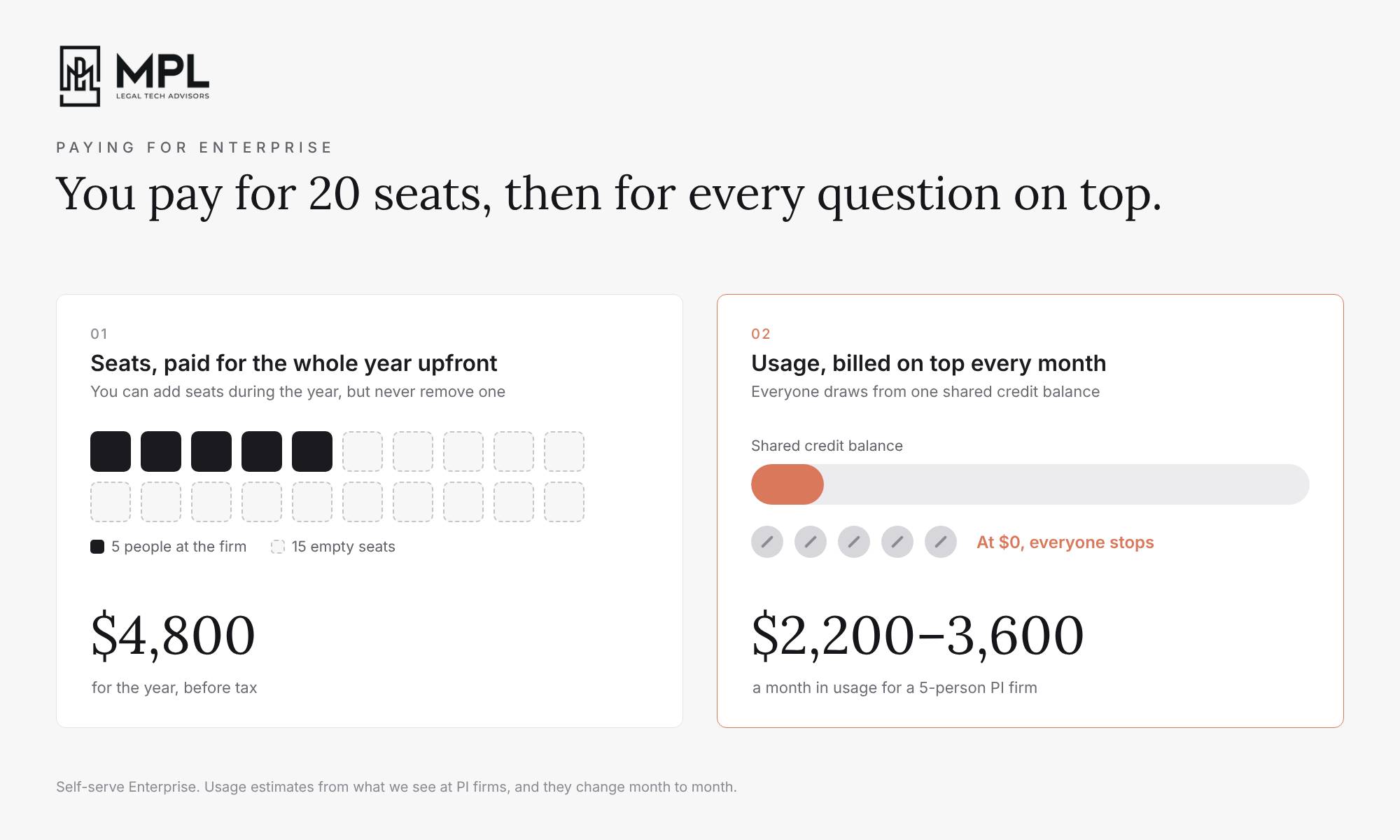
Anthropic only offers the HIPAA-ready version of Claude on its Enterprise plan, and Enterprise starts at 20 seats. So a 5-person personal injury firm that wants its paralegals to use Claude on medical records would pay for 15 seats nobody uses, $4,800 for the year, before tax and before anyone at the firm asks Claude a single question.
We went through this with a small plaintiff personal injury firm we work with. They have a bit under 100 active cases, and their paralegals go through a few hundred medical records every month, most of them scans of 100 to 300 pages each. Before any of those records reach the firm, the client signs a HIPAA authorization, and from then on the firm is responsible for how those records are handled, including the software they go into. So the paralegals couldn’t drop them into the firm’s Claude Team account.
That still left the firm with 3 ways to use AI on those records:
- Buy Enterprise anyway and pay the cost (some firms I know do this, because the return they get justifies it)
- Build their own pipeline that redacts the medical records before AI sees them
- Buy software that does the redacting for them
Once we compared the numbers for each one, it was pretty clear which one made sense for a small firm.
Paying For Enterprise
Enterprise costs $20 per seat per month, and you pay for the whole year upfront. Most small firms end up on what Anthropic calls self-serve Enterprise, which means you buy the account yourself on Anthropic’s website, instead of signing a contract through Anthropic’s sales team. On self-serve, you choose how many seats you want when you buy, and you pay for all of them for the full year right away. During the year you can add more seats, but you can’t remove any. So if someone leaves the firm in March, you’ve already paid for their seat until the end of the year, and you can’t get that money back.
And those seats only give you access. On Enterprise, every question, every record Claude reads and every chronology it writes is billed on top, at API rates. When we did the math for that firm, based on their current usage on a Team plan and based on what we see at other PI firms, the one really heavy user came out between $1,000 and $2,000 a month, and everyone else at around $300 to $400 per person. Depending on the month of course. For that firm, that’s about $2,200 to $3,600 a month in usage, on top of the seats.
With a self-serve Enterprise plan, you have to pay for that monthly usage upfront, by buying credits. Every chat and every task anyone at the firm runs in Claude would then be paid from that one shared credit balance. Your Claude admin can give each person their own monthly limit, so when the heavy user reaches their limit, only they get stopped and everyone else can keep working. But once the shared credit balance runs out, everyone at the firm gets stopped until the Claude admin buys more credits, including people who didn’t yet hit their own limit. So if one of the paralegals had used only $50 of their $400 that month, they still wouldn’t be able to use Claude until the firm topped up. To avoid that, you can set the credits to top up automatically whenever the balance drops below the amount you picked.
In this week’s video I go through how all of these settings work, and how you can set the limits in the first few months, when you don’t know yet how much your people will use Claude.
Enterprise also isn’t set up for medical records from day one. You have to switch on HIPAA in the settings and accept Anthropic’s business associate agreement, and once you do, you can’t switch it off again. Turning it on also resets some of the firm’s settings to Anthropic’s defaults, and it splits Claude’s features into three groups:
-
Covered by the agreement: normal chats, Projects, web search, research, voice, and the documents Claude creates in a chat. Cowork in the desktop app only joins this group after you apply a second HIPAA setting.
-
Still available, but not covered: skills, connectors that send data to other tools like Clio or Outlook, Claude in Chrome, and some of the Claude for Microsoft 365 features.
-
Not available at all: Cowork running in the cloud, Claude Docs, Slides and Design, and the combined chat and Cowork experience Anthropic started rolling out in September.
So Enterprise can work for a personal injury firm, but for a firm of 5 people, that’s a lot of cost and setup just to get started. Which is why a lot of small firms start looking for another way.
Build Your Own Redaction Pipeline
Some firms decide to build their own redaction pipeline instead, which is software that takes each new medical record through every step on its own, from the moment it lands in a folder until a redacted copy comes out the other end. On paper it looks simple, because AWS and Microsoft Azure both sell services that find health information in text. But those services don’t come plug-and-play, and the firm will have to hire a developer to build a lot around them before anyone at the firm can use it.
I’ve spent a big part of my career building systems like this, first at a large enterprise and later in startups, and this is what a redaction pipeline your paralegals can rely on would need:
-
Noticing new files: someone has to build the part that notices when a paralegal drops a new file into the folder and starts the whole process. If it misses a file, the paralegal ends up waiting for redacted records that never show up.
-
Reading the scans: most medical records arrive as scanned pictures of pages, so the pipeline first has to turn every page into text a computer can read. Records of 100 to 300 pages, faxed copies, pages scanned crooked and doctors’ handwriting all make that harder, and very large files have to be cut into smaller pieces, or the service that reads them gives up halfway through.
-
Deciding what to remove: Microsoft’s service will find the obvious things, like names, dates of birth and addresses. On top of that, the developer has to add the firm’s own rules about what always has to go, like claim numbers and medical record numbers, and what has to stay, like the names of the hospitals and doctors the chronology needs. And those rules won’t be the same for a trucking case and a slip-and-fall, so all of that has to be coded into what you build.
-
Finding the exact spot on the page: the service tells you which words to remove, but on a scan, those words are part of a picture. So the developer has to work out exactly where on each page they sit, on every page of every record. This is the hardest part to get right.
-
Really removing it: the information has to be wiped from the page itself and from the hidden parts of the file, instead of only being covered with a black box that someone could take off later.
-
A screen for the paralegal: the paralegal needs a page where they can see every redaction highlighted, undo one that shouldn’t be there, add one the pipeline missed, and approve the file. That’s a small app of its own, and it needs its own secure login.
-
Sending the files on: approved files have to land in the folder Claude can see, and the originals have to be stored away safely or deleted.
Then the paralegal will start using it on real files and come back to say that it redacted the name of every hospital and clinic, which the chronology needs, or that it missed a date of birth on page 140. Every time that happens, someone will write it up for the developer, the developer will change something, and the paralegal will test it again on the next batch. The firm will pay for those developer hours. It will also pay with its own paralegals’ time, because without their feedback the developer has no way of knowing where the redaction pipeline works and where it doesn’t.
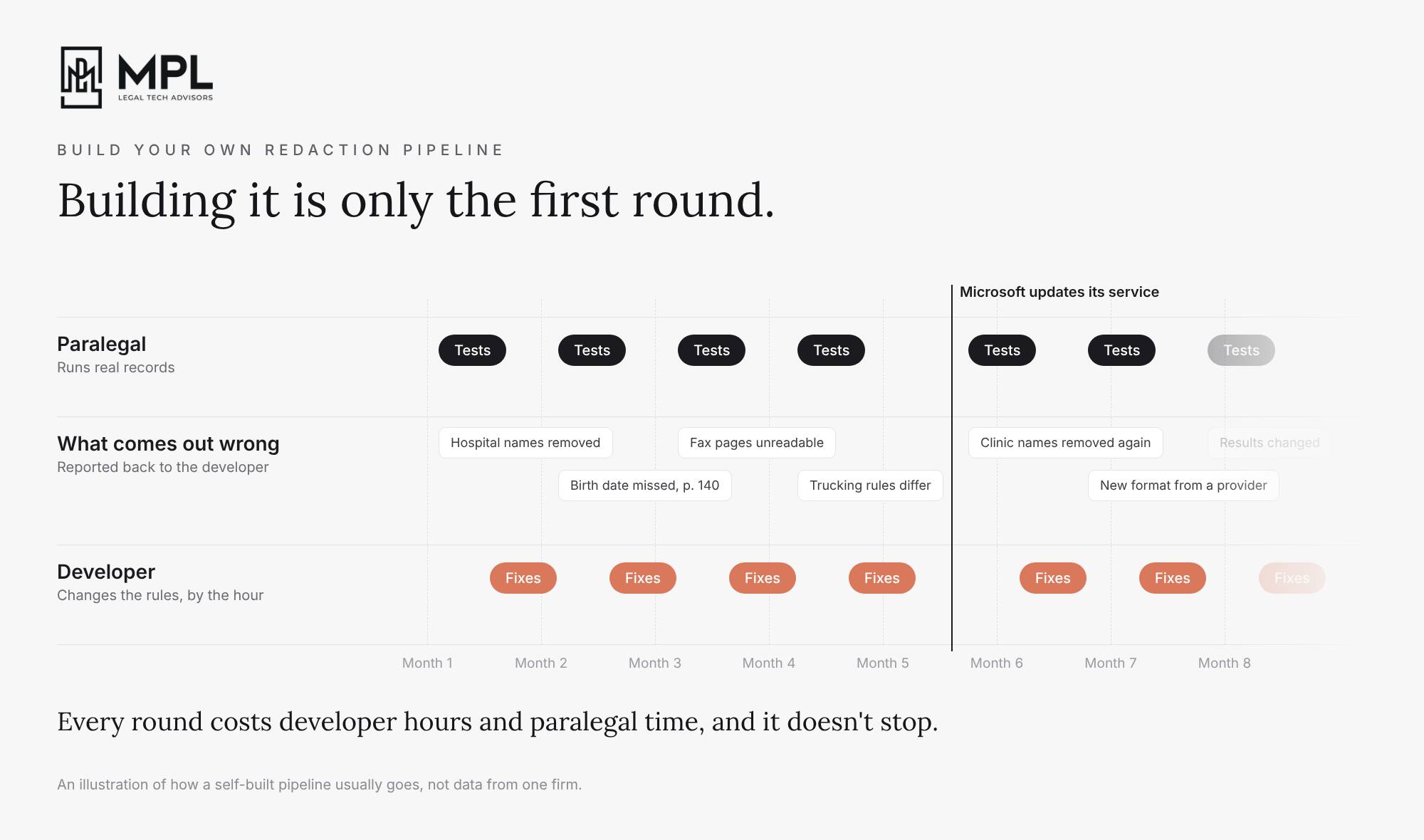
And once it works, it still won’t be finished. Microsoft retires older versions of its services and updates the models that find health information, so the results can change without warning. The code the pipeline is built on needs regular updates too, providers keep sending records in new formats, and someone will have to keep the whole thing running, every month, for as long as the firm uses it.
Sure, AI can write a lot of the code today, but you still need someone who knows what they’re doing, and those people are not cheap. A solid version would take an experienced engineer several weeks to a few months before the paralegals trust it, plus monthly Azure costs for every page read and checked, plus ongoing developer and MSP time.
Which brings me to the most reasonable option for smaller firms.
Redact Before AI Sees It
The third option, and the one I think makes the most sense for small firms, is to buy redaction software that’s already mature, HIPAA compliant, and plugs into the systems your firm already uses, like SharePoint, OneDrive or Clio. Your paralegals will still have to open the software to check what it removed before anything goes further, so you want that check to be as quick and easy for them as possible.
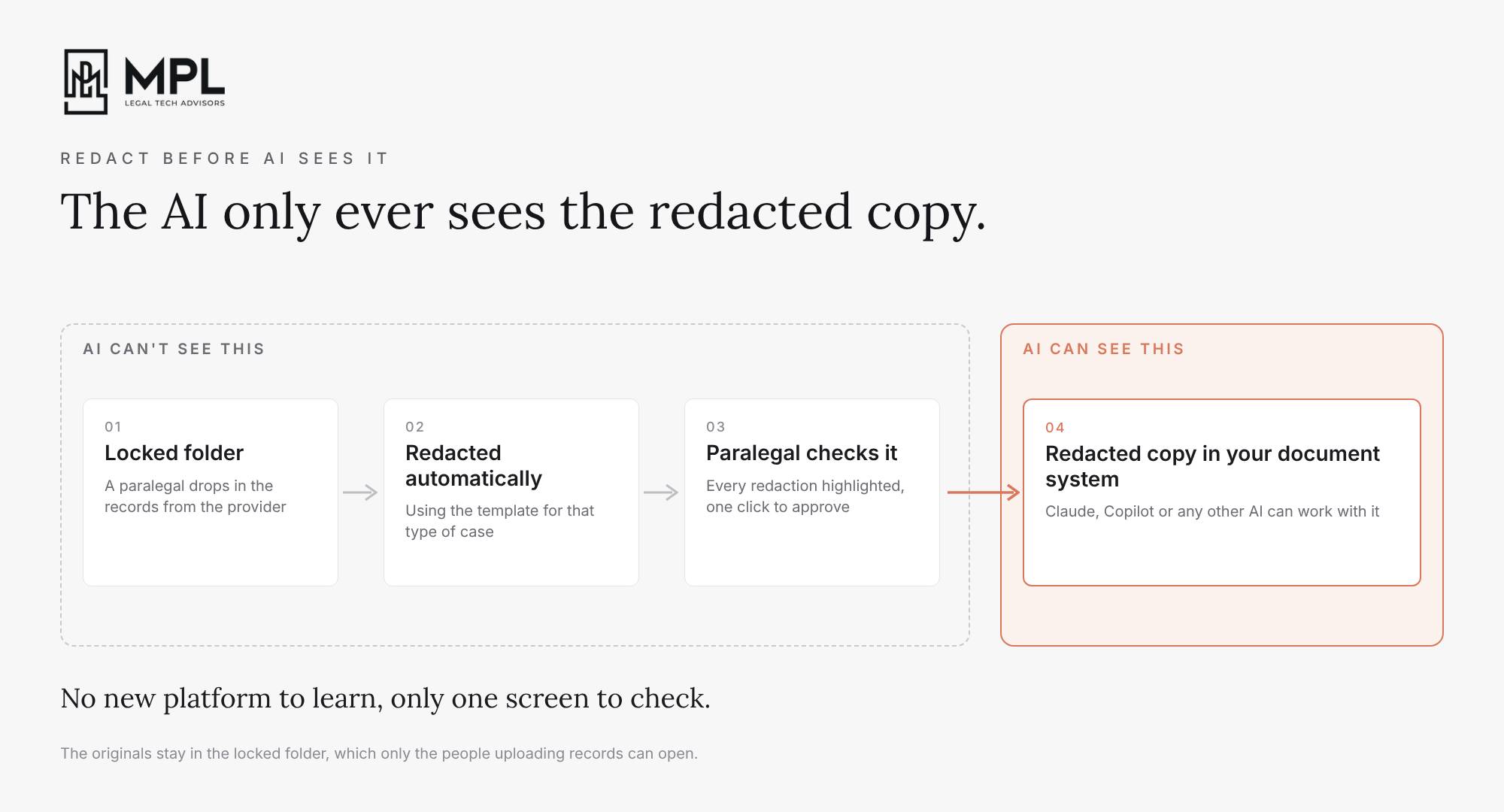
When records come in from a provider, a paralegal downloads them into a SharePoint folder that only the people who upload records can open, and that Claude and Copilot can’t see. The redaction software notices every new file in that folder, reads the scans, and redacts them using a template your firm sets up for each type of case, because trucking records and slip-and-fall records don’t always need the same things taken out. The paralegal then opens each document, with every redaction highlighted on the page and clicks to approve it. The redacted copy then automatically moves straight into a folder in your document system Claude is connected to, and the original is never available to the AI.
Many PI firms we work with today redact in Adobe, one file at a time, deciding page by page what should be redacted. Making sure the information is also removed from the hidden parts of the file takes extra steps that are easy to miss. With this setup, one paralegal is able to do the redaction for the whole firm in 30% of the time it usually takes them.
Mature software usually also comes with the things the firm would otherwise have to build and prove on its own: a business associate agreement, a SOC 2 Type II audit (an independent check of how the company protects its customers’ data), and a record of every redaction anyone made. Your paralegals log in with the same Microsoft account they use for everything else. And in our client’s case, it costs the whole firm $7,000 a year.
That can look like a lot next to the $4,800 for 20 Enterprise seats. But on Enterprise, the seats are only the start, and the usage on top would have come to about $2,200 to $3,600 a month for that firm. With the records redacted first, the firm can stay on its Team plan, where every seat costs a fixed price each month.
And the redacted folder will work for any AI the firm decides to use, not only Claude. The firm can use the same redacted records with any platform it moves to, without having to buy an enterprise plan from any of them.
For a personal injury firm, I would argue the setup and the software for medical records is more important right now than which AI tool you pick. Judges have started asking firms how they used AI on a case, and sooner or later a client, an insurer or a regulator will ask how the firm protects the medical records it receives. With this setup, you will be able to hand over a short document that shows where the records go, who can open them, and the record of every redaction, instead of trying to explain it on the spot.

Not much came out this week, but if your firm is on Enterprise, two things changed for you.
One Claude for chat and Cowork, now on Enterprise too. Back in the 55th edition I wrote that Anthropic started putting chat and Cowork together. On 9 October they sent Enterprise admins an email saying they can now turn it on, in beta. So your people don’t pick between chat and Cowork anymore, they just start a chat, and if the task needs files or code, Claude keeps going in the same conversation and gives back the finished work. It’s off until your admin turns it on, and you can try it with a few people first before the whole firm. You don’t have to switch now. But after the beta, the old separate chat and Cowork go away, you get at least 75 days to move, and Anthropic says that won’t be before 31 January 2027. If you’re on the HIPAA-ready setup, you can’t turn it on yet, Anthropic says that comes after the beta.
Docs, Slides and Design are now on for everyone on Enterprise. As I wrote last week, Anthropic turned them on by default today, 15 October, so if your admin hasn’t checked who at the firm can share a deck outside the firm or by link, now is a good time.

Since the last Minute, a lot of you asked me how to set up a Claude Project for a client matter. You want what Claude learns in that matter to stay out of drafts for other clients, and you want people at the firm who don’t work on the matter to be unable to open it. On the Team and Enterprise plans, which are the only plans a law firm should be on, this comes down to 3 settings:
1. Create the Project as Private
When you create the Project, keep Visibility on “Private”, which is the default. If you pick your firm instead, everyone at the firm can open the Project, its instructions and its files.
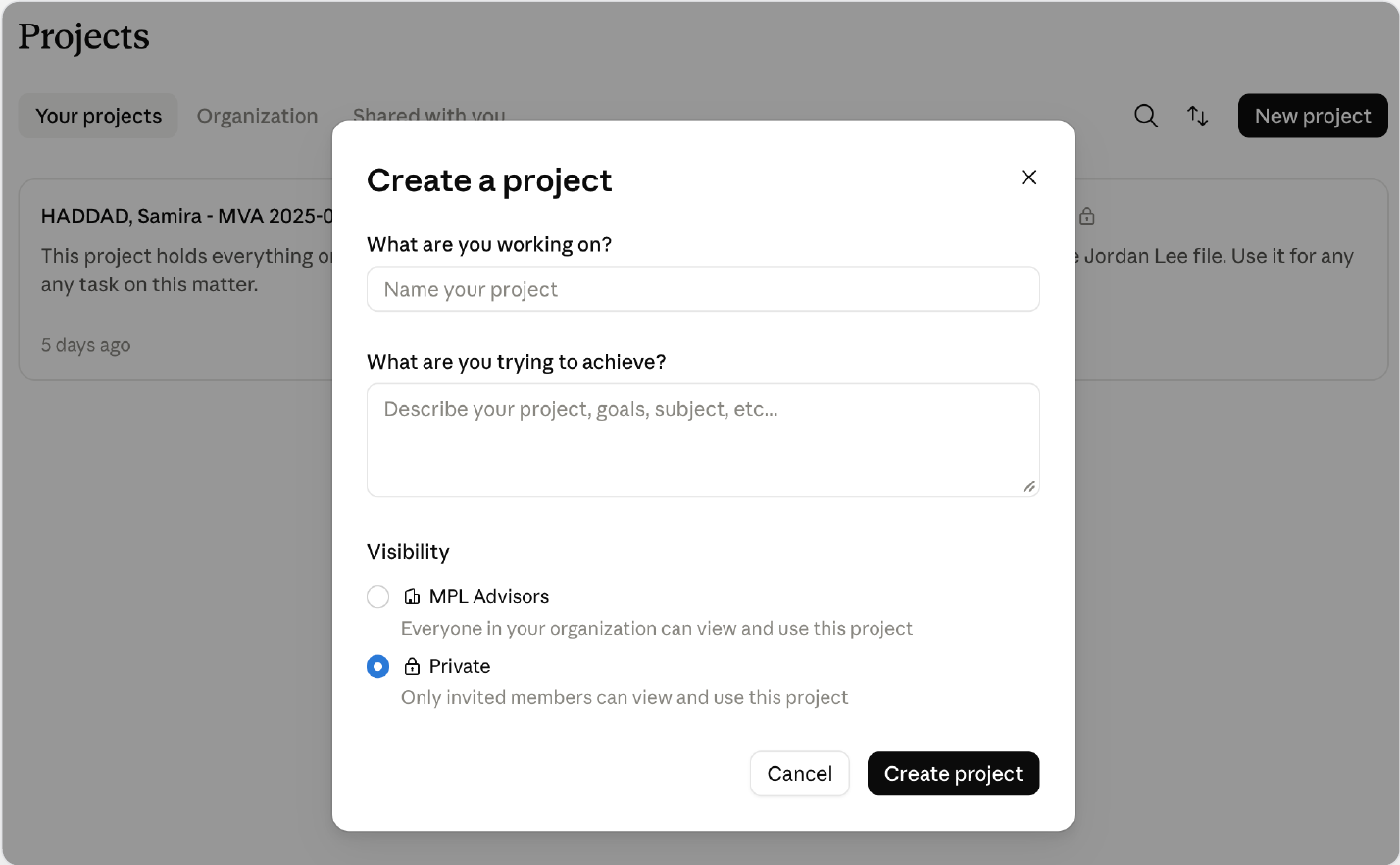
To check the Projects you already have, open the Organization tab on the Projects page. Every Project listed there is one the whole firm can open.
2. Turn off “Use account memory”
In the Project, click “View memory” and switch it off. It’s on by default, and while it’s on, Claude shares memory between this Project and your chats outside of Projects. That means details from the matter can come up when you draft for another client, and the other way round.
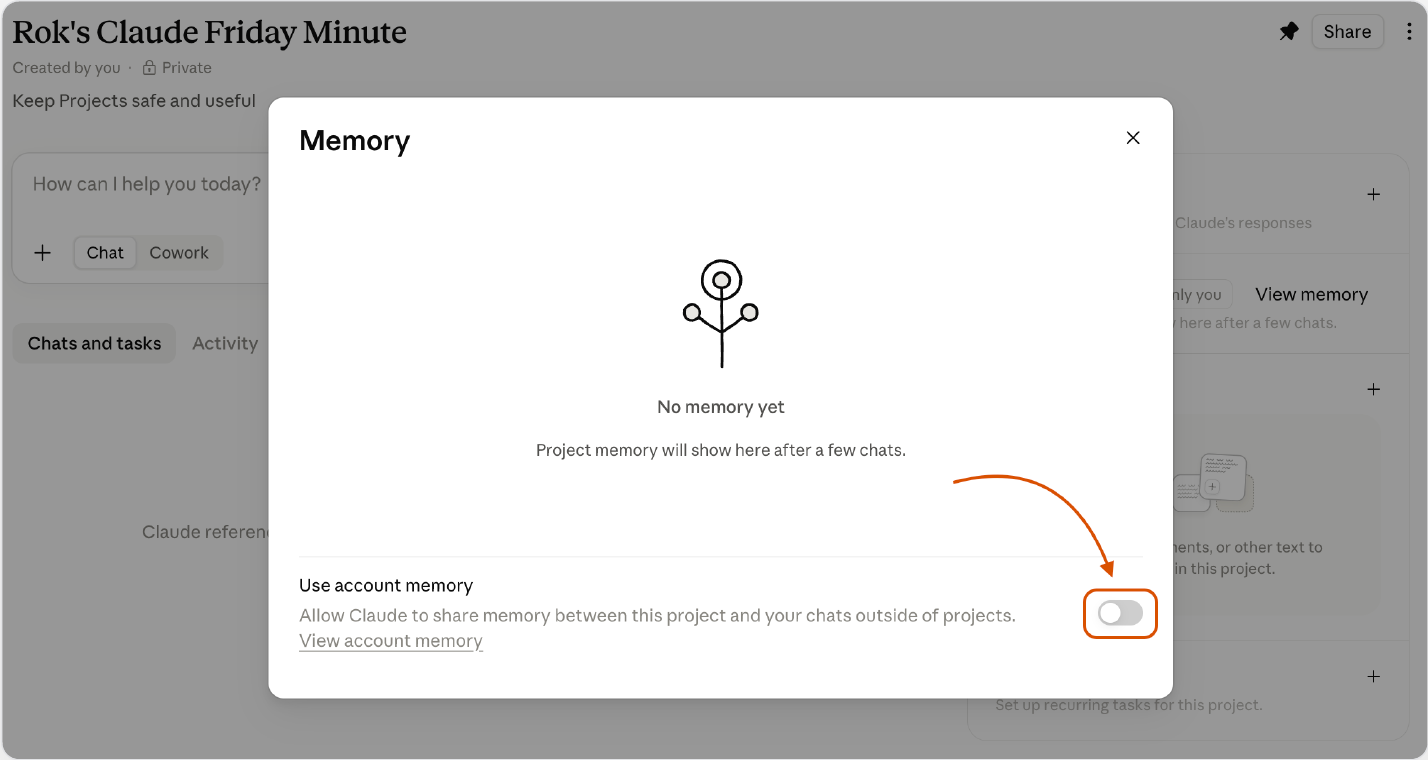
Do this before the first chat, so nothing from the matter gets shared in the first place.
3. Invite only the people working on the matter
Click Share, add them by email, and keep General access on “Only people invited”. If someone switches it to everyone at your firm, your Private Project becomes a Project the whole firm can open.
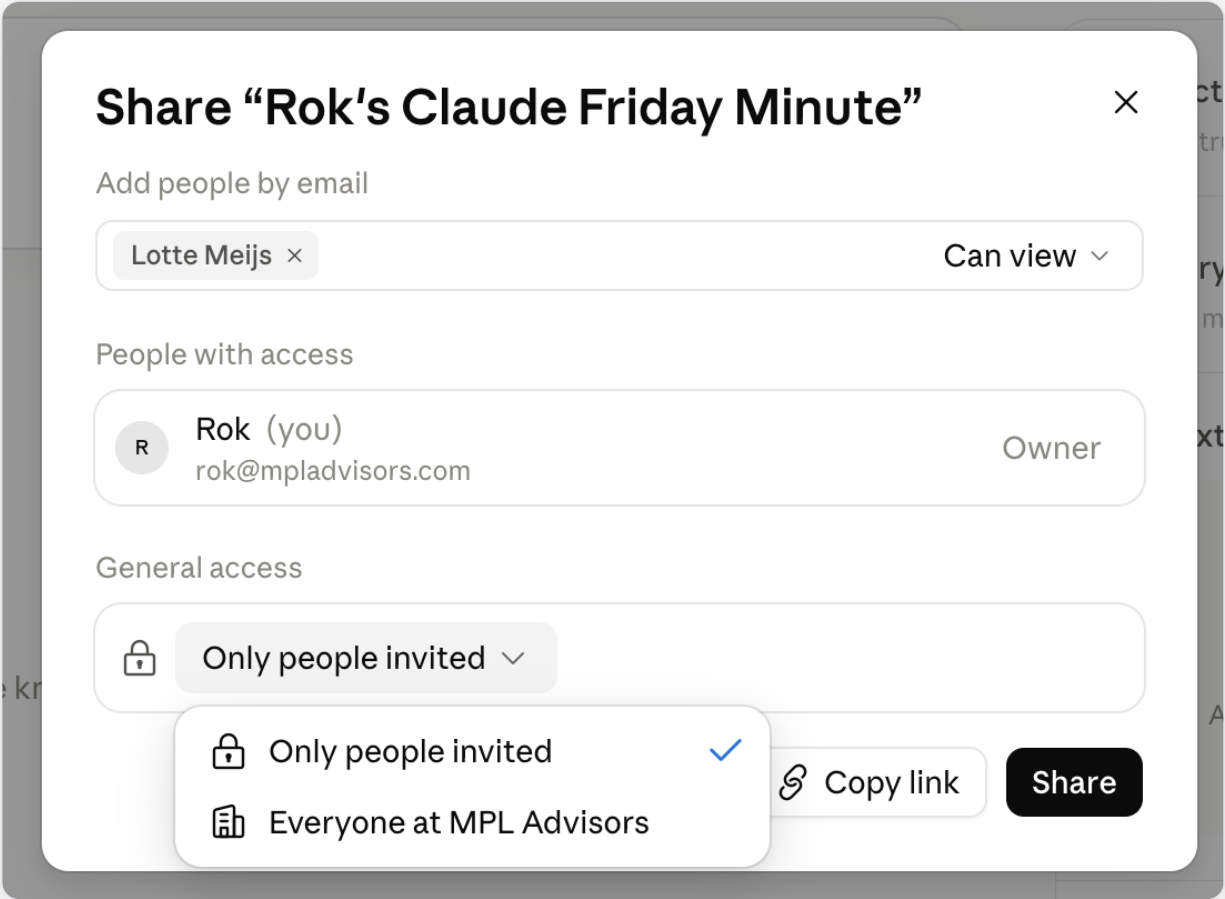
Inviting someone doesn’t give them your chats. Each chat in a Project stays private to the person who started it unless they share it.
Legal AI in Action
🎬 Keep Your Claude Bill Under Control
If half your attorneys and paralegals can’t use Claude a few days into the month, it usually comes down to how your plan charges for usage and a few small habits they can adopt. In this video, I go through how usage works on Team and on Enterprise, the settings an admin can use to keep spend under control, and how to set limits in the first months, when you don’t know yet how your people will use Claude. Then I walk through nine habits everyone at your firm can start using this week, whichever plan you’re on.
🎙 Testing Harvey and August on Litigation Work
Jeremy Mallory is counsel at Massey & Gail, a 25-lawyer commercial litigation boutique in Chicago, and became the person in charge of AI there after he wrote the firm’s first proposal for using it. Before that he clerked on the Seventh Circuit and worked at Sidley Austin and Kirkland & Ellis. According to his own words, he would be stunned if law ever ended up with industry-wide standards, so he thinks a firm’s own knowledge will keep being the differentiator, whichever platform it runs on.
We talked about how he tested Harvey and August against each other on a dozen litigation tasks, why vendors are only now noticing that litigators exist, and why getting knowledge out of lawyers’ heads is so hard when a lot of the work happens over texts on their phones.
Coming up!
🎙 Next Tuesday at 11am PDT/ 2pm EDT / 6pm CET
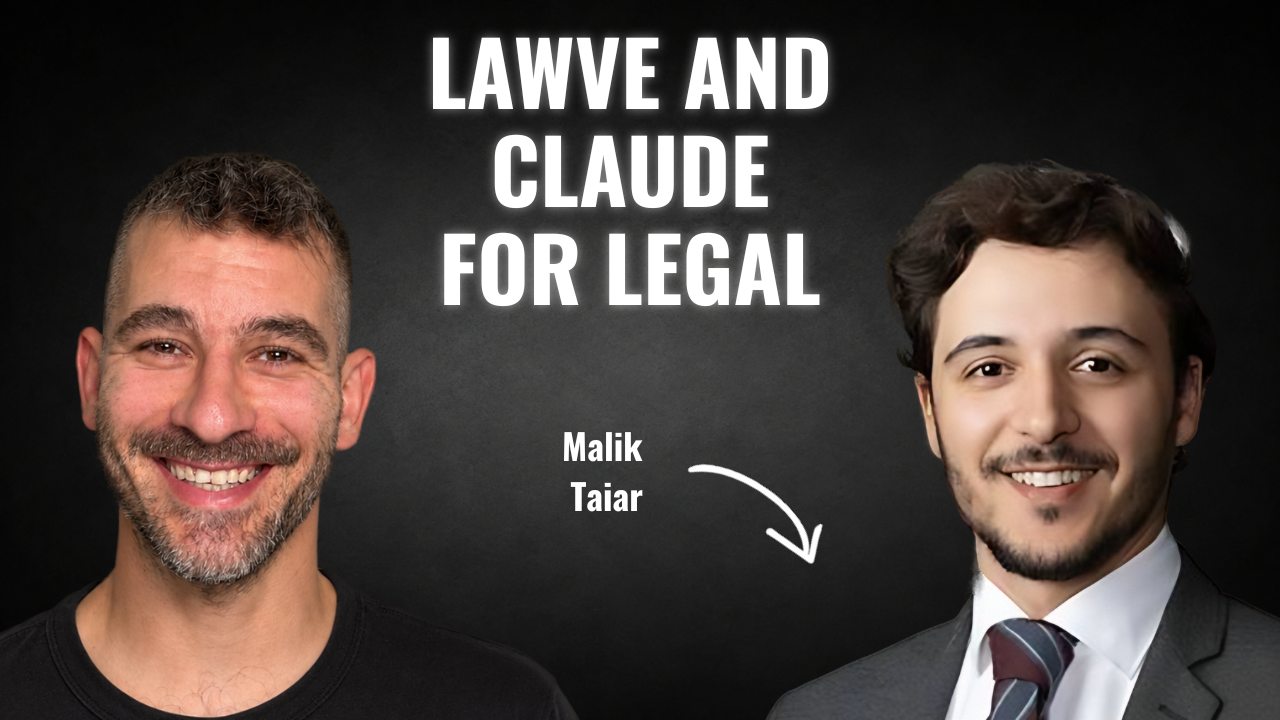
Next week’s guests on Rok’s Legal AI Conversations is Malik Taiar, co-founder of Lawve, the open-source hub where legal professionals share the skills, plugins and connectors they build for Claude and other AI platforms. He trained as a lawyer in France, worked on white-collar and investigations matters at McDermott Will & Emery, and started Lawve with two co-founders, an AI researcher and a software engineer, because he wanted a place where lawyers share what they build freely, instead of every firm building the same thing from scratch.
He tells me why he thinks buying specialist tools won’t keep a firm ahead, what a legal engineer does all day and at what size a firm needs one, and how a small firm can set its own benchmarks for AI’s work. We also get into how US and EU firms differ, and what it would cost a firm to run an open-source model itself.
Each edition of Legal AI Brief brings practical lessons from the frontlines of legal AI by our editor, Rok Popov Ledinski.