
Against Your Playbook
Last Thursday Microsoft launched Copilot for Legal, with more than 20 legal skills inside Word and Copilot Cowork. In the 55th edition I wrote that its Legal Agent was still about a month away, and it came right on time.
Those skills know how contract review, drafting or a chronology gets done in general. To do it the way your firm does it, they read from your firm’s own playbooks, and Microsoft expects you to bring those. Anthropic, Google and OpenAI built their legal versions the same way.
And most of that was never written down. It’s clear that work takes precedence over writing down how work gets done. But your team has been writing it anyway. The third time a paralegal told Claude that every trucking spoliation letter asks for the ELD data and the dashcam footage, they wrote a line of your playbook. They just wrote it in a chat they closed that afternoon, and nobody at the firm has looked at it since.
What is the Legal AI Brain?
Every week I see a new name for it. The firm brain, the second brain, the legal AI brain, the knowledge layer (I’ve used a couple of those myself). And most of the time it’s not so clear to me what specifically the author means by what should be in it.
Over the past two years we’ve built quite a few of them for law firms, so let me make it concrete for a personal injury firm. When we build a legal AI brain for a PI firm, it holds three things: procedures, playbooks and a case bank.
Procedures are the steps your people follow to get a task done the way your firm wants it done: how a records request goes out, how a medical chronology gets built, how a new case gets opened and how conflicts get checked. In Claude, we build those procedures as Skills, so Claude follows the same steps no matter who on your team asks.
Playbooks hold what your firm knows and what it has decided is the standard. That covers the checklists, the positions, and all the small facts people carry around in their heads, like which provider only sends records through their portal, how a certain carrier usually answers a demand, or which version of your HIPAA authorization is the current one. Your procedures read from your playbooks, so what Claude does matches what your firm actually does.
The case bank is what your past cases settled for, by injury, treatment, carrier and venue. It’s what you reach for when you value a new case or push back on a low offer. That one gets built from your closed files and not from your conversations with Claude, so I’ll save it for another edition.
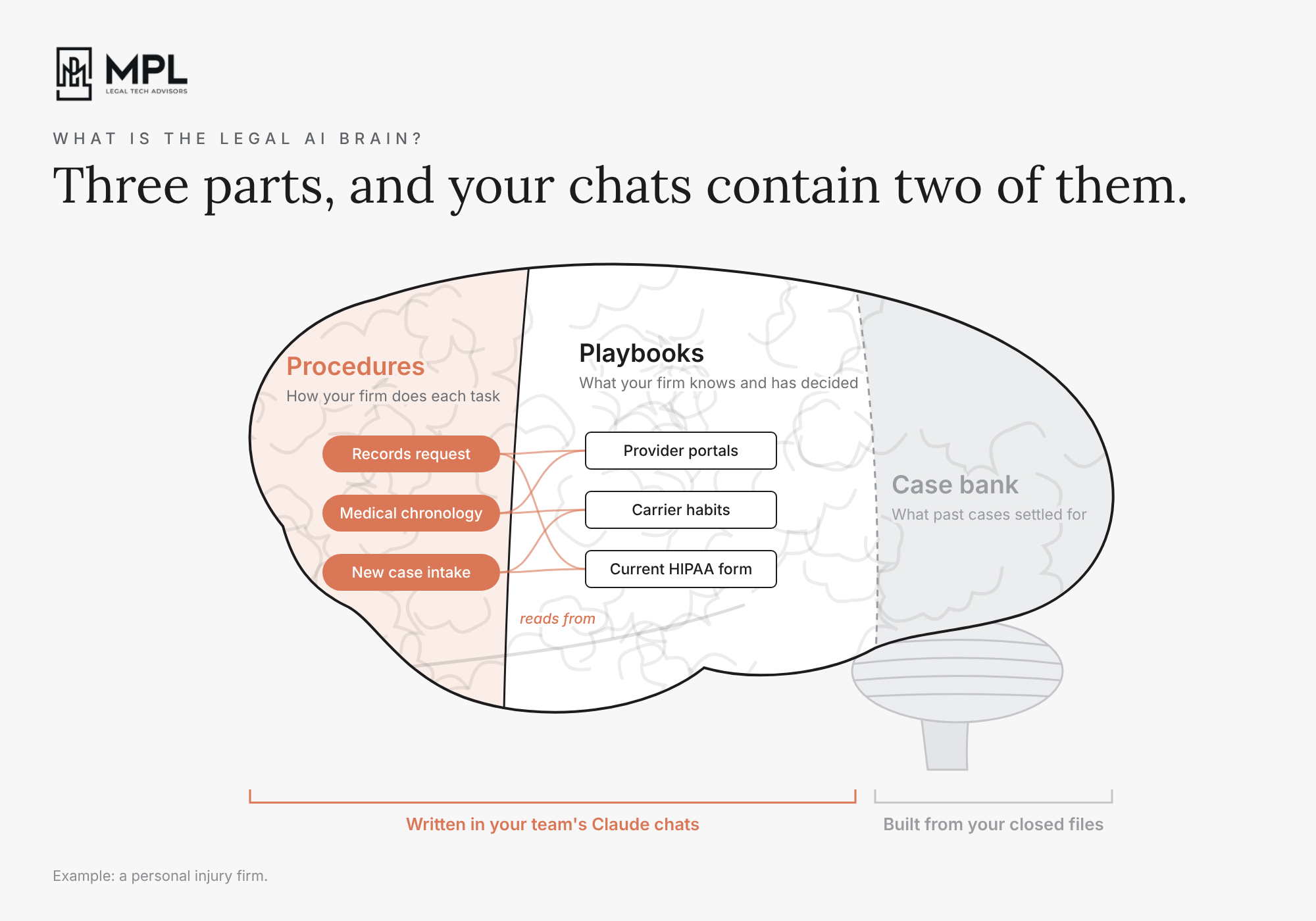
That leaves procedures and playbooks, the two your team has been writing into Claude all year. So I’ll stay with those two from here on: where they show up in your team’s chats, and the five steps to turn them into a brain your firm owns.
Five Moments
So where in your team’s Claude conversations do procedures and playbooks actually show up? There are five kinds of moments to look for.
The first one is when someone fixed Claude’s work. Claude drafted a records request to a hospital, and the paralegal told it that this hospital only accepts its own authorization form and sends back anything on the firm’s HIPAA form. That’s a line for your records playbook.
The second one is when someone told Claude something it had no way of knowing. For example, that a certain provider’s billing office always sends an incomplete ledger the first time, so the request has to ask for the itemized ledger with CPT codes from the start.
The third one is the same request typed again and again. Four people asked Claude every week to read a police report and pull out the same things: the date, the location, the citations, the witnesses and the officer’s narrative. Each of them asked in their own words, and each got the answer back in a different shape. That’s a procedure your firm only needs to write once.
The fourth one is when someone walked Claude through the same steps every time. Before every deposition, the same attorney had Claude draft the same prep letter to the client, with the same list of questions to expect and the same reminder to stay off social media. The steps become a procedure, and the list of questions becomes a checklist that procedure reads from.
And the fifth one is when Claude went the wrong way and someone stopped it. Claude mentioned the client’s earlier back injury in a demand letter, and the attorney took it out, because the firm never brings up prior injuries in a demand unless the records already put them in front of the adjuster. That’s a position, and anything Claude writes to an adjuster should know it.
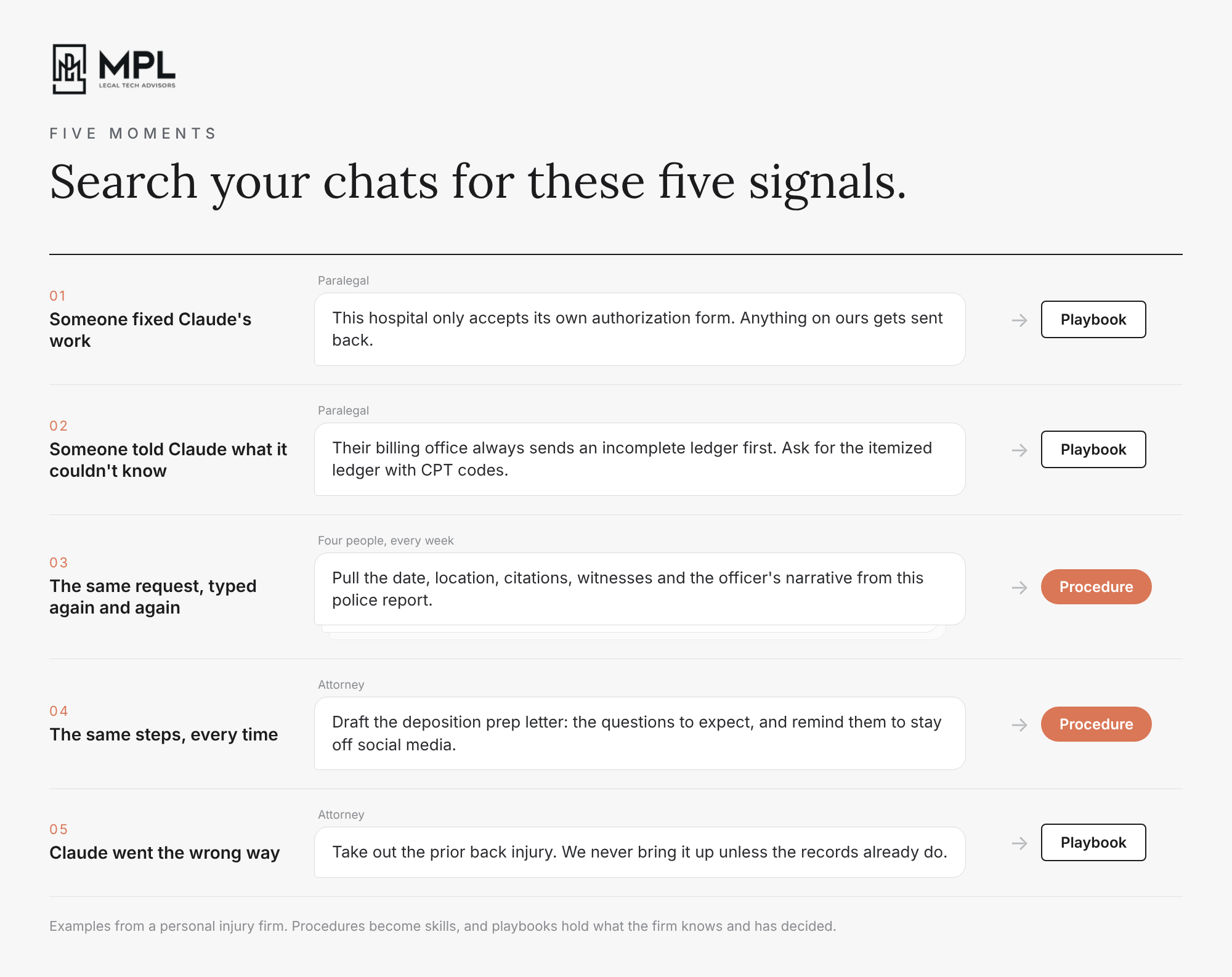
Each of these was a single message in a single chat, sent by someone in the middle of their work.
Five Steps
For a long time, the way a firm got this written down was by bringing in consultants. They’d sit with your senior people for hours, ask them to walk through how they do things, and write it all up. For a small firm that’s slow and expensive, and it misses exactly the steps people do on autopilot, because those are the ones nobody thinks to mention. And even when the write-up is good, someone at the firm still has to keep it current every month, by hand, next to a full caseload, which in practice almost never happens.
Working with firms, we turned this into a process that needs very little of the firm’s own time. Whether you do it yourself or someone does it for you, this is what it takes:
Collecting every conversation: your team’s Claude conversations don’t all sit in one place. Some are regular chats, some are inside projects, some are longer tasks Claude ran in Cowork, and some only ever ran on one person’s computer, and the export your firm can download only covers part of that. So the first job is pulling all of it, for every person at the firm, into one place inside the firm’s own environment. And if you’re on Claude Enterprise, check whether someone set your conversations to be deleted after a set period. It can be as short as 30 days, and once they’re deleted, you can’t get them back.
Finding the five moments: going through every conversation and sorting each moment into a procedure or a playbook. Something one person did once isn’t how the firm works yet, so a procedure only gets written when the same work shows up across several conversations. And when two people do the same task in two different ways, nobody picks one for you, it goes on a short list of decisions for the partners.
Human approval: each item goes to the one person at the firm who would know if it’s wrong. The note about the incomplete billing ledger goes to whoever orders your records, and the position on prior injuries goes to the attorney who writes your demands. They approve it, change it or throw it out, so nothing ends up in the brain just because AI found it in a chat.
Keeping it current: the brain only helps as long as it matches how your firm works, and the small nuances change all the time. For example, a provider changes how it wants records requested, a carrier moves your claims to a new adjuster team, or the partners change their minds about a position. So while your team works, Claude writes suggestions into a weekly folder in your document system, based on your firm’s criteria we train it on.
When a new suggestion contradicts something that’s already in the brain, it doesn’t automatically replace the old note. Say the hospital that only accepted its own authorization form moves to an online records portal. The first time a paralegal corrects Claude about it, a note gets written and flagged as a conflict with the old one. It then goes to the person who approved the old note, because they’re the one who knows which version is right. Once a week someone at the firm goes through the folder and decides what gets added, changed or removed, so every change to the brain is decided by a person at your firm. And every few months, the first four steps run again on the newer conversations, because some things only show up over time, like a request the team has started typing every week, or two people who have slowly drifted into doing the same task in different ways.
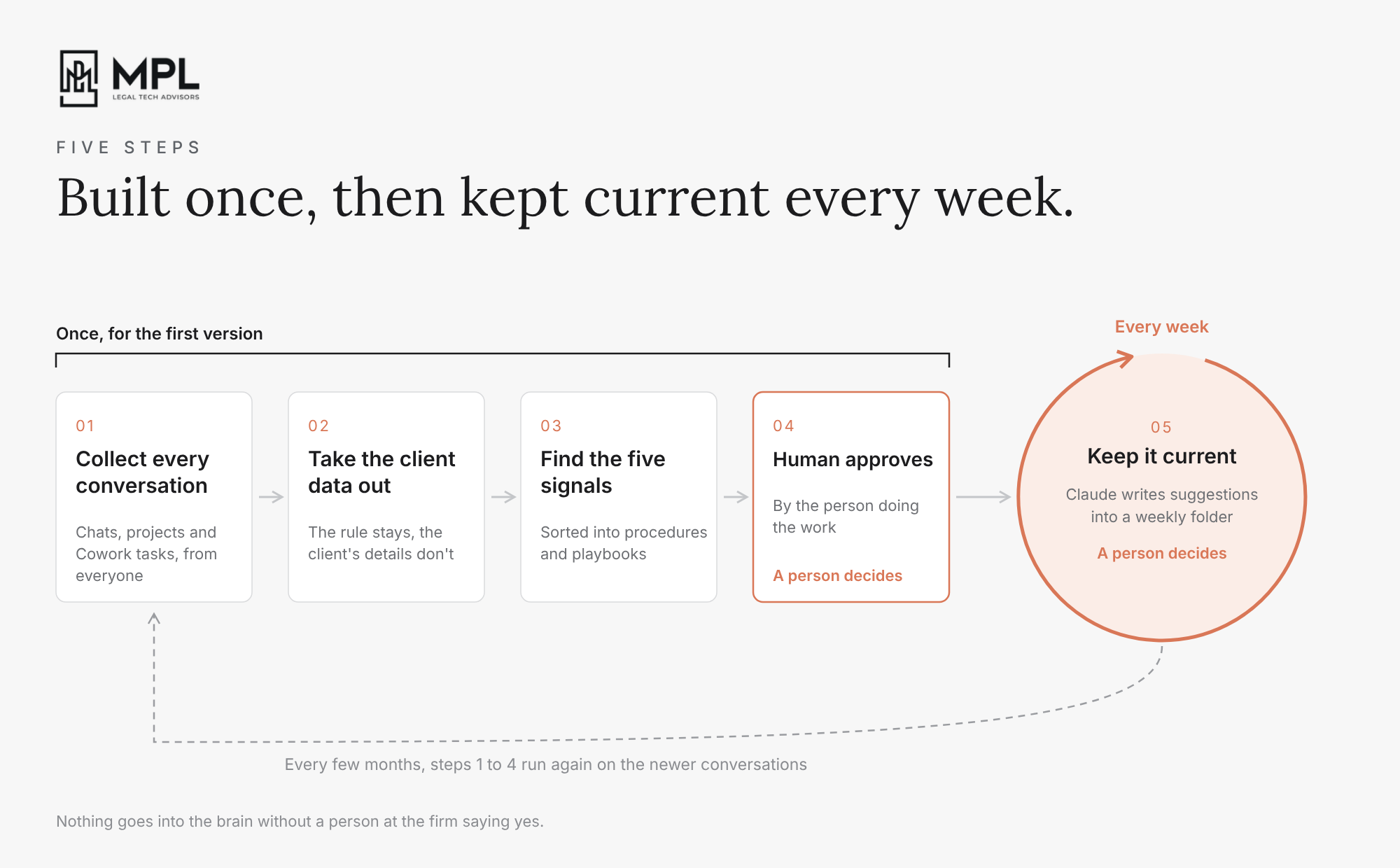
The first four steps give the firm its first version of the brain, and from then on the fifth one keeps it current, with the first four coming back every few months. In this week’s video I go through each of the five steps, what usually goes wrong in each one, and how we handle it.

Claude Duet is in research preview. Anthropic is late to this one. Google showed its Daily Brief and Gemini Spark at I/O in May, Meta launched Muse in September, and OpenAI followed on 29 September with Dots. On 21 October Anthropic opened a waitlist for Claude Duet. It’s a separate app that sends you a morning brief, checks your connected apps every few hours, keeps working on tasks on its own cloud computer while you’re away, and asks before it sends, signs or deletes anything.
For a personal injury firm, it’s easy to picture what that could look like. It could tell you in the morning which adjuster still hasn’t answered the demand, which provider never sent the records, and which file has a deadline coming up next week. But an agent that acts on its own only does that well if it knows your firm’s rules: who you follow up with and how often, what never goes in writing to a carrier, and when to ask a partner first. That’s the brain from the essay above. Without it, Duet works the same generic way the legal skills from Microsoft do.
And for now it’s only for US users on Pro and Max, which are personal plans, so it isn’t on Team or Enterprise and your firm’s admin settings don’t cover it. If someone at your firm joins the waitlist, the client email Duet reads goes through their personal account. That’s worth talking about before anyone signs up.
A few days ago, one of our clients asked Claude to draft a reply in Outlook and moved on to another chat while it worked. Two hours later there was no draft, only a message from Claude saying “No approval received”. The first thought was that the MS365 connector had stopped working, but it hadn’t. Anthropic’s documentation isn’t very clear on this part, probably because the way it works has changed several times over the past few months.
1. Claude was waiting for the approval
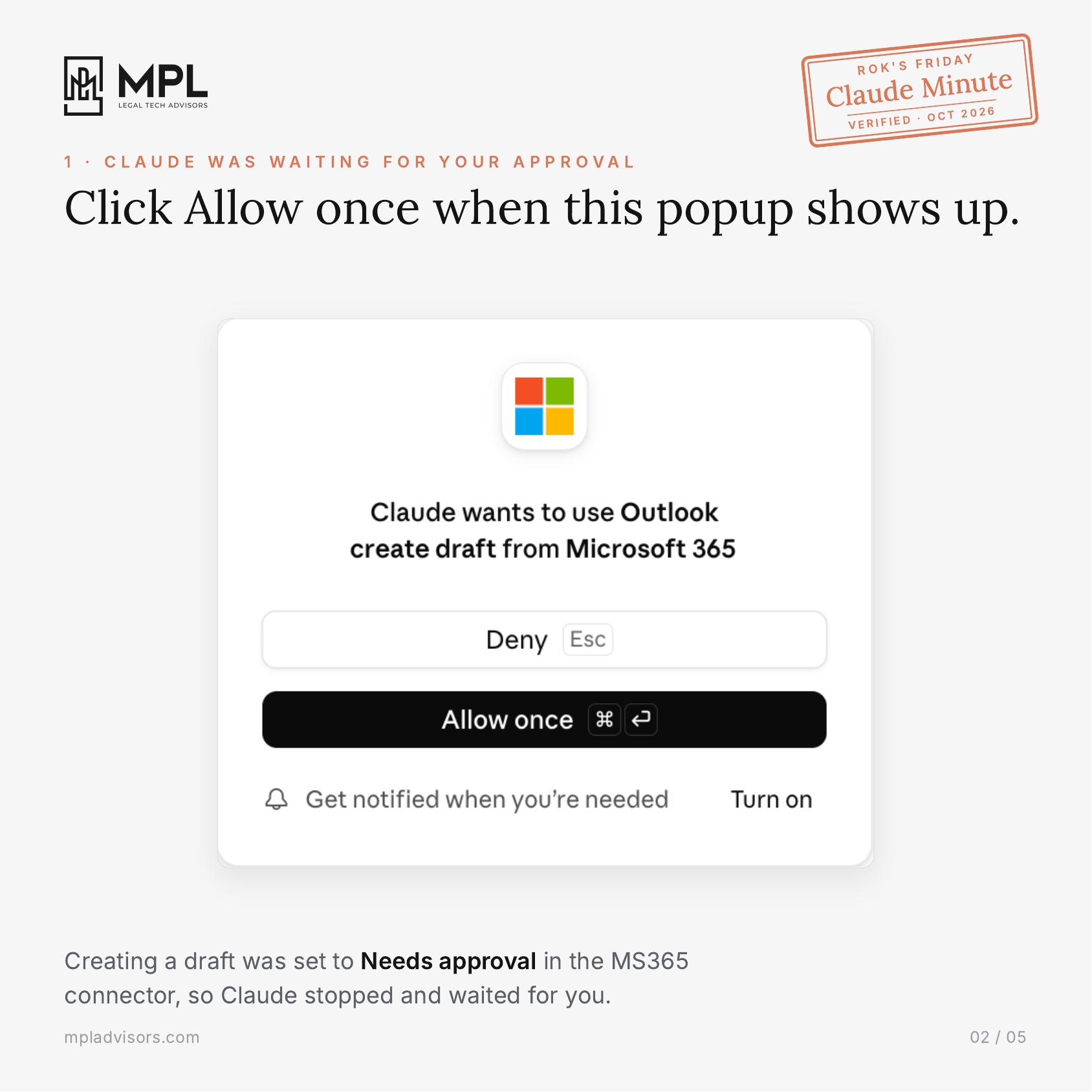
Every tool in the MS365 connector is set to Always allow, Needs approval or Blocked. Creating a draft was set to Needs approval, so Claude showed a popup with “Allow once” and “Deny” and stopped until someone clicked one of them.
2. Claude waits two hours
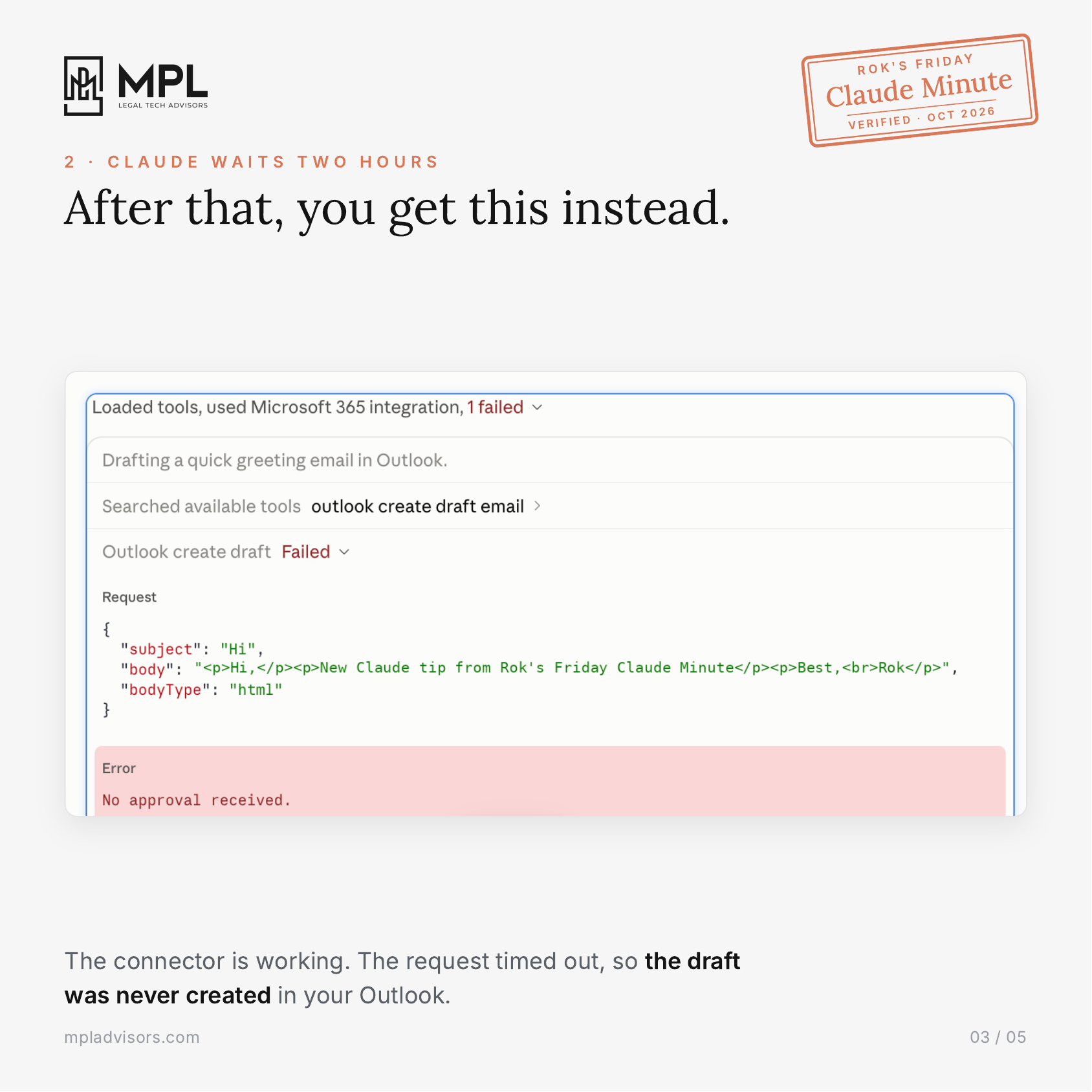
If nobody clicks “Allow once” within two hours, the request times out and the draft is never created in Outlook, even though the connector was working the whole time.
3. Turn on “Response completions”
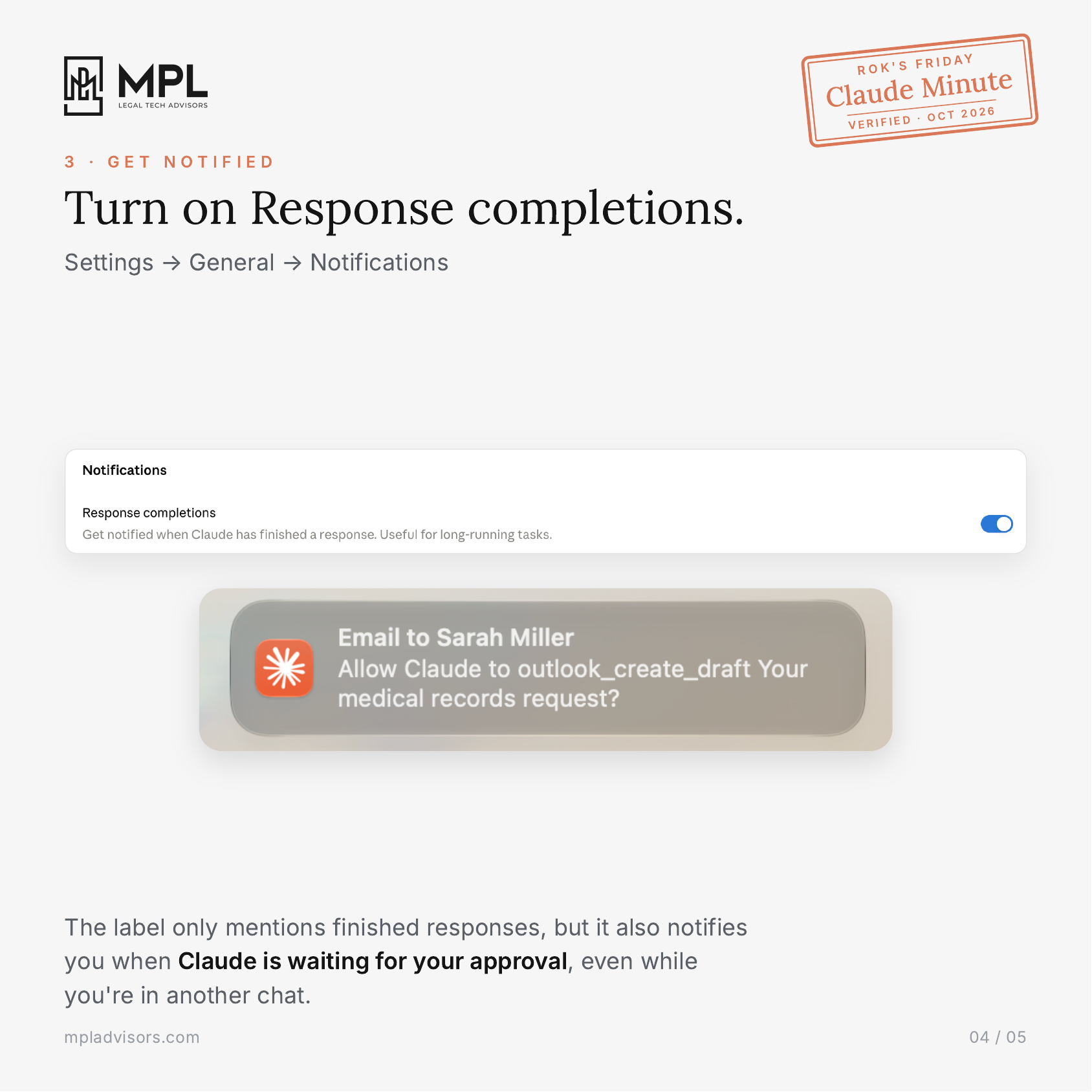
It’s under Settings > General > Notifications. The label only mentions finished responses, but we tested it, and it also notifies you when Claude is waiting for your approval, even while you’re working in another chat. Your computer has to allow the notification too. On Windows that’s under Settings > System > Notifications, and on a Mac it’s System Settings > Notifications.
Keep Needs approval on for anything in the MS365 connector that writes to your Outlook, so nothing happens in your mailbox without someone at the firm saying yes. The notification only makes sure you see the request in time.
Legal AI in Action
🎬 Turn Your Team’s Claude Chats Into Your Firm’s Legal Brain
The five steps above are the short version. In the video I take each step in turn and show, with a personal injury example, what usually goes wrong when a firm tries it and how we do it instead. One example is why asking AI to write up your procedures from a pile of chats ends up turning one person’s habit into firm policy. Another is why every approval shouldn’t land on the managing partner’s desk. And in the end I show how a legal AI brain looks like on an example: 400 conversations from 9 people turned into a first version of the brain, with 45 skills, the notes each skill reads from, and who approved each note.
🎙 Building HuggingFace for Law
Malik Taiar is a lawyer and co-founder of Lawve, an open-source hub where legal professionals share the Claude skills they build. He started it with an AI researcher and a software engineer. Before that, he was an associate at McDermott Will & Emery, working on white collar and global investigations matters. He sees buying specialized tools as a good starting point, and thinks what puts a firm ahead is writing down how it works, in a format any AI platform can read.
We talked about why sharing skills inside a firm has become a necessity, how a small firm can build its own benchmark to check whether AI gets its work right, and when it makes sense to bring in a legal engineer.
Coming up!
🎙 Next Tuesday at 11am PDT/ 2pm EDT / 6pm CET
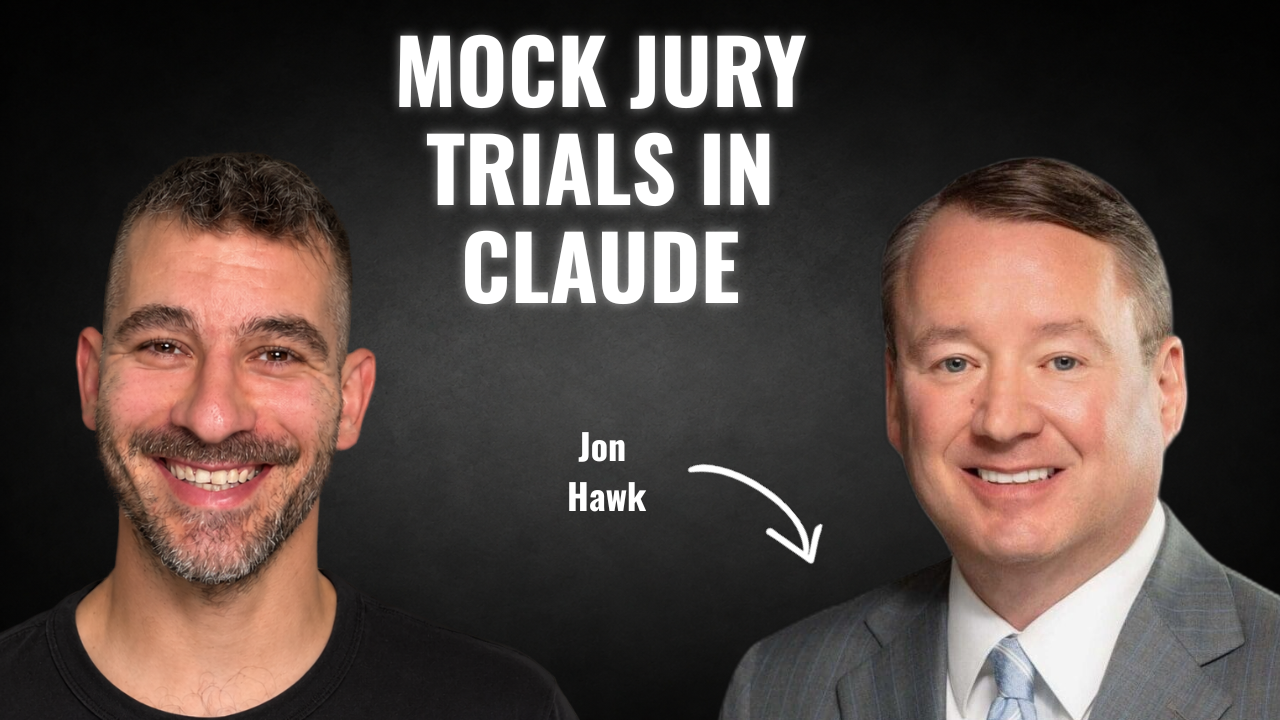
Next week’s guests on Rok’s Legal AI Conversations is Jon Hawk, a trial attorney and managing partner at Hawk Injury Law in Macon, Georgia. He started his career in 1997 defending insurance companies, has represented injured people since 2000, and has tried more than 60 cases to verdict. He started learning AI two years ago, on Saturday mornings at the office, because he needed his small firm to work as efficiently as much bigger ones.
Jon shows me, on screen, a mock trial jury skill he runs on a fictional trucking case, explains how he decides when something should become a skill, and walks through a mediation where Claude found what he needed in the medical records while the mediation was still going. We also get into whether AI makes lawyers think less, and what it takes to keep 20 skills up to date.
Each edition of Legal AI Brief brings practical lessons from the frontlines of legal AI by our editor, Rok Popov Ledinski.