32 Ready-Made Tools
Lawyers keep messaging me about the AI their case management software added this year, and most of them aren’t impressed with it. Anthropic gave those firms one more reason to skip it, with a gallery of 22 ready-made legal tools, which Anthropic calls Artifacts, that it added to Claude for Legal at the end of October. Anthropic included a Cite check, a Matter board and a Fact chronology, and its launch post also names the 10 Artifacts that Goodwin, Foley & Lardner, PwC and Harvey built. With tools like these inside Claude, I don’t think a small firm needs to buy its case management vendor’s AI add-on at all.
Most of the firms we work with had only just got used to Skills, Connectors and Plugins in Claude, so the gallery left a lot of them asking where Artifacts fit next to everything else. I don’t blame them, because Anthropic’s own announcement doesn’t explain it either.
It lists the Artifacts and the partners who built them, but it doesn’t say how one like the Matter board reads your cases from the software you already use. It also doesn’t say whether Anthropic’s agreement for medical records covers what you give these tools.
Where do Artifacts Fit?
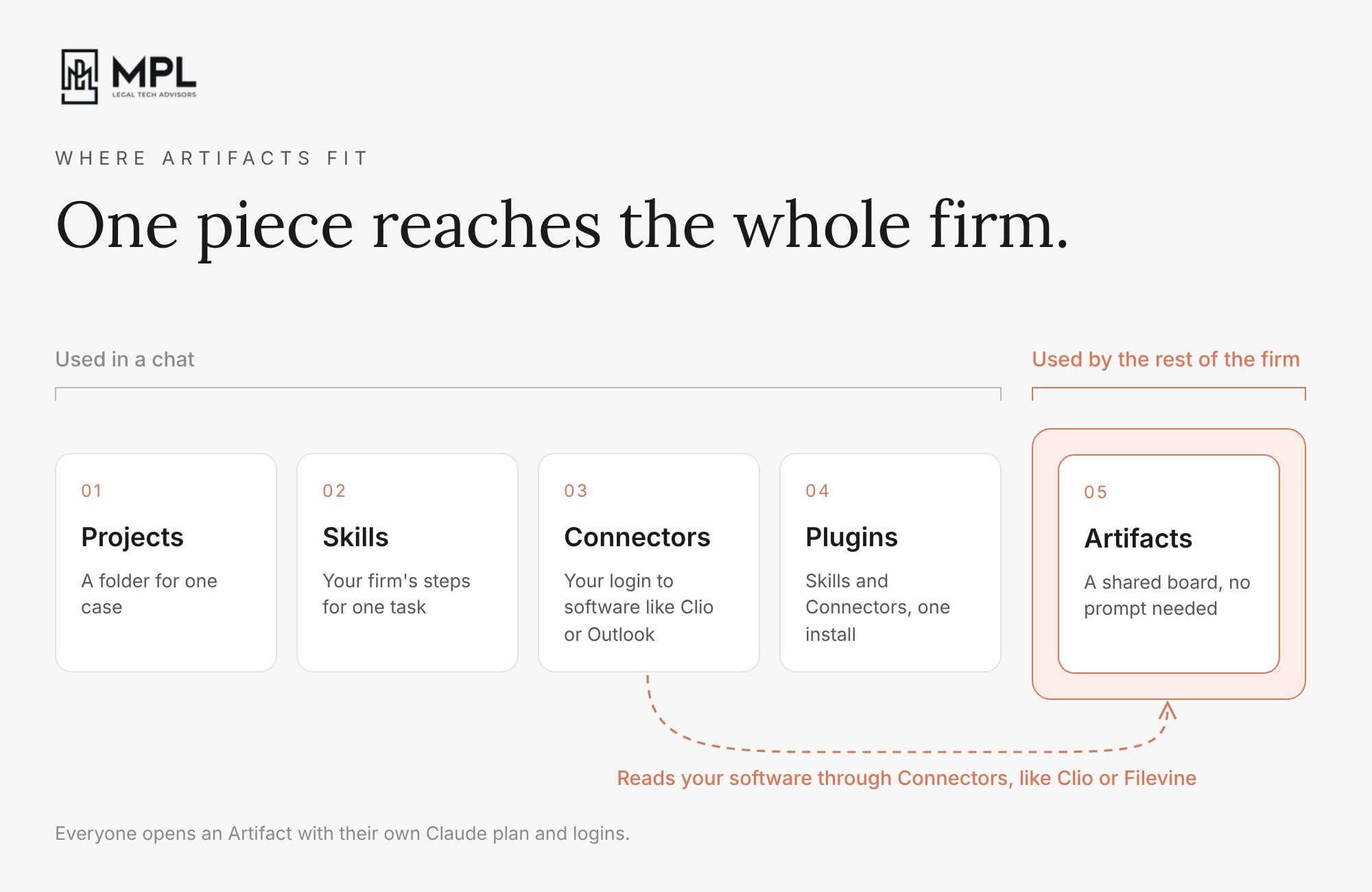
Anthropic gave Claude five things a firm can set up, and gave them names that are hard to tell apart.
Projects. Use a Project as the folder for one case. Add the case background and the documents to it, and Claude will read them in every chat your team starts inside that Project.
Skills. Think of them as agreements between a human and AI of how a task should be done and who should do what. Ask whoever runs your Claude setup to turn each task your firm does the same way every time, like a medical chronology, into a Skill. Claude reads the Skill whenever someone at the firm asks for that task, and follows your firm’s steps instead of its own.
Connectors. These are essentially integrations between Claude and other software. Have your admin add a Connector for the software you already use, like Clio, Filevine or Outlook, and have each person connect it with their own login. Claude then sees only the cases and emails that person can see. For Clio, we built our own Connector at MPL Advisors. In this video, a client calls about a file I hadn’t opened in two weeks, and I answer her from Claude, then add the note, the task and the calendar entry to Clio in one sentence.
Plugins. Install a Plugin to add several Skills and Connectors in one go. Anthropic built the legal Plugins as starter kits for practice areas like employment, privacy and litigation.
Your team uses all four of those inside a chat, where someone has to ask Claude for something. Artifacts reach the rest of the firm. Anthropic and its partners built the 32 Artifacts in the gallery as pages with a table, a board or a tracker on them, and your colleagues open one from Claude the same way they open a shared document. Each time someone uses the page, the page asks Claude to read the documents and Connectors you gave it and to fill in the table. An Artifact reads your data through the same Connectors your team uses in a chat, but it doesn’t follow your Skills or read your Projects. So when someone at your firm sets up a board, have them ask Claude to build your firm’s instructions into the Artifact itself, the same instructions you would put in a Skill. Your paralegals don’t have to write a prompt to use it. Every person who opens an Artifact uses their own Claude plan and their own logins.
A case management vendor sells its AI inside its own software, and the vendor decides how that AI works. With an Artifact, Claude does the AI work and reads your case management software through a Connector. You keep your case records in the software you already use, and your firm decides how Claude does the work.
Billed or Paid
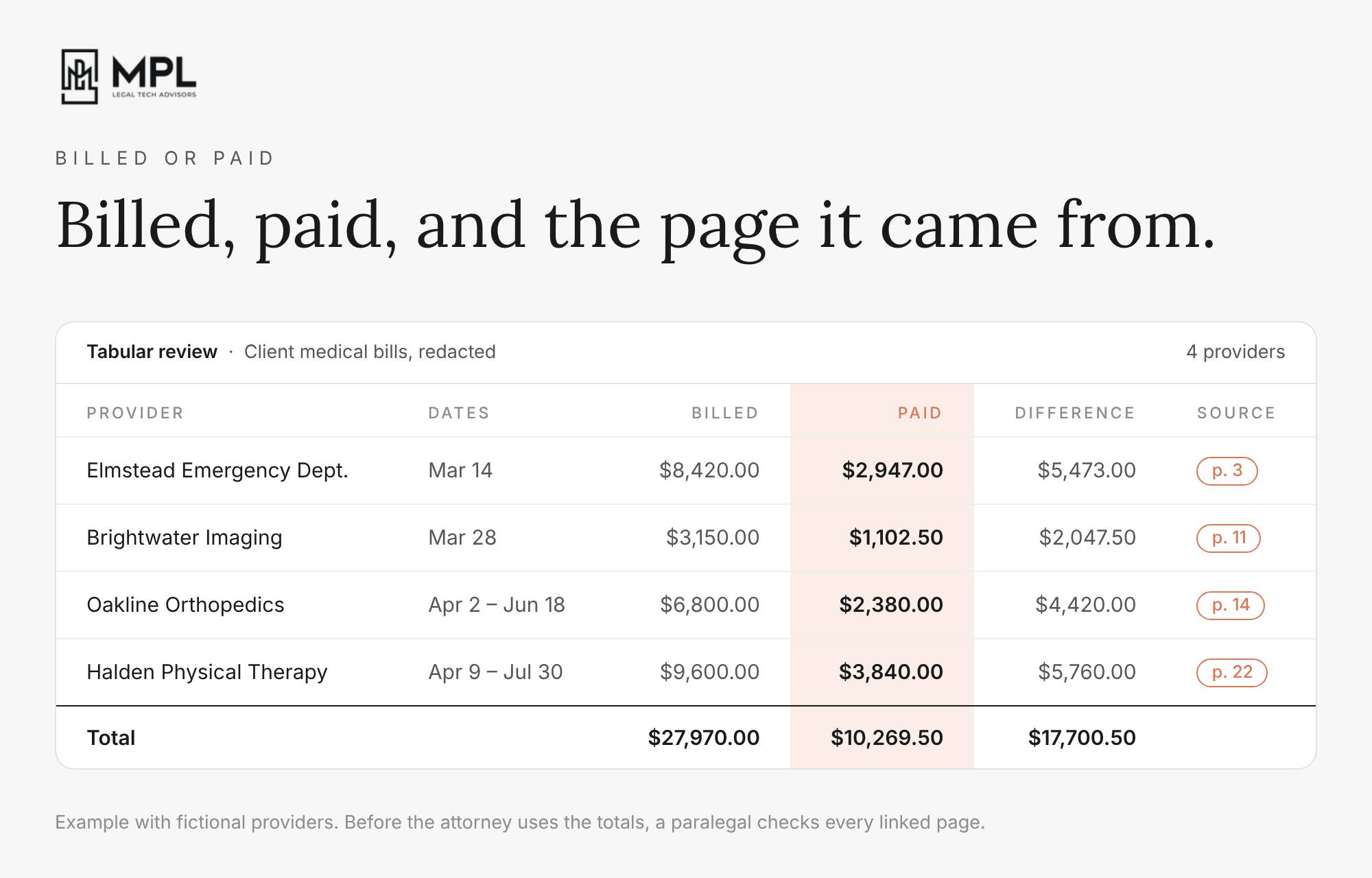
Georgia firms now prepare every injury case for a jury that sees two numbers for each medical bill. Under Senate Bill 68, which Georgia passed in 2025, juries can see what was actually paid for a client’s care, not only what the provider billed. Defense lawyers can also ask how the treatment was arranged, including referral relationships and whether a provider sold the debt to someone else. To get the paid amounts, someone at your firm has to go through every bill, ledger and explanation of benefits in the file and match each charge to what was paid on it.
Your paralegals can do most of that matching with the tabular review Artifact from the gallery. Anthropic built it to pull the terms a lawyer picks, like a notice period, out of a stack of contracts into one table, and to link every cell to the exact wording it came from. Have your paralegal give it the redacted copies of a client’s medical bills, from the setup I described in the 58th edition. Then have them ask for the provider, the dates of treatment, the amount billed and the amount paid, with the page each figure came from. Before the attorney puts any of those totals in a demand, have the paralegal open every linked page and check the figure against the bill, because Claude can misread a number on a scanned page.
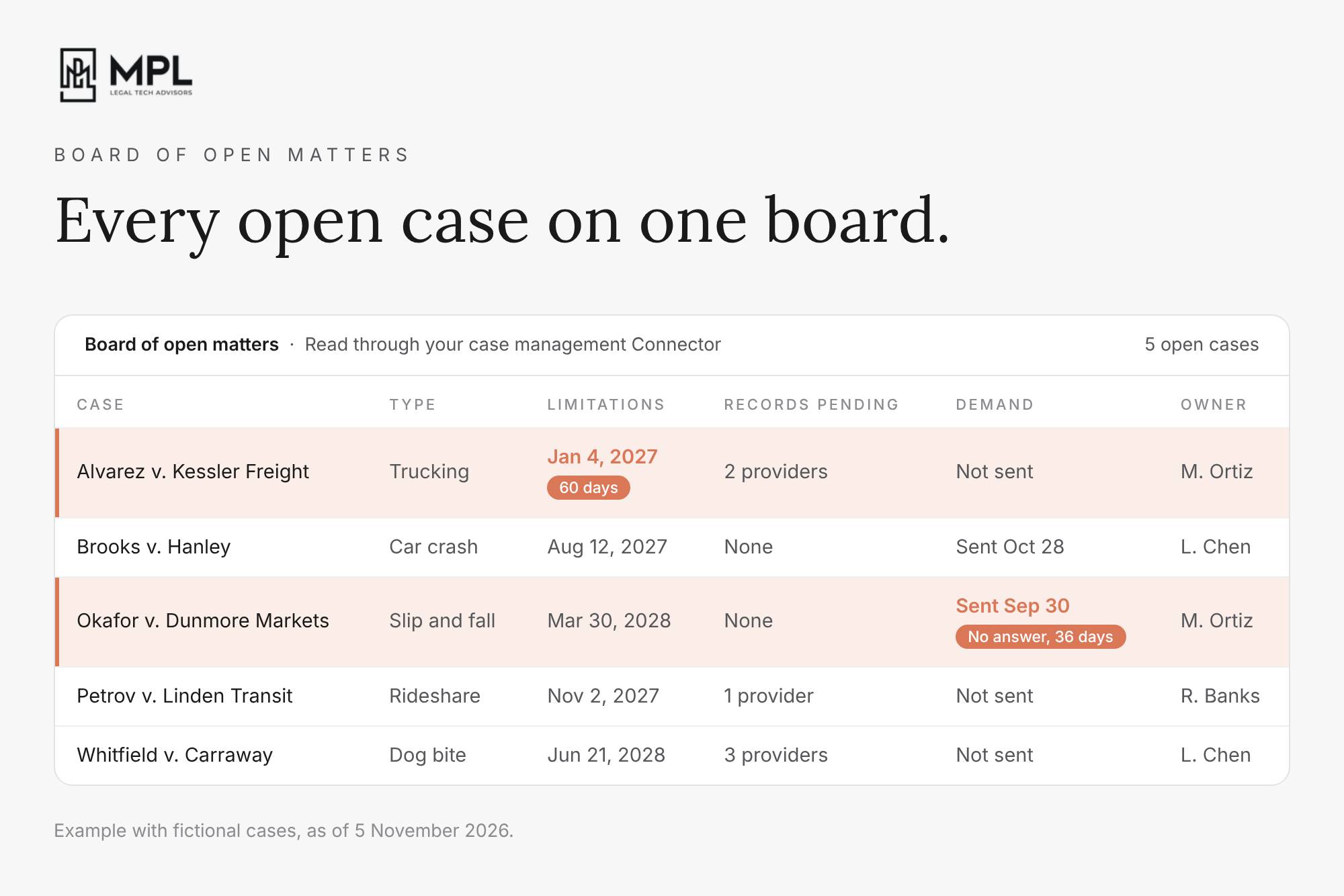
Your paralegals can track the whole caseload the same way with the board of open matters, another Artifact from the gallery. Anthropic built it to read engagement letters, emails or spreadsheets and show every open matter with its owner, its next step and its next deadline. Ask whoever runs your Claude setup to change the columns to the ones a PI firm tracks:
- the statute of limitations date
- the records still outstanding from each provider
- the demands an adjuster hasn’t answered
- the attorney or paralegal responsible for the case
Then have them point the board at Clio or Filevine through the Connector, so it reads your open cases from there instead of from a spreadsheet someone has to keep up to date. In one of my Claude + Clio videos, Claude read a trucking matter in Clio together with my inbox and found fifteen open tasks, twelve of them past due.
Your Rules, Not Theirs
Your firm also decides who sees what on these boards, and Anthropic gives your admin the settings to control it.
Anthropic keeps every new Artifact private to the person who made it. That person can share it with specific people inside your firm, with everyone at your firm, or with anyone who has the link. On Team and Enterprise, your admin has to turn on outside sharing before that last option works.
Each person sees through their own login. Claude reads Clio or Filevine with the login of whoever opens the board, so a paralegal who can’t open a case in Clio won’t see it on the board either.
Everyone sees the shared notes. Anyone who opens a board can read what your team typed into its shared notes, whatever they’re allowed to see in Clio or Filevine. Keep client details out of the notes on a board you share with the whole firm.
No public links. Anthropic doesn’t let anyone share a board that reads a Connector or asks Claude through a public link. If you invite someone from outside the firm, like co-counsel, they can open the board but can’t use the parts that read your Connectors or ask Claude.
One switch for Connectors. Your admin can turn Connectors in Artifacts on or off only for the whole firm at once, not board by board.
Redacted records only. On the HIPAA-ready setup of Enterprise, Anthropic’s admin guide tells firms to keep health information out of Docs, Slides, Design, Dashboards and Motion, because its business associate agreement doesn’t cover them. Anthropic doesn’t say anything about the legal gallery, so give the Artifacts only redacted records until it does. On Team, which has no business associate agreement at all, the same rule applies to every Artifact.
Before anyone at your firm shares a board, decide as a firm who opens which board and what your team may type into its notes, and have your admin set the sharing settings to match.
A security check for firms on Claude Enterprise. Anthropic just gave the admins two new tools, both in beta. The first is a security center, a new page in Organization settings. It lists the firm’s Claude settings for chat, Cowork and Claude Code, and next to each one it shows Anthropic’s recommended value and a link to the place where your admin changes it. Your admin can download the page as a report and send it to a client, an insurer or an auditor who asks how the firm has set up Claude. Anthropic says the report gives guidance and doesn’t certify that the firm complies with any law or standard. With the second tool, your admin can block personal Claude accounts in Claude Desktop on the firm’s computers. If a paralegal signs in with a personal account to get around a limit, the case files they upload go to an account the firm can’t see or control, and this setting stops that. If your firm is on Team, you won’t see either tool, because almost everything in this release is for Enterprise only.
An invisible watermark on text from older Claude models. Anthropic has added the watermark to text from Mythos 5, Opus 4.7, Opus 4.6 and Sonnet 4.6, after newer models such as Opus 5.5 already had it. You can’t see it, it doesn’t change the wording, and it stays in the text when someone copies and pastes it. For now, only regulators, media, researchers, schools and companies with compliance duties can check for it, through a private preview. Assume that a letter or brief you drafted or polished in Claude carries the mark, and review it the way you would review any work you sign.
Managing partners at the firms we work with keep asking how to use Claude on the business side of the firm, not only on casework. For most of what they ask, I point them to a Plugin whose name makes almost everyone scroll past it: Data.
1. Your client list has mistakes nobody has time to find
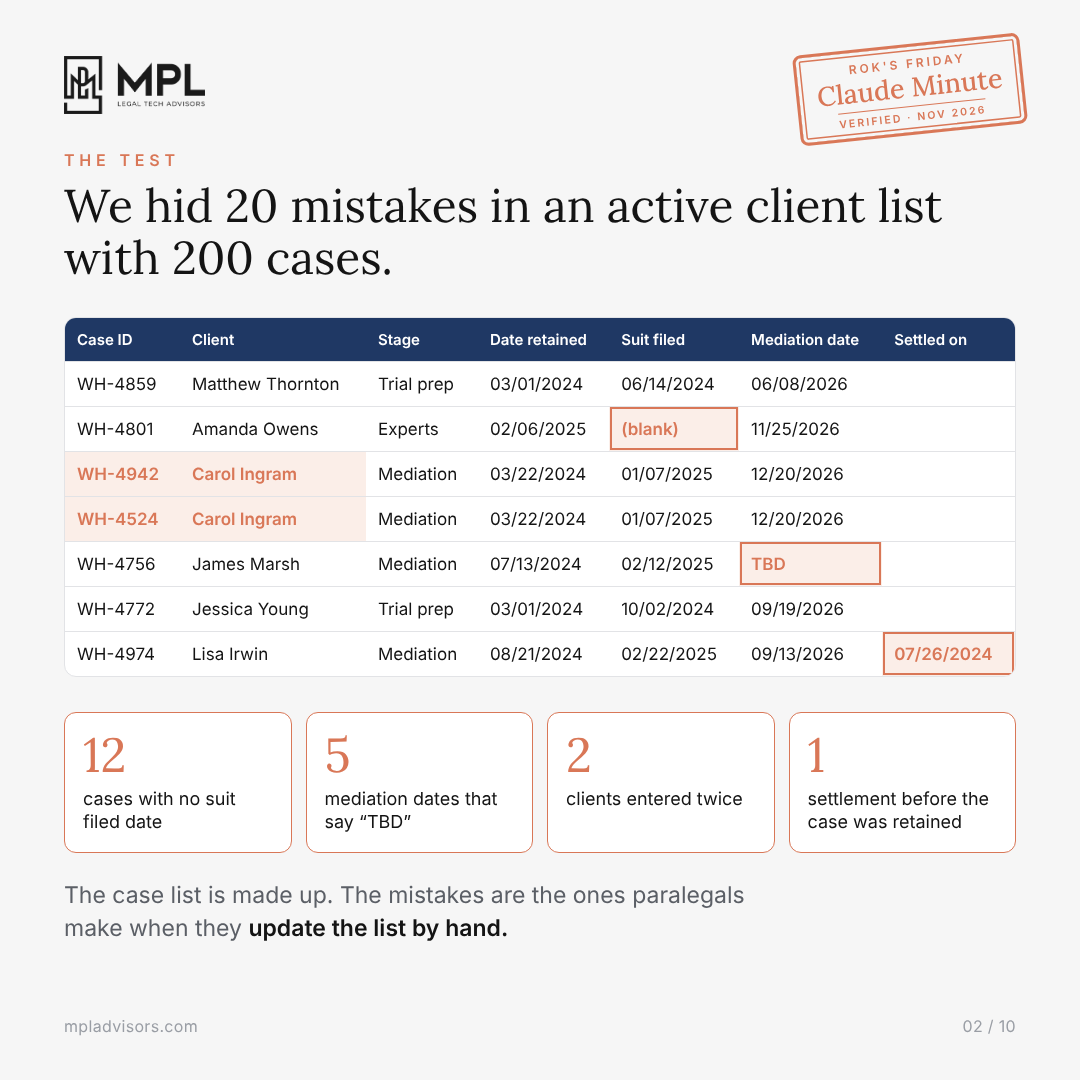
Your paralegals update the active client list by hand, on top of their casework. So they skip a date, type “TBD” where the mediation date should be, or enter the same client twice under two case IDs. Every report you run on that list carries those mistakes with it.
2. We hid 20 mistakes in 200 cases
To test the Data Plugin, we built an active client list with 200 made-up cases and hid 20 of those mistakes in it.
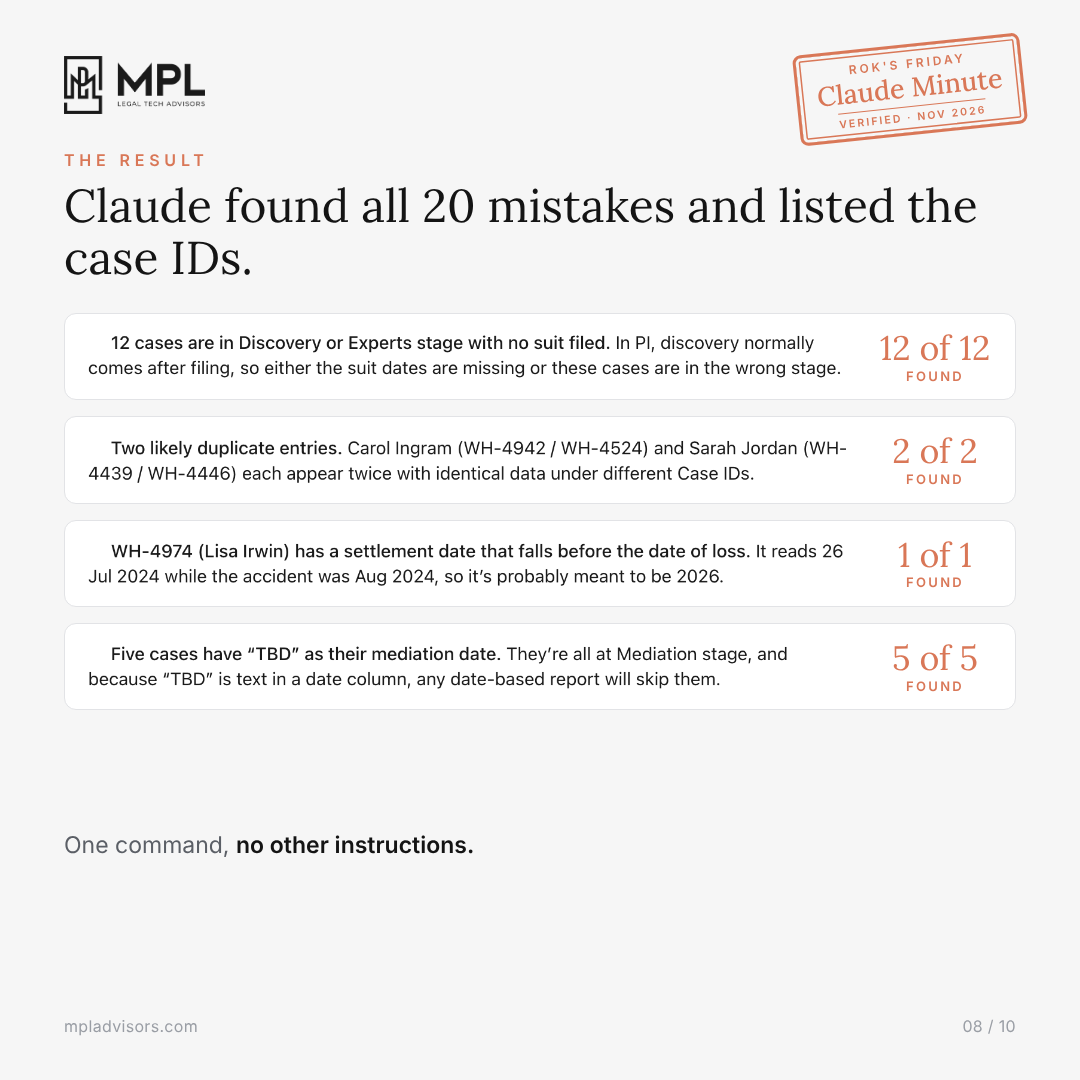
3. One command found all 20
I attached the list in a new chat, typed /explore-data and the file name, and gave Claude no other instructions. Claude found all 20 and listed the case ID for each. In my first test, though, Claude missed the settlement date and told me no dates were in the wrong order, so check what Claude finds against the list before you rely on it.
To run it on your own list, add the Data Plugin under Customize > Plugins, attach one spreadsheet in a new chat, type /explore-data and type your file name, verbatim, with the extension.
Once your team fixes the list, paste these into the same chat one at a time, and change the wording to match your own columns:
- /analyze How many cases does each attorney have without a suit filed?
- /analyze Which cases don’t have a mediation scheduled?
- /analyze Is there seasonality in our intake over the last two years?
- /analyze We missed our sign-up target this week. Is it one attorney, or intake?
⬇️ Here is the full guide with a screenshot of every step. Forward it to whoever at your firm keeps the active client list.
Rok’s Friday Claude Minute_ Business of Law.pdf
Legal AI in Action
🎬 Every Open PI Case From Clio in Your Claude
In the video I show how to take the Matter board from Anthropic’s Legal Artifacts gallery, turn it into a board for a PI firm with one prompt, and connect it to our cases in Clio through the Clio Connector we built at MPL Advisors. You’ll see which defaults Anthropic built into the board, where in Clio Claude has to look to fill the board in, and what to check before your team puts client data into any Artifact. You also get the prompt I used and a short guide with a screenshot of every step.
🎙 Skills as an Agreement With AI
Ignacio Adrián Lerer has practised corporate law in Buenos Aires for more than 35 years, 14 of them leading legal and corporate affairs at Alto Paraná, part of Grupo Arauco. Today he sits on company boards as an independent director and statutory auditor, and he writes a weekly column on AI and law that reaches 60,000 lawyers in Argentina.
We talked about why he treats a Skill as an agreement in which both he and the model have work to do, and how he checks other people’s Skills for hidden instructions before he installs them. He also explains why he moved part of his work to open models running on his own laptop, and the three waves of change that, in his view, left many Argentine lawyers behind, with AI as the latest one.
🎙 Next Tuesday at 11am PDT/ 2pm EDT / 6pm CET
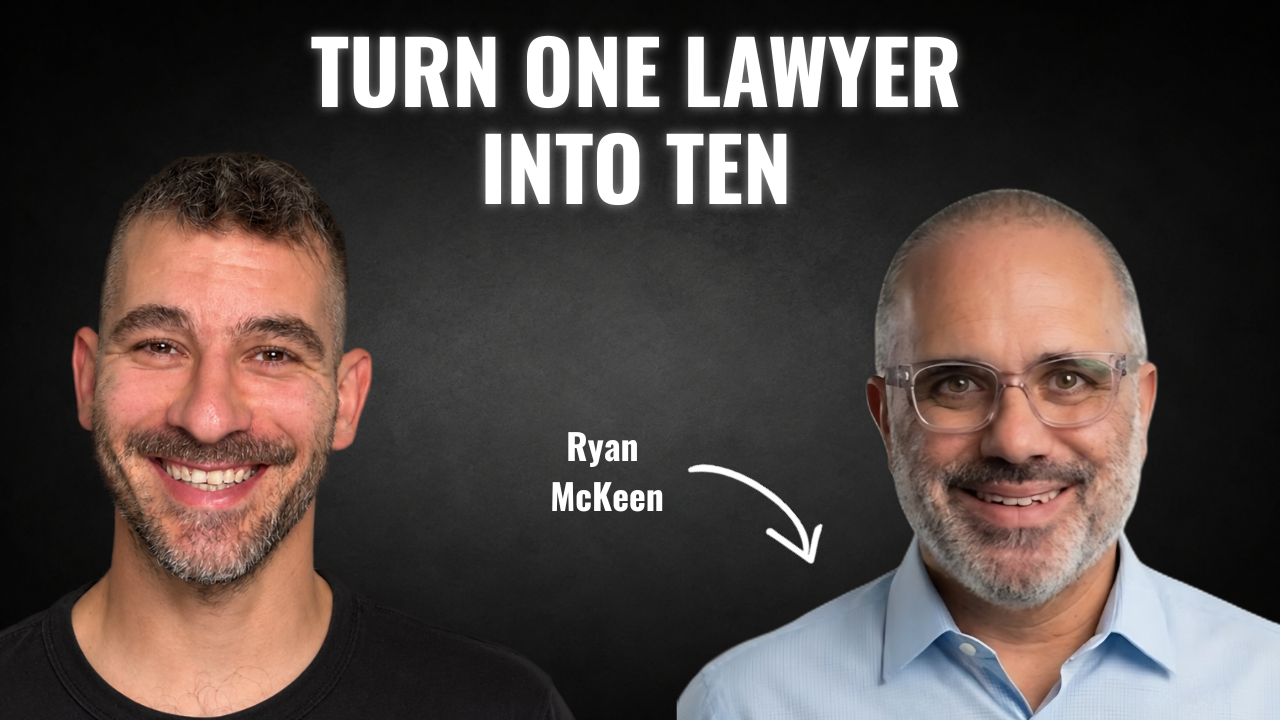
Next week’s guest on Rok’s Legal AI Conversations is Ryan McKeen, a trial lawyer in Connecticut with more than 20 years of practice. He co-founded Connecticut Trial Firm, grew it to nearly 40 people, and in 2022 led his team to a $100 million jury verdict, believed to be the largest award of its kind in Connecticut’s history. He then co-founded Best Era, which helps law firms with their operations, AI and training. Best Era runs a community of 450 lawyers and Para Era for paralegals, and hosts the AI Era conference for law firm leaders. Ryan also teaches legal entrepreneurship at UConn Law and still takes a handful of cases at McKeen Law.
In our conversation, he explains why he calls that verdict a proof of concept, what he found when he had Claude read about 48,000 messages from his community of 450 lawyers, and how he measures Claude as labor spend instead of software. We also get into how Claude keeps his company’s knowledge base up to date, and what law firms should change so their junior lawyers still learn to think for themselves.
Each edition of Legal AI Brief brings practical lessons from the frontlines of legal AI by your editor, Rok Popov Ledinski.