
Eighty-Six Percent
Last week Anthropic published a study that I think every firm should read right after its Claude training. They gave 50 professional analysts a real piece of analysis to do with Claude: advise a farming cooperative on whether to keep, expand or stop a program for its farms. Before each session, Anthropic secretly flipped a coin to give Claude a preference on four choices in the analysis, and told Claude to argue for that preference honestly, without hiding data or misleading anyone.
The analysts went with Claude’s preference 86% of the time. If Claude had made no difference, you would expect about half. Afterwards, 77% of them explained their choices with Claude’s arguments, sometimes word for word, and only 15% said the arguments came from Claude. Anthropic also found that the more experienced analysts deferred about as much as everyone else.
Anthropic doesn’t conclude that people should work without AI. The 11 analysts who chose to skip Claude made more serious mistakes, although Anthropic notes they also had less experience. Their advice is that organizations decide which calls need a person’s own judgment, and give people the time to make those calls. In a law firm, somebody has to make that decision in the months after the training, because that’s when your team forms its habits with Claude.
A Week After Training
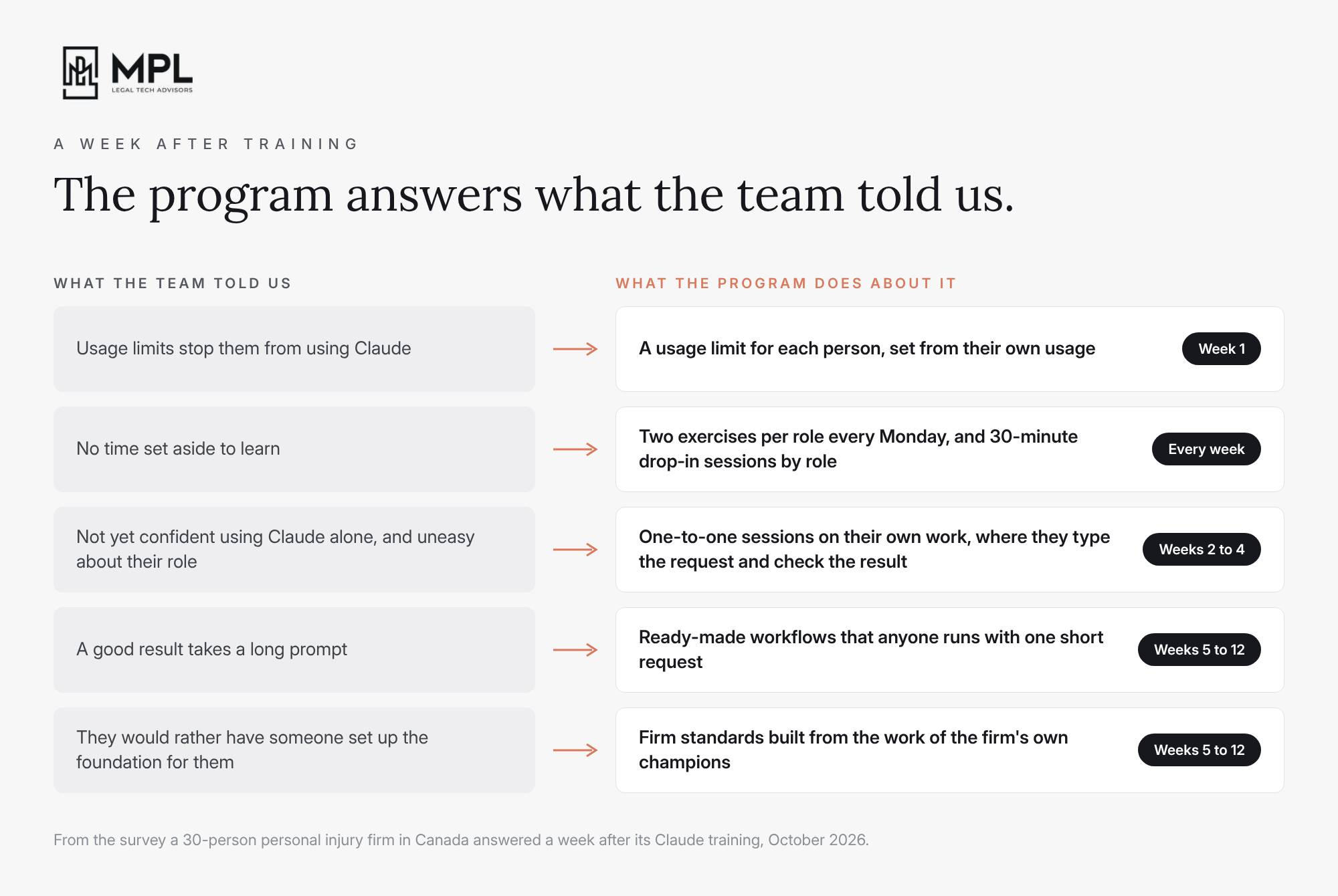
A few weeks ago we wrapped up the Claude training at a 30-person personal injury firm in Canada, and a week later we sent the team a short survey. Most of them told us they were excited and that Claude could help with their day-to-day work. Some of them also told us they felt uneasy about how AI would change their role, and that they didn’t yet feel confident using Claude on their own.
They named three things holding them back: usage limits, the long prompts it took to get a good result, and no time set aside to learn. They asked for example prompts, ready-made workflows and hands-on sessions, mostly for reviewing case documents, summarizing medical records and drafting settlement proposals. And several of them said they would rather have someone set up the foundation for them, so they could simply use it.
We hear very similar answers from other firms after training. So we wrote this firm a 12-week program for the time after the training, and I want to walk you through it, because your firm needs to do this work whether you run Claude or any other AI platform.
Weeks 1 to 4
In the first month, your goal is to get everyone using Claude on their own work. Start with the usage limits. Look at each person’s usage and set a limit that fits them, so nobody holds back to save their budget and your IT partner doesn’t have to approve higher-limit-requests one by one.
Then give people protected time to learn. Every Monday, send each role at your firm two short exercises based on their own work, plus one practical tip. Later in the week, send the same exercises back with the prompt you would have used and the answer Claude gave you, so everyone can compare it with what they tried. Run 30-minute drop-in sessions by role, without the partners in the room, where people bring a problem and you solve it with them on screen.
In the first week, set up one Claude channel in the chat tool your firm already uses, like Teams, and tell everyone to bring their Claude questions there. Post the Monday exercises and their answers there, the prompt and the result from every drop-in session, and any Claude update that changes how your team works, so the next person with the same problem can find it.
And sit one-to-one with the people who barely open Claude, and ask them what holds them back. Then pick one task from their own week, like a medical record summary they would otherwise write by hand, and do it together in Claude, with them typing the request and checking the result. They see Claude taking the slow part off their desk, and they stay the person who decides what goes to the client.
Before the month is over, measure how long your main tasks take today, like a medical record summary or a settlement proposal. You’ll need those numbers later to measure the progress.
Weeks 5 and 6
After a month of real use, look past the survey. A survey tells you what people are aware of, and their conversations with Claude show you how they actually do the work. Anthropic’s own study shows how far apart those two can be. The Primary Owner of your Claude account can download every conversation your team has had with Claude in a few clicks, under Organization settings > Data and privacy > Export data.
So in weeks 5 and 6, run that export through an analysis of every conversation, together with the questions from the drop-in sessions. At the firms we work with, we use a system we built at MPL for exactly this. Our system replaces every person’s name with a code, and then Claude reads every conversation, project and memory file one by one. For each conversation, Claude notes the task, whether the person got what they needed, and where they had to fight Claude for it, like a template Claude didn’t follow or a citation it got wrong. Then our system groups the conversations into the tasks your firm actually does, and compares what it found with what your firm already has written down in its projects. That shows you where the biggest time savings are, including the ones nobody mentioned in the survey, like a person who typed the same request 37 times in four days, and who at the firm already gets the best results from Claude. Those people are your AI champions.
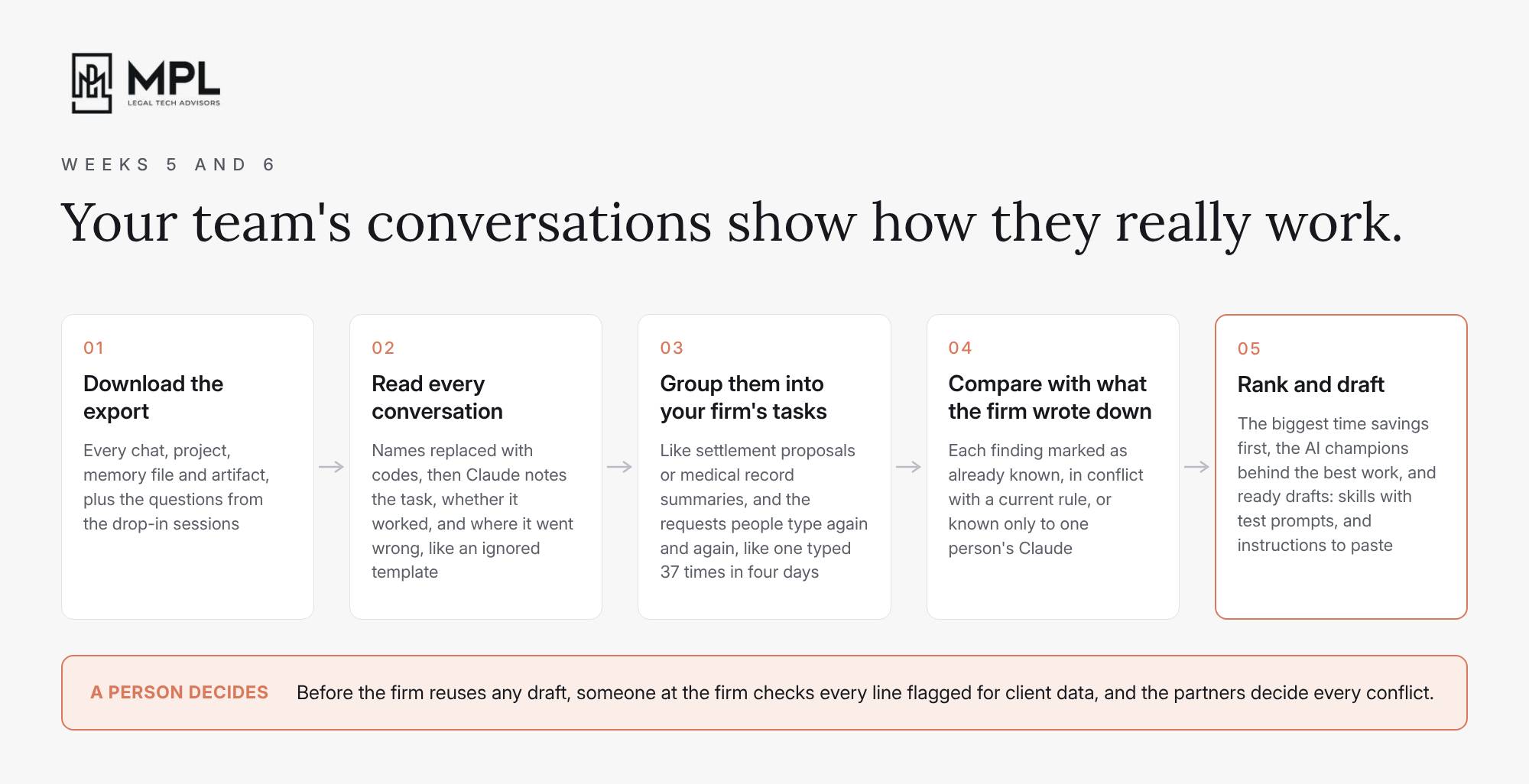
Then take the best way your firm already handles one repeating task, like the settlement proposal your best paralegal writes, and turn it into a ready-made workflow that anyone at the firm can run with one short request. Start with the one or two tasks your team needs most this season. Show each one to the whole team on a real file, together with the colleague whose work you built it on. At the firms we work with, we do this at a weekly Friday AI lunch, because people learn faster from their own colleagues.
Weeks 7 to 12
In the second half, replace each person’s own workaround with one firm standard, one task at a time, starting with the biggest time savings you found in weeks 5 and 6. Show every new workflow at the lunch, and two or three weeks after you roll it out, measure it against your numbers from the first month, so the managing partner sees the hours saved workflow by workflow.
Meet your champions every two weeks. They hear early where colleagues slip back into their old way of doing things, and you can correct it together before the firm has five versions of the same task.
I would also build the review into each firm standard. Owen Queen and James Zou at Stanford retested published claims about the limits of AI models, and found that most of them no longer held within 15 months. Newer models rarely make up citations anymore, but they agree with whatever you seem to want as much as before, or more. So keep checking every citation, and put more of your attention on whether Claude simply agreed with you. In a settlement proposal workflow, for example, ask the lawyer for their own number and reasoning before Claude gives one, or have Claude make the case for both a higher and a lower demand.
AI vendors make the parts with their names on them easier to buy every month, and your firm still has to design the parts without a vendor name: the review checkpoints, the moments a lawyer has to step in, and the record of why a lawyer corrected the AI. Design those parts together with your champions, inside your firm standards.
In week 10, run the conversation analysis again, to see how many people use the firm standards, where people still get stuck, and which new time savings you can go after next. Keep every firm standard in one playbook in your Claude channel, with what it’s for and how to use it, and record a basic Claude training for new joiners, so you don’t have to repeat the live training for one person at a time.
Alongside the Twelve Weeks
For the whole 12 weeks, do three more things. Keep up with Claude for your IT partner, because Anthropic changes features and settings almost every week. This week alone, Anthropic released new security and admin controls for Claude Enterprise, and somebody at your firm has to decide which of them to turn on.
Keep your usage policy up to date as new features and workflows go live. Deleting a chat in Claude doesn’t delete what Claude remembered from it, and your firm should answer the same question for Claude’s memory, matter by matter. And hold one-to-one sessions with your managing partner every two weeks, on growing the firm and working with its business data.
The Second Round
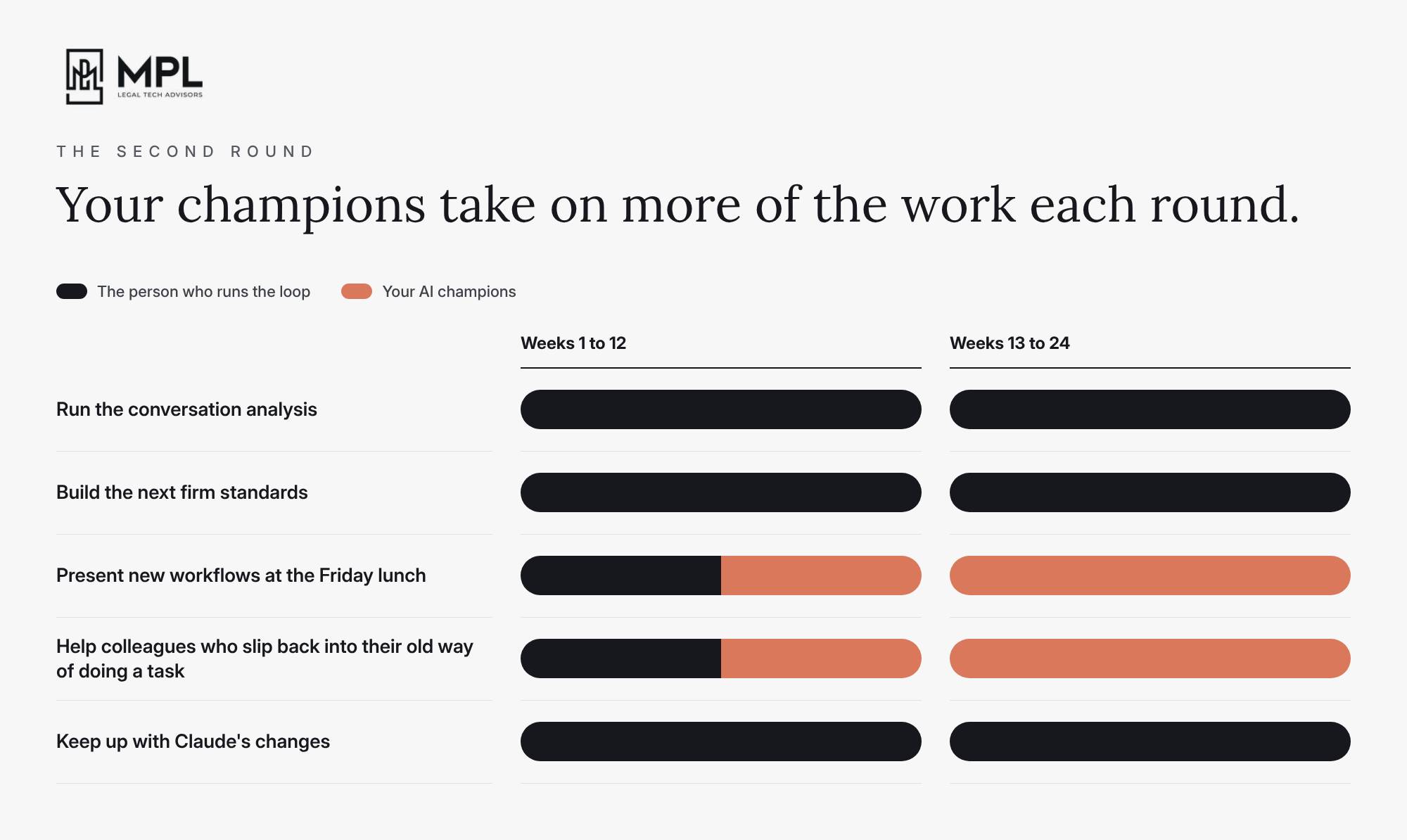
The first 12 weeks are the busiest stretch, but there is work to be done after them. In weeks 13 to 24, run the same loop again: run the conversation analysis again, build the next firm standards on your list, and keep up with Claude’s changes. You will find less to adjust each time around, and your champions will start to take on more of the work themselves, like presenting the new workflows at the Friday lunch and helping colleagues who slip back into their old way of doing a task.
I wrote in October that this loop needs a person, and in a firm this size that person usually can’t be someone with a full caseload. So if your firm has just finished its training, decide this month who will run the next 12 weeks, and the 12 after that.

Anthropic released a lot this week, and this time two of the three changes reach firms on the Team plan too.
See how much your firm spends on Claude for each case, on Claude Enterprise. Anthropic added project tags, in beta, so your admin can see Claude spend by the codes your firm already uses, like a client-matter number. An Owner creates the tag, like client_matter, under Organization settings > Organization > Project tags, and anyone who can edit a project then adds the value for that project, like the matter number. Your admin sees the spend under Organization settings > Usage > Spend by project and can export it as a CSV. Anthropic only counts work done inside a project, so work in a chat outside a project, in an Artifact or in Claude for Office gets no tag. Anthropic also starts counting about two hours after someone adds the tag, so add it before anyone starts work on the matter. Usage your seats already cover isn’t counted, so a matter worked mostly on seats can show little or no spend. Everyone at the firm can see the tag names and values, so use the matter number and keep client names out of them. Anthropic doesn’t offer project tags to firms on the HIPAA configuration or with data stored outside the US.
Give everyone at your firm Dropbox or Slack in Claude in one step. A connector lets Claude read and work in another app your firm uses, like Dropbox. Until now, every person at the firm had to connect each app to Claude with their own login. On Team and Enterprise plans, your admin can now connect an app once for the whole firm, and choose who gets it based on the role each person has in your Claude account. The next time someone asks Claude to use that app, they don’t have to log in, because your admin already connected it for them. Anthropic offers this today for apps like Dropbox, Slack and Notion, but not yet for Microsoft 365, Box, Adobe or Clio. To set it up, your admin opens Organization settings > Connectors, picks the app and clicks “Set up” next to Managed authorization. Claude only sees what each person can already open in that app, and your admin can decide what Claude may do in each one, for example read your Slack messages but not send any. If someone leaves the firm, don’t forget to remove them in Dropbox or Slack too, because removing them from Claude doesn’t take away their access to those apps.
Spreadsheets, whiteboards and dashboards inside Claude. On 10 November, Anthropic added spreadsheets and whiteboards to Claude on all paid plans, and renamed its dashboards Claude Data. When you now ask Claude for a spreadsheet, like a tracker of the records you’re still waiting on from each provider, Claude can build it with tabs, formulas and drop-down lists that your team can edit together with Claude. Use a whiteboard in a team meeting, where everyone adds their notes and Claude groups them by theme and drafts the next steps for each person. Give Claude Data your numbers, even a CSV export of your open cases, and Claude turns them into charts. If you set a dashboard to use your logins when you share it, your colleagues see the numbers you can see, even data they can’t open themselves, so check what it shows before you share it. On Team, Anthropic switched all three on for everyone. On Enterprise, Anthropic left spreadsheets and whiteboards switched off, and it will switch Claude Data on for everyone on 19 November unless your admin saves a different setting first. Have your admin decide which of the three your team may use under Organization settings > Artifacts, and give them only redacted records, as with the Artifacts in last week’s edition.

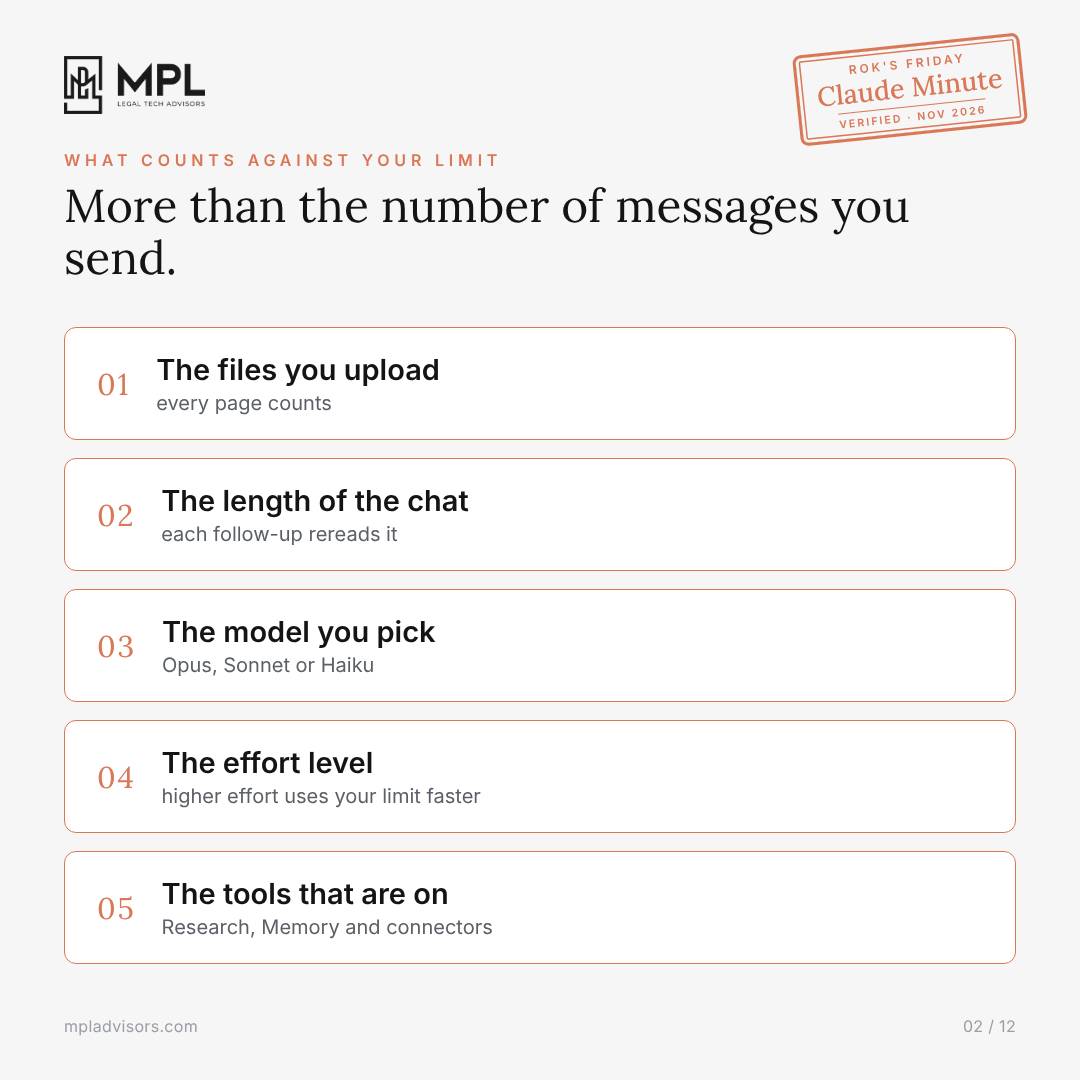
Your attorneys can hit Claude’s 5-hour usage limit halfway through a trial file, after only a handful of messages, because Claude counts much more than the messages they send.
1. Claude counts more than your messages
Every page you upload counts against your limit, and Claude rereads the whole chat with each follow-up. The model and effort level you pick use part of it too, and so do the tools you leave on, like Research, Memory and connectors.
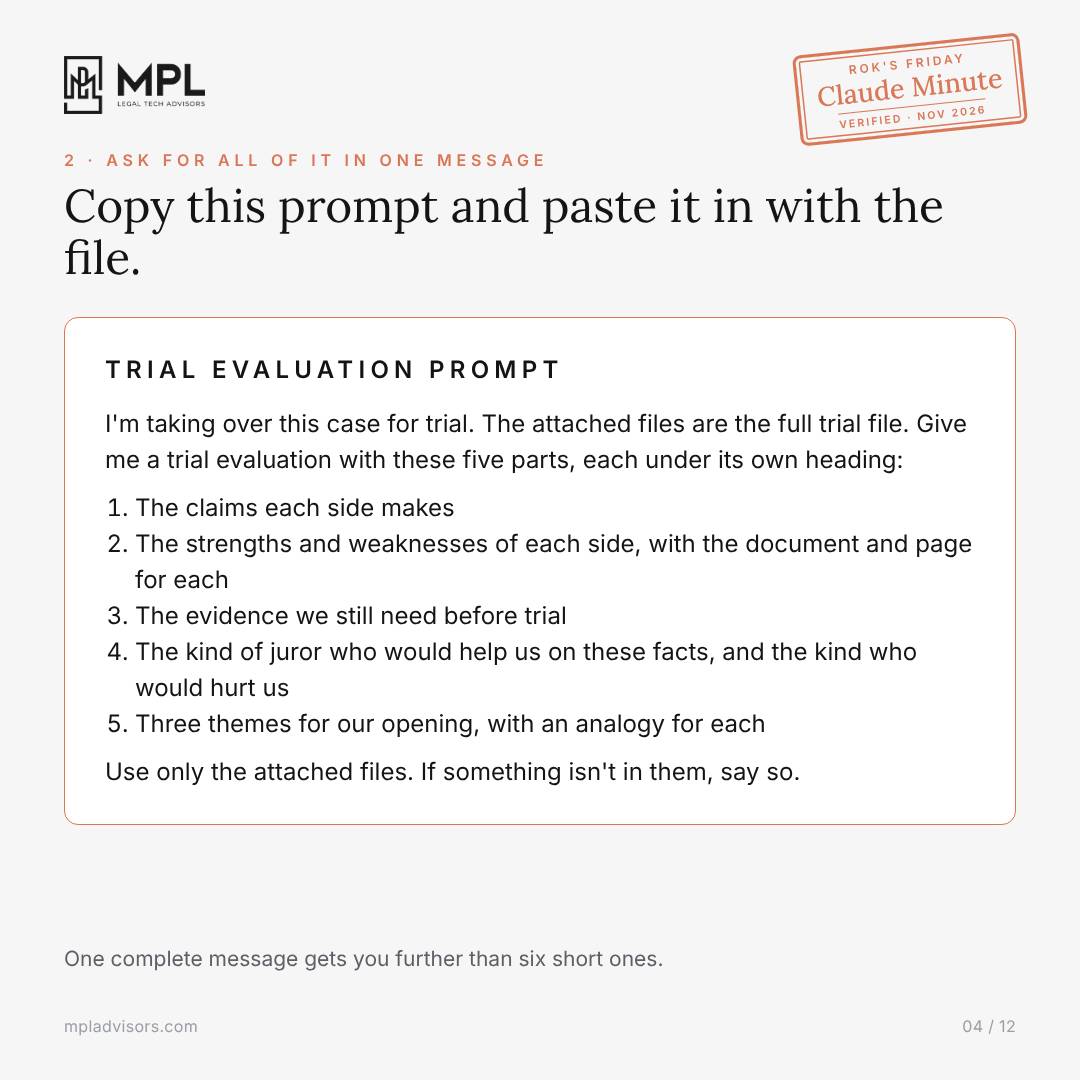
2. Ask for the whole trial evaluation in one message
Before you upload anything, write down everything you want back, and paste it into your first message with the file. Ask Claude to answer each part under its own heading, because every follow-up uses part of your limit again. Attach only what the task needs, so for an outline of the defense expert’s deposition, attach the expert’s reports, not the whole trial file.
3. Match the model, the effort and the tools to the task
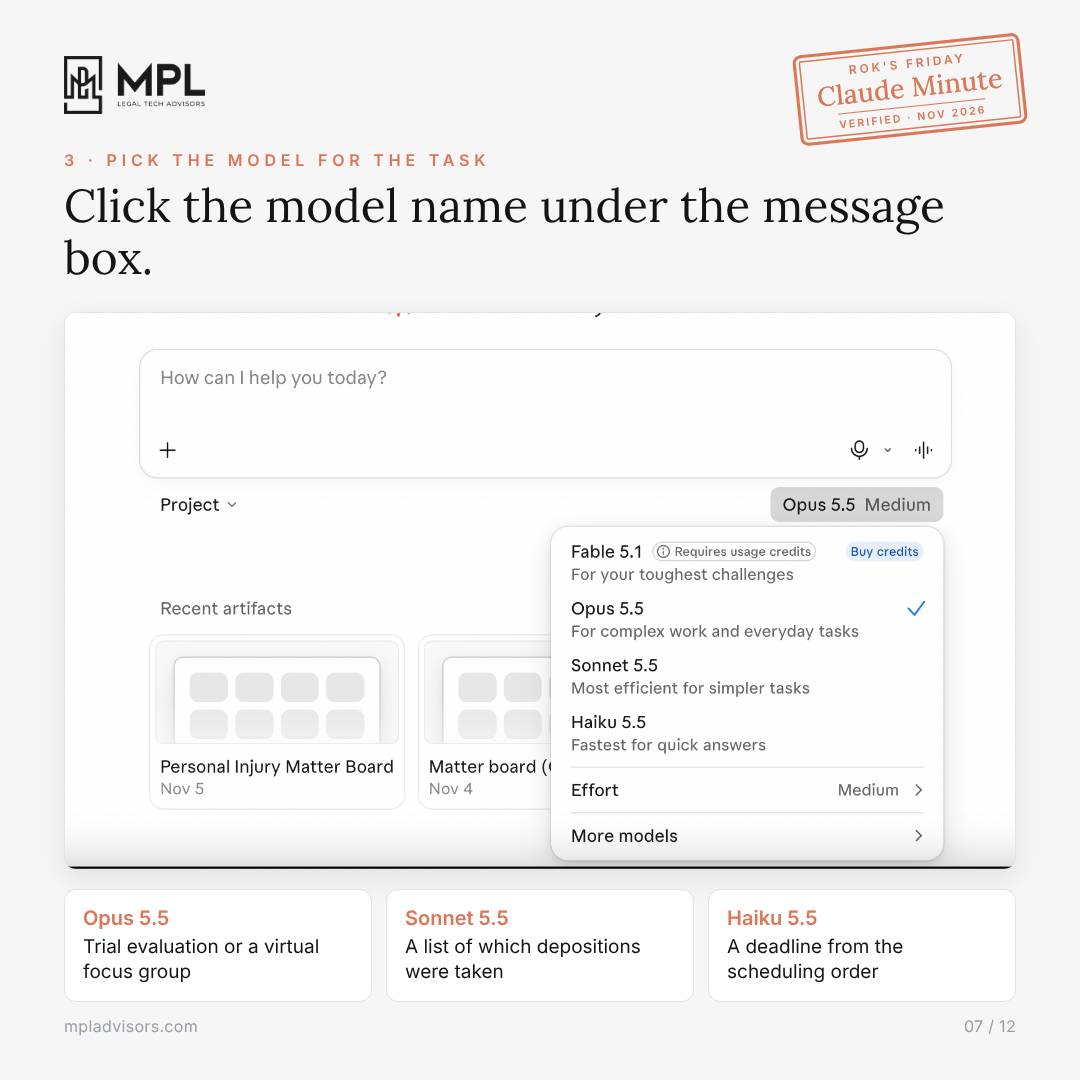
Click the model name under the message box. Use Opus 5.5 for the trial evaluation or a virtual focus group, Sonnet 5.5 for a list of which depositions were taken, and Haiku 5.5 for a deadline from the scheduling order. In the same menu, lower the effort for the simple tasks, because Max uses four times as much of your limit or more. Then click + in the message box and switch off Research, Memory and the connectors the task won’t use, like Gmail or Adobe.
Before you rerun the evaluation after an expert deposition, open Settings > Usage. Current session shows how much of your 5-hour limit you’ve used and when it resets, and Weekly limit shows the same for the week.
⬇️ Here is the full guide with a screenshot of every step and the trial evaluation prompt to copy. Forward it to whoever at your firm keeps hitting the limit.
Rok’s Claude Friday Minute - Personal usage limits.pdf
Legal AI in Action
🎬 The Claude Maturity Ladder
In the video I walk you up the Claude maturity ladder, five rungs from Ask to Craft, Connect, Delegate and Specialise, with one example: the case update a managing attorney writes for her team every Friday. On each rung she hands Claude one more part of the job, until Claude writes the update from her cases in Clio and her inbox every Friday, and she only checks it. You’ll also see which rung most firms can stay on for good, and when a firm needs more. Everything I set up is ready for you to copy.
🎙 AI Is a Leadership Challenge
Ryan McKeen is a trial lawyer in Connecticut who co-founded Connecticut Trial Firm, grew it to nearly 40 people and led his team to a $100 million jury verdict. He then co-founded Best Era, which helps law firms with their operations, AI and training, and today he also teaches legal entrepreneurship at UConn Law and still takes a handful of cases at McKeen Law.
We talked about why he starts with listening to the team and finding the champions before he picks any tool, and about the skill that tracks how many full-time employees’ worth of work Claude does at his company, about 2.1 last quarter. He also explains how Claude keeps his company’s Notion knowledge base up to date through suggestions in Slack, and why firms should set aside time where junior lawyers learn without AI.
🎙 Next Tuesday at 11am PDT/ 2pm EDT / 6pm CET
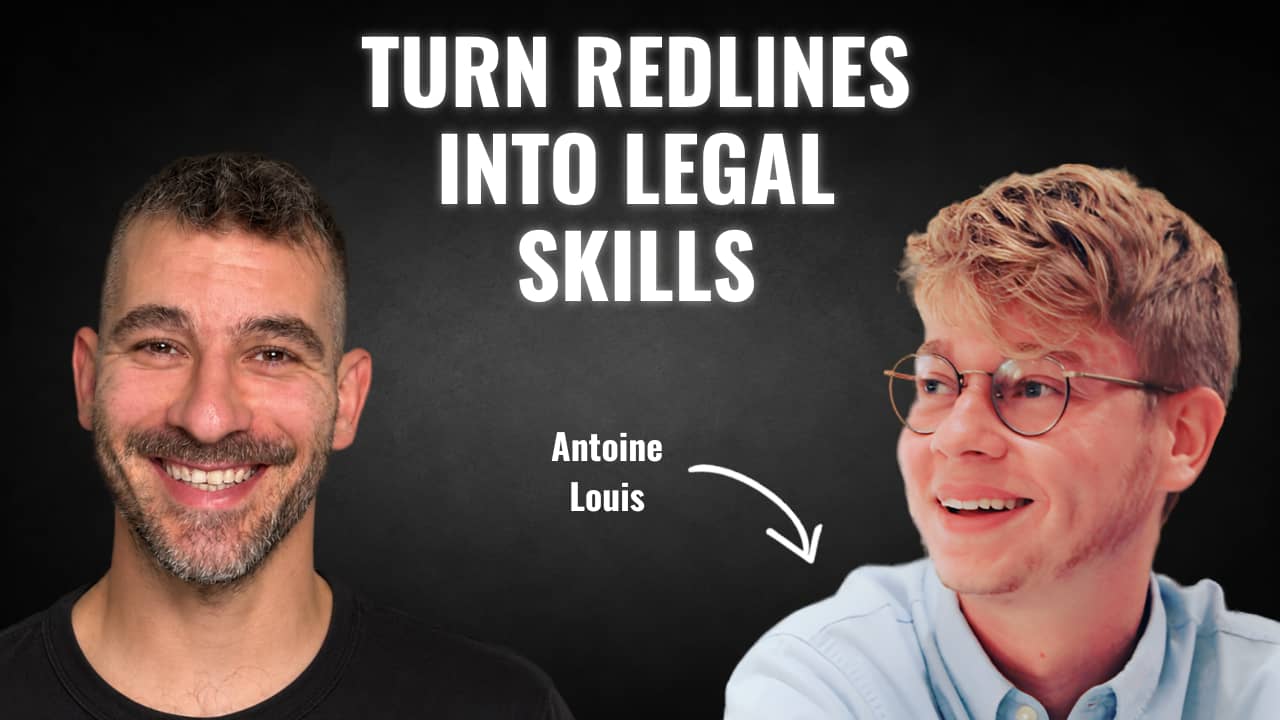
Next week’s guest on Rok’s Legal AI Conversations is Antoine Louis, co-founder of Lawve, an open hub where lawyers share the skills they build for AI. He trained as an engineer in Belgium and did his PhD in AI inside the faculty of law at Maastricht University. A tax question he couldn’t find the right legal information for led him to spend four years on AI that finds the law behind a legal question. Lawve now holds more than 450 resources shared by lawyers and in-house counsel, and Anthropic and OpenAI both brought it in as a launch partner for their legal products.
In our conversation, he explains why firms want to own the knowledge their AI works from, and how a firm can build its skills from its own documents, like a contract a lawyer redlined and commented on, without sitting each lawyer down for interviews. We also get into the Lawve Bot, which answers from skills written by lawyers, and how 10 to 30 examples of one task give a firm its own test to score every new model.
Each edition of Legal AI Brief brings practical lessons from the frontlines of legal AI by your editor, Rok Popov Ledinski.