
One System For Everything
Five legal tech companies launched an operating system for law firms inside fourteen weeks.
Legora went first on the 7th of May with aOS, the agentic operating system for legal work. NetDocuments announced the first context graph for legal work a week later. iManage described its version as a context fabric at its own conference in Chicago the week after that. Harvey and DeepJudge partnered on the 20th to pull a firm’s past work into Harvey’s workflows. LawVu shipped LegalOS on the 2nd of June.
Every one of them is racing to become the system your firm runs on. When that many serious companies point at the same thing in the same quarter, they’re reading the market correctly. One system for everything. Your whole practice in one place. Every action generating structured data that feeds an AI twin of your firm.
That’s the right destination, and your firm should be heading for it. But, you can (and probably should) also build it yourself, out of systems you already run, and own the result at the end.
Why Not To Buy One
You have two options. Buy one, where a vendor replaces your case system, your files, your billing and your intake, and your firm works inside their product. Your know-how gets written in their system and in their format, and you leave it behind if you ever want to switch systems.
Or you can get the same thing on Claude, connected to the tools and systems you already run, without locking your firm into any of them. That way your know-how sits in plain files you own and carry to any other AI platform.
I went into this properly back in the 2nd of July edition.
This edition is about the architecture of your firm’s Legal AI Operating System and 2 arcs that get you there.
Legal AI Operating System Architecture
There are ten parts to this.
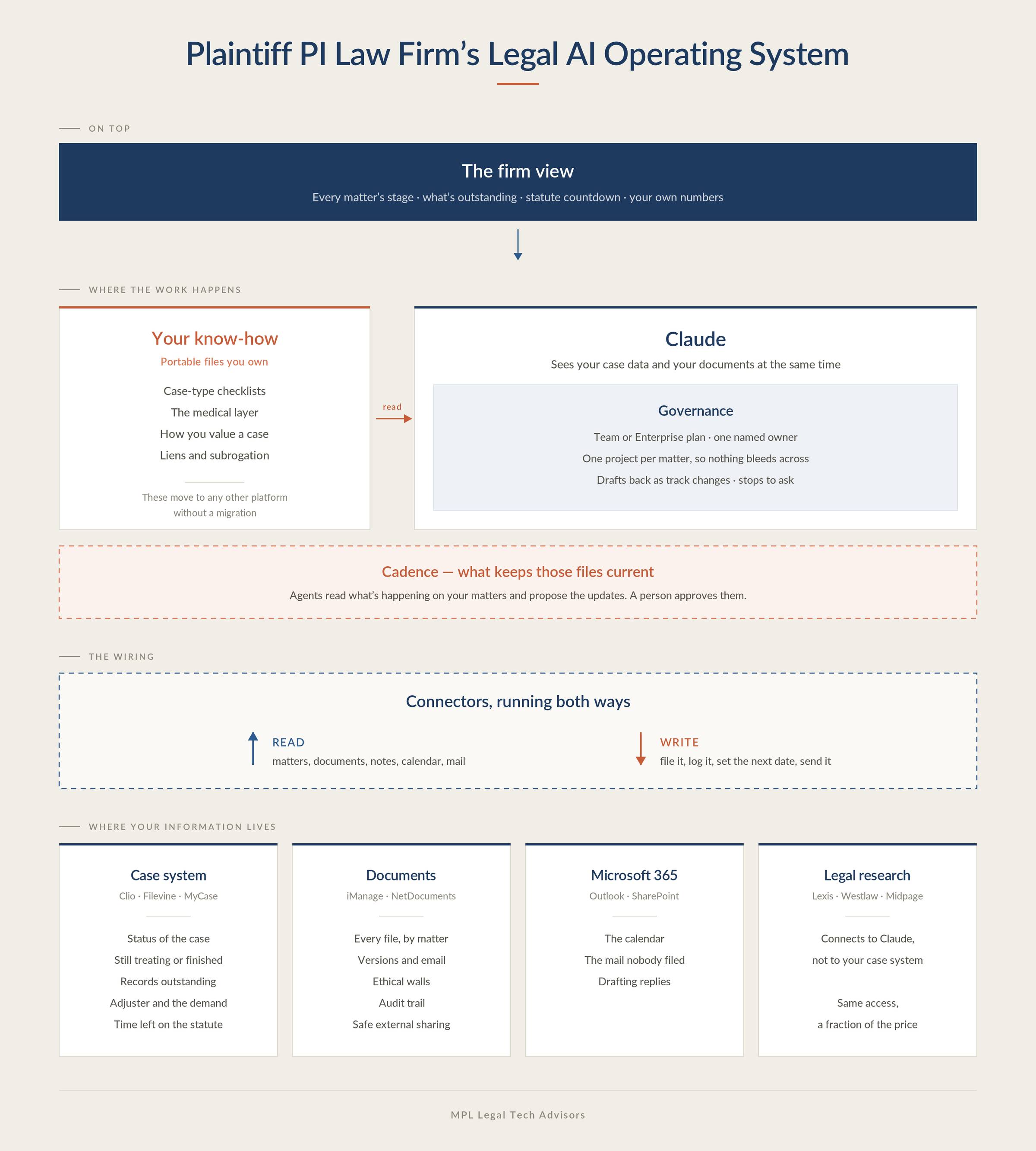
Your case system, your documents, Microsoft 365 and legal research hold your firm’s information. Claude is where your people work. Connectors between them make AI aware of your firm’s information. Your know-how sits in portable files that Claude reads, with agents on a set cadence keeping those files current, and governance setting the rules Claude works under. On top of that, you have the firm view - one central screen showing where every matter stands without having to talk to your people to figure it out.
Where your information lives. Your case system (Clio, Filevine, MyCase, etc) - answers the following question: What is the status of this case? Whether the client is still treating their injury, which records are outstanding and from whom, whether the demand has gone to the adjuster and whether anyone has chased it since, what the policy limits are, and how long is left on the statute. I recommend buying the base tier for these platforms and not other packages, because their research add-on, their AI and their document management capabilities are not as good as you can get from somewhere else. More below.
Your document system (iManage, NetDocs, or Sharepoint, etc) holds every file by matter, with versions, email filed to the matter, ethical walls, an audit trail, and a safe way to share a matter with an expert or co-counsel. If you’re a solo with one paralegal and no decade of closed files behind you, your case system is fine as your file store. It starts breaking once you’re past a few thousand files and into terabytes. And don’t buy AI from the company that stores your files.
Microsoft 365 brings the calendar, the mail nobody ever filed, and drafting replies. If Outlook already files into your case system, those three are what you’re actually adding.
Legal research (Westlaw, Midpage, Descrybe, CourtListener) connects to Claude rather than to your case system. Same access, and a fraction of what your case system charges for the research add-on.
Where the work happens. Those four hold what’s true for your firm. Claude is where it changes, and it’s the only place that sees your case data and your documents at the same time.
The wiring. These connections run both ways. Coming in, Claude sees your matters, your documents, your notes, your calendar and your mail. Going back out, it files the finished document, writes the matter note in Clio, creates the next task with its date, and creates a demand letter in the correct subfolder. Half the time you save is in that second direction, and it’s the half most firms never build.
What makes it yours. These files are where you write down what your people know and have never written down. In Claude they’re called Skills. For a plaintiff firm there are five.
The first is the checklist for a type of case, with a name and a date against every step. The second covers the medical side: which portal each provider uses, which fax number goes to billing and which goes to records, and how long each one actually takes to come back. The third is what a complete chronology looks like at your firm, including how you separate treatment for the injury from treatment the client was already having. The fourth is how you value a case - what this venue does, how this carrier and this adjuster behave, and what your own past files with this injury settled for. That one is the demand number, and it’s why a paralegal sits waiting for a partner. The fifth is liens and subrogation, the same handful of entities on every case, each with its own forms and its own timing.
AI agents updating your knowledge. Those files go stale when a form gets rewritten or a judge changes. You already know why every knowledge management project goes nowhere: updating it is somebody’s extra job on top of their real one, and they either run out of time or forget. So put AI agents on it - they read what’s happening on your matters and update the files themselves, on a schedule. A person approves or adjusts the changes, and that’s the only step that still needs one.
Governance sits in three places. The setup: a Team or Enterprise plan, written down, with one named owner. The structure: a separate project per matter, so one client’s context can’t reach another’s. And the work itself: drafts coming back as track changes, and the workflow stopping to ask before anything carrying real exposure. The supervisory duty stays with you - this lets you meet it, it doesn’t discharge it.
On top. The firm view: every matter’s stage, what’s outstanding, how close each statute is, your firm’s KPIs, the average case time, you name it. Generated on a schedule out of what’s already in your case system.
Two Arcs, Both Moving
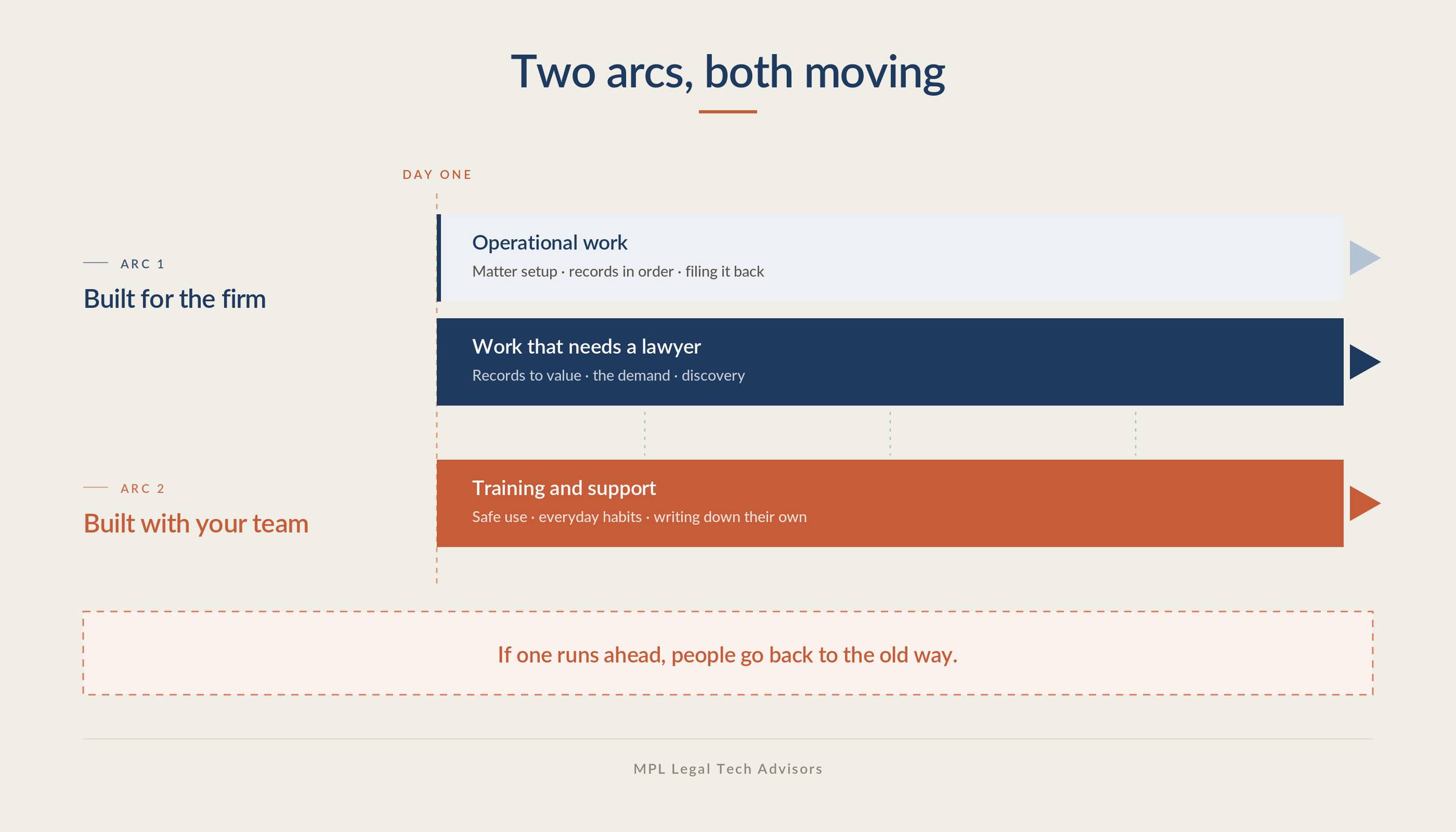
That’s the map. Building it takes two arcs of work, and they run at the same time.
THE FIRST ARC:
The first arc gets done for the firm - by an outside partner, by someone you hire, or by you if you have the time and the appetite for it. It covers the plan, picking and connecting the systems, sitting with your people to see how the work actually gets done today, and getting two or three tasks they do on a daily basis running end to end on AI so the team has something real in front of them and the momentum and enthusiasm starts picking up. That arc splits in two, and both halves are equally important.
The first half is the operational work: copy-pasting, formatting, opening the matter and setting up the same subfolders every single time, running the conflict check, routing intake, sending status updates, getting records into date order, keeping the chronology current, filing output back where it belongs. These are often the cheapest wins available, and a surprising number of them aren’t AI at all. A workflow where an intake form arrives, the matter opens, the standard subfolders get created and the standard documents get dropped in has no AI anywhere in it, and gives a paralegal twenty minutes back on every new file.
The second half is the work that needs a lawyer: getting through a thousand pages of medical records to find where the value actually is, turning that into a demand and setting the number, picking apart the defense medical exam against the treating records, answering written discovery, and reading a paralegal’s draft before it goes out.
It’s tempting to go straight to the second half, because that’s where the impressive stuff happens. But if that’s all you do, your paralegal is still doing everything in the first half by hand and the case doesn’t move through your office any faster.
THE SECOND ARC:
The second arc is enablement - getting your team trained to use the system and supporting them throughout. This starts immediately, well before the Legal AI Operating System is anywhere near finished. Your team is already using AI, even if you haven’t given them any firm-wide licenses - it’s literally one tab away in their browser or on their phone. Training also pays back faster than anything you build, because the people are already doing this and you’re getting them doing it in a much more effective and safer way.
Your firm runs on a million small tasks. Nobody will ever have the budget to write them all down for you, so your people have to be able to write down their own as they are doing the work. This is how AI gets really embedded into a law firm.
Both arcs have to move together. When the technology and tools run ahead, people get results they don’t trust from something nobody showed them how to use, there’s no one in their corner at the moment it fails, and they go back to the old way - and getting them to try the second time is much harder, the momentum is fading.
None of this requires you to become an AI specialist and you shouldn’t be carving out your day to figure this out for your firm. This defeats the purpose as it forces you to spend more time at your desk. AI belongs inside a firm the way marketing and accounting do, and nobody expects a founder to run their own marketing department.
Legal AI in Action
🎬 Take 20-40% Off Your Time On Desk
How to build your PI firm’s own AI operating system on Claude instead of buying one from a vendor. It covers the five systems you need, and how Claude connects to all of them so the work stops moving between programs by hand. Then the part that decides whether it holds up: your firm’s know-how written into files you own rather than a vendor’s product. Ends with the two arcs it takes to get there and three things to do this week.
🎙 AI With the Cards You’re Dealt
Aleksandra Czubek is TMT/IP associate at Addleshaw Goddard in Warsaw, where she advises on the EU AI Act, the Data Act and GDPR. She came through Bird & Bird and Linklaters, and spent nearly six years at the University of Gdańsk running its IP law summer school alongside a PhD. Her firm has Harvey and Legora, but her team’s work isn’t high volume enough to make the business case, so she works with an internal chatbot, Claude and ClauseBuddy instead.
We talked about the time cost of teaching a tool that nobody puts in the marketing, the four things she checks in any contract review that she only wrote down once she started handing parts of it to AI, and why she doesn’t lose sleep over whether client data is safe in these systems.
Coming up!
🎙 Next Tuesday at 2pm CET!
Next week’s guests on Rok’s Legal AI Conversations is Wendy Jephson, co-founder and CEO of Let’s Think in London. She was UK Legal Director at Eli Lilly, went back to study business psychology, then co-founded Sybenetix and sold it to Nasdaq in 2017. Let’s Think builds behavioural science into technology that gets what an expert knows out of their head and into words.
She explains why partners can’t tell you how they know what they know, the difference between offloading, drifting and surrendering your thinking to a tool, and why she’d stop trying to write a playbook and let one emerge from the work instead.
Each edition of Legal AI Brief brings practical lessons from firms using AI safely.