
Seventeen Days
“How long is this going to take?”
That’s a fair question, and we get it every time we talk to a law firm founder about setting up Claude for their team. The honest answer is it depends, and that doesn’t help anyone. So let me try to be more specific in this newsletter.
To keep it simple, there are two parts to this, one with a timeline and one without.
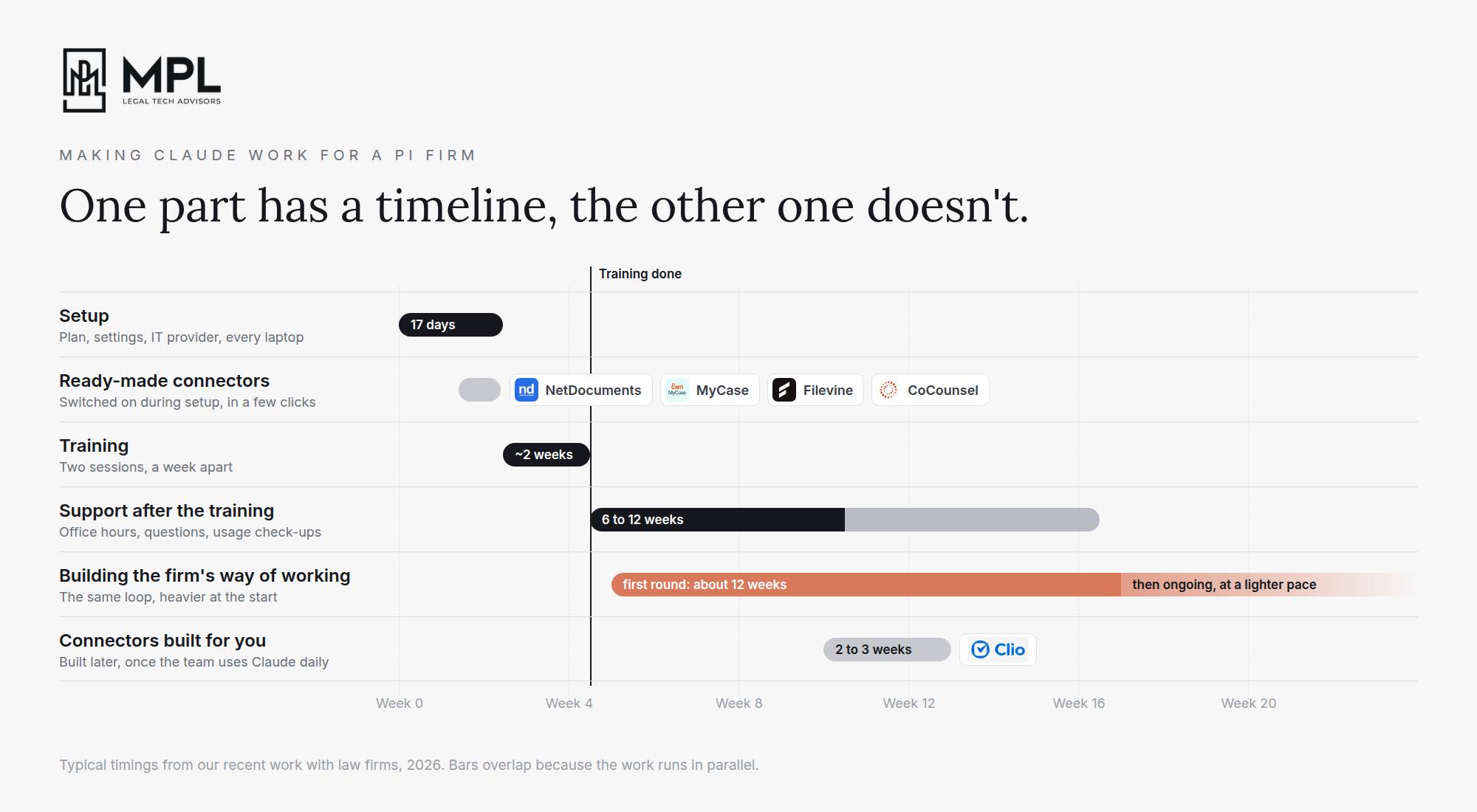
The first part is the technical one. Most recently, it took us 17 days to set up a fully compliant Claude Enterprise for a 30-person PI firm, and that includes walking their MSP through a setup they had never done before. Training the team on the tool took another two weeks.
But just because everybody has Claude installed and has done the training doesn’t mean they’re all going to use it effectively the month after, and those first few months decide how much value the firm gets from what it bought.
This is also where the continuous part starts. To be clear, that second part has to happen whether you buy a specialized legal AI platform or a general one. The only difference is who ends up owning your institutional moat.
Where Time Goes
Before you buy anything, you want to know where the time in your firm actually goes. And there are a lot of stones to look under.
The obvious and (probably therefore) underrated example is intake. Intake is the first time the firm touches a case, so whatever intake captures, or misses, carries through the whole file. If intake doesn’t get the date of the accident, the insurer and the treating doctors, then someone has to chase them later. The records requests go out late, the statute deadline might not make it onto the calendar, and a year later the demand gets built on a file with holes in it. So fixing intake saves time on intake, and it also stops every later step from having to make up for what intake missed.
And intake is only the start. When we sit down with the team and go through their week, we see a lot of work they repeat on every single case. To name just a few:
-
Going through hundreds of pages of prior medical records to find earlier complaints about the same neck, back or shoulder
-
Building medical chronologies by hand, which can take a paralegal a full day every week
-
Asking providers for records and bills, and then asking again, and again
-
Following up with adjusters several times a week, because before you file suit there’s no judge setting deadlines for anyone
-
Answering “where are we on this case?”, from the client or from the founder, which means somebody has to stop and go find out
-
Putting together demand packages one case at a time, pulling in the records, the bills and the prior injuries
-
Before AI can help with any of these, the firm needs two things. It needs a written way of doing the work, like what a good chronology looks like or when someone follows up with an adjuster, so Claude has something to follow. And the information needs to sit where it belongs, with the dates, tasks and notes in your case management system instead of in someone’s inbox or head, so Claude has something to refer to and update.
Once both are there, AI can do its part on top of them, and it can do it the way your firm wants it done.
The First Month
I’ve written a lot about how it doesn’t stop with rolling out the tool. But I don’t talk enough about what actually starts happening in the first weeks after the training, once people go back to their desks and use Claude on their own.
In those first weeks, everyone starts using it their own way. You’ll see one paralegal set up a project for her trucking cases, while the one next to her uploads the same records into a new chat every morning. Someone writes a great instruction for demand letters and never shows it to anyone. Someone else types “12-point Times New Roman” into every letter she drafts, because nobody showed her she only has to say it once.
It’s not realistic to expect people to sort this out by themselves or after a few training sessions. They don’t have the time to notice where they keep repeating work, to figure out which project makes sense for which kind of case, which documents go where, and how to keep them updated without ending up with five copies of the same folder. A few people will figure a couple of things out. They’ll build their own skills, some will share them and some won’t, and you end up with the same problem law firms have always had with knowledge, just now inside Claude.
So in the first month especially, you need a net that catches all of this. Where are people repeating the same instructions? Which task are three people doing three different ways, and which way works best? Who should be using a project and isn’t? What keeps coming back as a question? At one small firm we work with, more than a hundred emails with questions came in from their team during that first month alone.
And you can’t copy what the firm next door did, because your cases and your people are different. So you use what you caught, being very proactive about finding out how people are using Claude, in order to decide what to set up for your firm:
-
good examples of each kind of work, organized where everyone can find them
-
the checklists and templates
-
the projects people should have set up but didn’t
-
the skills for tasks everyone does differently, built on the way that works best
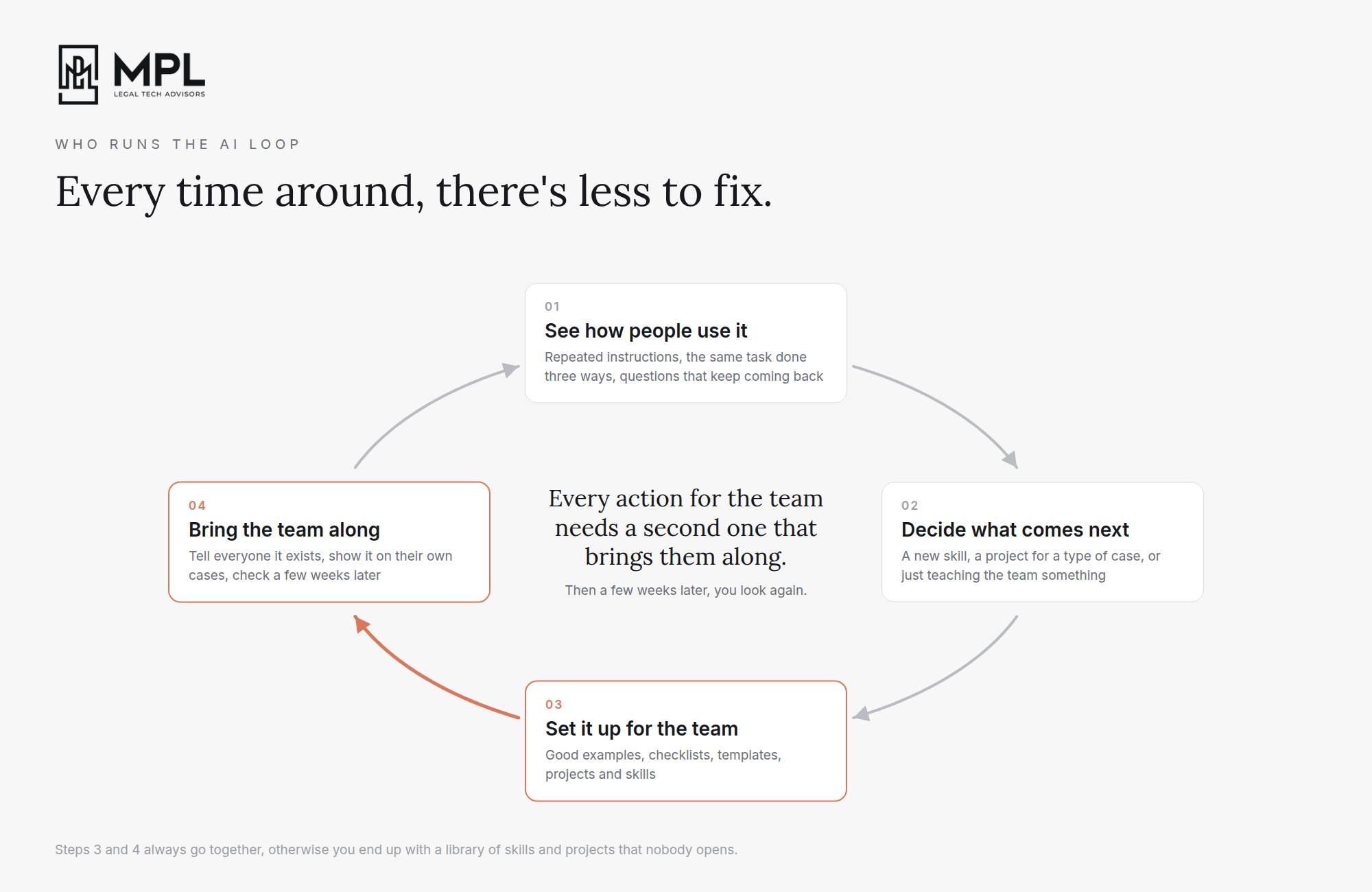
Then you show it to them on their own work, with examples from their own cases, and you stay available for the very specific questions, such as how do I get Claude to stop deviating from what I asked, or why did it spend so many tokens on this simple question. After a few weeks, you repeat the same process. Every time around there’s less to course-correct and build, and that’s how the firm ends up using Claude in one way instead of everyone doing it their own way.
Who Runs the AI Loop
So who runs that loop? In a small firm, the people who know the work best are also always the busiest ones. So it can’t be them, because they already have a full caseload, and setting things up for everyone else is a side job they will be forced to drop the first week a big demand is due.
But the loop does need a person. Someone has to set things up for the team, see how people actually use what was set up, and decide what comes next. Sometimes that’s a new skill, sometimes a project for a type of case, and sometimes it’s just teaching the team something they didn’t know Claude could do.
Every one of those actions needs a second one right after it, one that brings the team along. When you set up a skill for demand letters, you tell everyone it exists, you show them how to use it on one of their own cases, and a few weeks later you check whether they’re actually using it or still writing demands the old way. When you set up a project for trucking cases, you make sure the people working those cases know it’s there and what’s already in it, so they stop uploading the same documents into a new chat every morning. Otherwise you end up with a library of skills and projects that nobody opens.
The person running the loop also has to keep up with Claude itself, because it changes every week. And I am not exaggerating, in September alone, Anthropic put chat and Cowork into one Claude and released a new model, updated how memory works, introduced Smart reports, and much more. Someone has to know which of those changes matter for your firm and which ones are noise, and then bring the team along on those too.
And that loop doesn’t end. Not with Claude, not with any other AI platform. Your cases change, your people change, and the platforms change every week, so there’s always a next round. Which is why in a firm this size it usually has to be someone outside the daily work, because the people inside it are busy doing the actual work.
Legal AI in Action
🎬 How to Roll Out Claude in a Law Firm So It Pays Off
Getting Claude set up properly in a law firm takes about two weeks, but the part that decides whether it pays back comes after that. In this video, I walk through the whole road: finding out where your time goes before you buy anything, getting Claude cleared for client work with your MSP/IT, training your people on their own work and connecting the systems they use every day. Then I spend most of the video on the months after the rollout, when the questions pile up, everyone uses it their own way and somebody has to run the loop.
🎙 A PI Trial Attorney’s Claude Setup
Andrew Haling is a partner and trial attorney at Pathway Law Firm in Beverly Hills, representing injured plaintiffs since 2010 in personal injury, wrongful death and catastrophic injury cases, and he built his firm’s Claude setup himself over the past 9 months. He thinks the “automate your firm” ads get it backwards: used properly, legal AI should leave you mentally exhausted at the end of the day, because the mindless tasks are gone and what’s left are the decisions.
We talked about why only a few people at his firm get full access while junior attorneys keep doing the work by hand, the simple HTML walkthroughs for his staff he gets Claude to build on SharePoint for tasks that don’t need AI at all, and why his skills are ready for the whole firm but the current monthly bill isn’t.
Coming up!
🎙 Next Tuesday at 2pm CET!
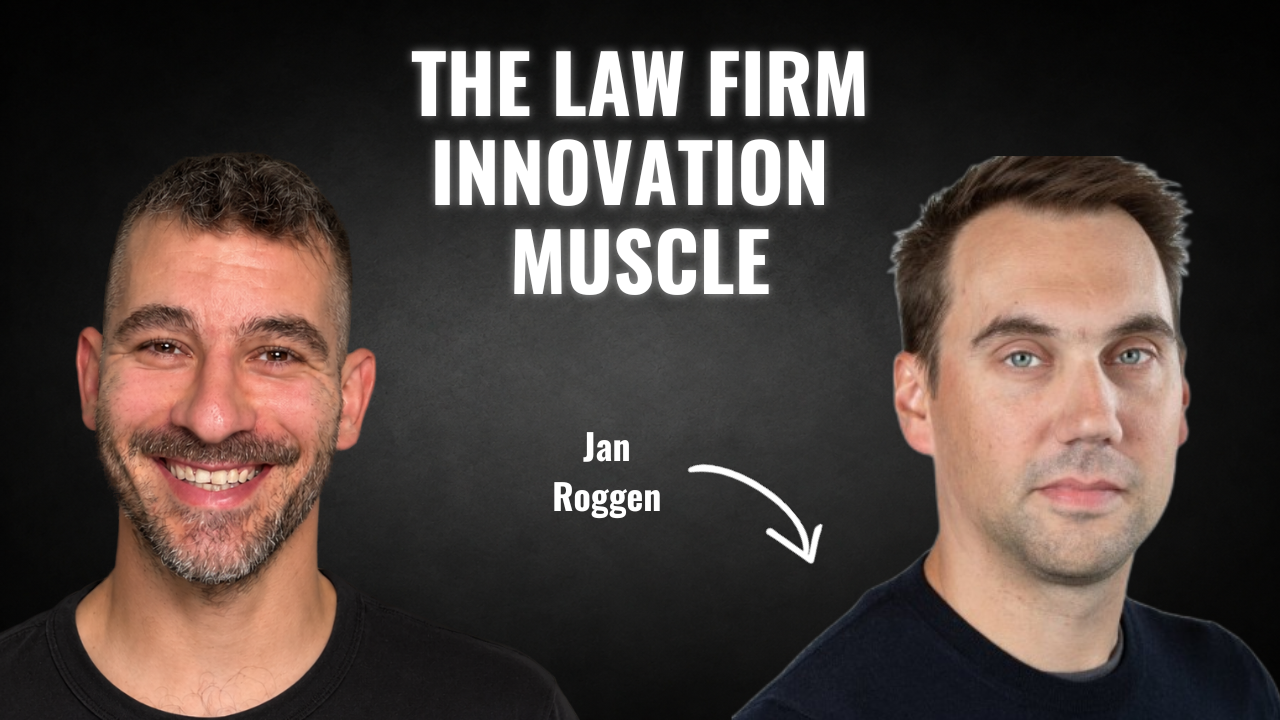
Next week’s guests on Rok’s Legal AI Conversations is Jan Roggen, founder of Legaltech Match. Before that he was a practising lawyer, built and ran his own firm, led legal management consulting and GenAI work at Deloitte Legal Belgium, and worked inside legal tech at ClauseBase. These days he helps mid-sized firms decide on AI strategy, fast.
He tells me how he gets a stuck firm to a six-month plan in one week, and why the same rollout fails when you put the people who push a button to see what happens in the same room as the people who only push it when they know. We also get into the maths for a 20-lawyer firm: 30,000 hours a year, 10% back from AI, and 600 of those hours ring-fenced for a half-time person building the innovation muscle, before the AI-native firms and the law firm franchises show up.
Each edition of Legal AI Brief brings practical lessons from firms using AI safely.