
Same Result, Three Prices
Vals AI updated its legal research board this week, the one where agents do multi-step research with real tools and get graded against rubrics written by practising lawyers. Claude Opus 5 and Claude Fable 5.1 pass exactly the same share of the tasks, 55.29%. One of them costs about $6.76 a task and the other about $23.06.
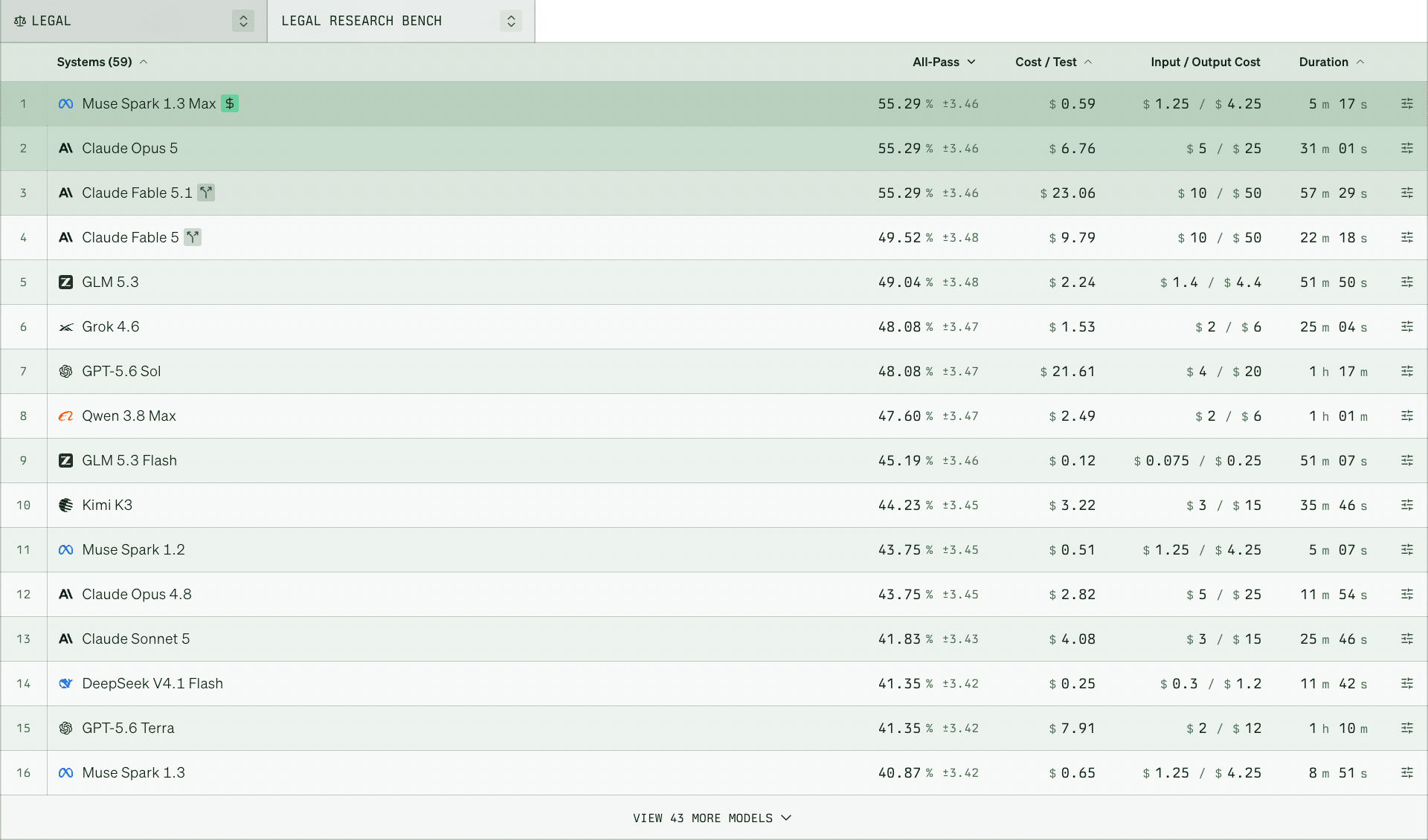
I dedicated a whole issue to these boards in July, to how crowded the top has become and how little the ranking tells you. The column on the right tells you more.
When a bill comes in high, the natural instinct is to go looking for a cheaper model. But, more of it depends on where your documents sit and how the question gets asked, and you can change both this week without telling anyone to use Claude less.
Fewer Tries
A test from LN Labs put a number on that lever in a legal setting - one model, forty legal tasks, three different setups around it. I wrote about it here when it came out and took it as a point about quality, because the setup with a written playbook and the documents in the right place passed 83% of the tasks while plain chat passed 76%. The same table had a second column. That better setup cost 80 cents a task against $2.80 in plain chat, because it reached a good answer in fewer tries.
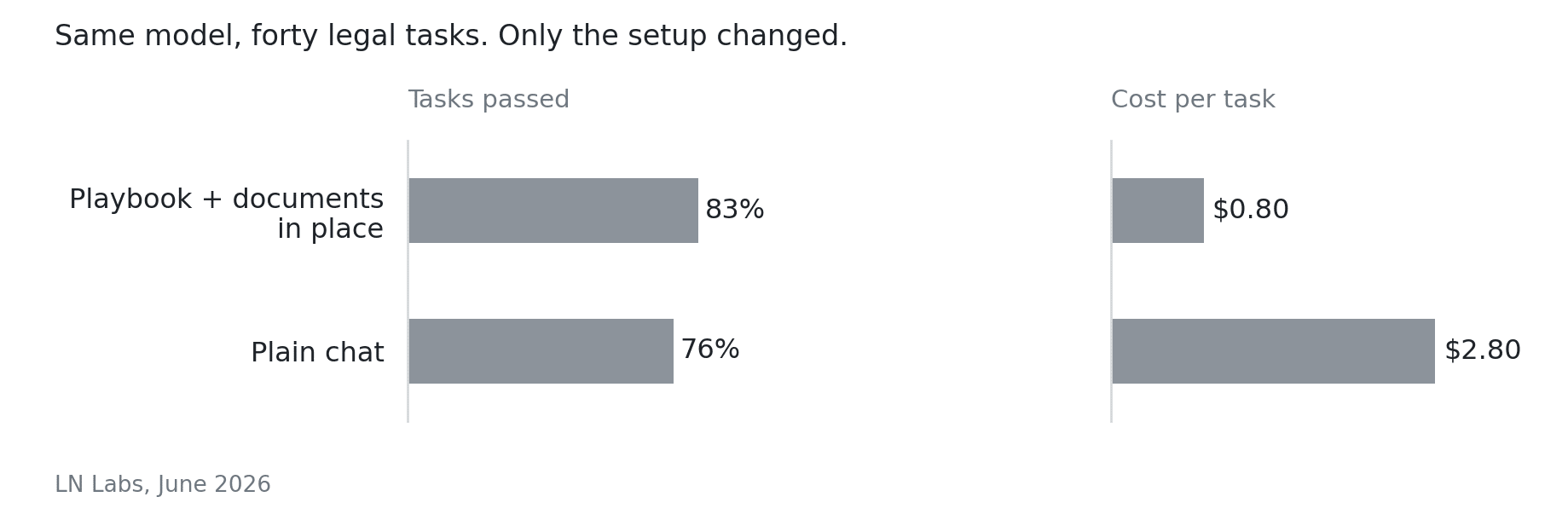
Those tries are where the money goes. Claude re-reads the whole conversation every time you send a message, so your correction in the fourth message pays for the three before it, and the sixth pays for all five.
A team at Microsoft Research and Salesforce measured what those rounds do to the answer, not just to the bill. They took tasks that models handle well when you state them properly in one go, then fed the same information in pieces across a conversation, the way people actually work. Across fifteen models and more than two hundred thousand simulated conversations, performance dropped 39% on average, and once a model had gone down the wrong path it mostly stayed there. Giving it everything in one well-prepared message got back about 95% of what was lost. Their paper was named an outstanding paper at ICLR this year.
So the patched-up thread costs more and answers worse, and the same handful of habits fixes both ends of it.
Ten Habits for Lawyers
Start with where the work lives. Reference documents - your templates, your playbooks, a long case file - belong in a Project, where Claude reads them back at about a tenth of what it costs to send them fresh, rather than being dragged into every new chat. One chat per task, and when a thread gets long, ask for a short summary, check that the dates and facts you need survived it, and start again with that. Put the facts, the actual document and the format you want into the first message, because three related questions in one message cost less than three messages. And say how long you want the answer, since what Claude writes costs five times what it reads, and a long answer then travels along with every message after it.
Then the engine - the model. Sonnet handles client emails, letters, first drafts and a summary of a deposition perfectly well, while Opus earns its 2.5x on work that needs careful reasoning across many facts - a liability analysis, a brief, case strategy - and Haiku is there for bulk sorting. Effort is the same idea one level down, turned down for a task you can check in one read and left high for work that’s hard to verify. And Cowork isn’t a bigger chat. It works in many small steps, opening a file, deciding, opening the next, checking itself, and every step is billed, so one answer or one draft belongs in chat and a folder of files belongs in Cowork.
Then what you hand it. A PDF attached to a chat gets read as text and as an image of every page, which is how a ninety-page agreement eats most of one conversation, while the same PDF in a Project’s Files is read as text alone. Switch web search off when the answer sits in your own documents, and ask a connector about one matter instead of asking it to look through everything.
And then what you keep. The request that keeps coming back - the demand letter, the medical chronology, the spoliation letter - gets written up once as a Skill, which costs around 100 tokens sitting there and under 5,000 when it runs.
All ten of these are in the guide further down, together with the six settings your admin controls.
The Floor Keeps Moving
Your bill also moves when you change nothing at all. On 30 June Anthropic released Sonnet 5 at a lower price than the model before it, $2 and $10 per million tokens against $3 and $15 for Sonnet 4.6, and the cut turns out to be smaller than it looks. Sonnet 5 counts text differently, and Anthropic’s own page says the same input text now produces roughly 30% more tokens, so “the cost of an equivalent request does not drop in direct proportion”. Simon Willison ran plain English prose through both models and counted 1.42 times as many tokens on the new one, above Anthropic’s own estimate.
It moves in your favour just as often. Harvey put Opus 5 through their legal agent benchmark in July and found similar performance at lower reasoning levels while generating 26% fewer tokens than the model it replaced. Same work, same firm, smaller bill, and nobody had to change how they work.
So test a new model on your own work before you move the firm onto it. Pick a task you run most weeks, keep the documents and the prompt fixed, and run it again when the next release lands. Anthropic asks for the same thing in their documentation: “Don’t reuse counts measured against earlier models; recount against Claude Sonnet 5”.
Six Switches for Claude Admins
Your admin opens Organization settings > Models, chooses a specific model instead of Anthropic’s recommended default, starts everyone on Sonnet, and sets a default effort on the same page. That same screen governs which models each user role can reach and how high they can push effort.
That’s also where the instinct to take something away goes wrong. Artificial Analysis prices Claude Opus 5 at $1.10 a task on low effort and $5.86 on max, for about eleven points of difference on their quality index, so capping effort for people who aren’t power users usually costs less quality than removing a model, because a current model at medium effort tends to beat an older one at maximum. And when the analytics show somebody deep in Opus for routine drafting, they were probably never shown when Sonnet is enough.
Set spend limits per group rather than only firm-wide, since a firm-wide cap stops everybody at once, with alerts at 75% and 90% and an individual limit overriding the group either way. Start those low - raising a limit is easier than handling an overage - and raise them before a training day so nobody gets cut off halfway through.
Give every role the same access at the start and narrow it later, once you can see who actually uses Cowork, web search and connectors for what. Put your standing rules into organization instructions, remembering Claude reads them with every message, so keep them short and add to them as the first weeks teach you something. And check claude.ai/analytics weekly at first, monthly after that.
I gathered the tips and tricks I have up my sleeve and created a guide with 10 things your lawyers can change and 6 settings your admin can change to bring your Claude bill down.
🎯 Grab it here for free 👇
Download the PDF 506 KB
What One Workflow Costs
In February, Thomson Reuters asked 1,500 professionals across 27 countries whether their organisation tracks the return on its AI tools. 18% said yes, and about 40% didn’t know either way. Most firms measure adoption instead - seats bought, people logged in - which tells a partner nothing about whether the work pays off.
That analytics page closes the gap. It shows spend per person and per model, split between chat and Cowork, and for each Skill it shows how often the Skill runs and what a single run costs. A demand letter, a medical chronology, a first-pass review - you can put the cost of one run next to the hours that task used to take and look at the two numbers together.
I went looking for a firm that has published a figure like that, through ILTA, the ABA, Clio and the trade press, and found nothing. Nobody in our industry has published what one piece of AI-assisted work costs them. And even if they did, it wouldn’t help you much. A number from another firm would be built on their documents, their matters and the model they ran last month.
So this week, open claude.ai/analytics, take the task your firm runs most often, and write down what one run costs next to what that task used to take you. That single line is where the pricing conversation starts.

Smart Reports are here
Claude Enterprise admins can now have Claude analyze how a team is actually using it: what work people are doing, what different outputs cost, where sessions keep running into friction, and which repeated tasks are good candidates for shared Skills.
Instead of looking at a usage dashboard and guessing why somebody is burning through credits, Smart Reports can surface things like repeated rework, missing connectors or approval gates. And if the same workflow keeps appearing across the team, it will suggest turning it into a Skill and even gives you a starting prompt.
It’s in beta for Claude Enterprise, with up to 10 reports per organization per month currently free. Reports can be scoped to a team and up to the previous 28 days of Chat, Cowork and Claude Code usage.
Legal AI in Action
🗣️ Six Countries, One Projector
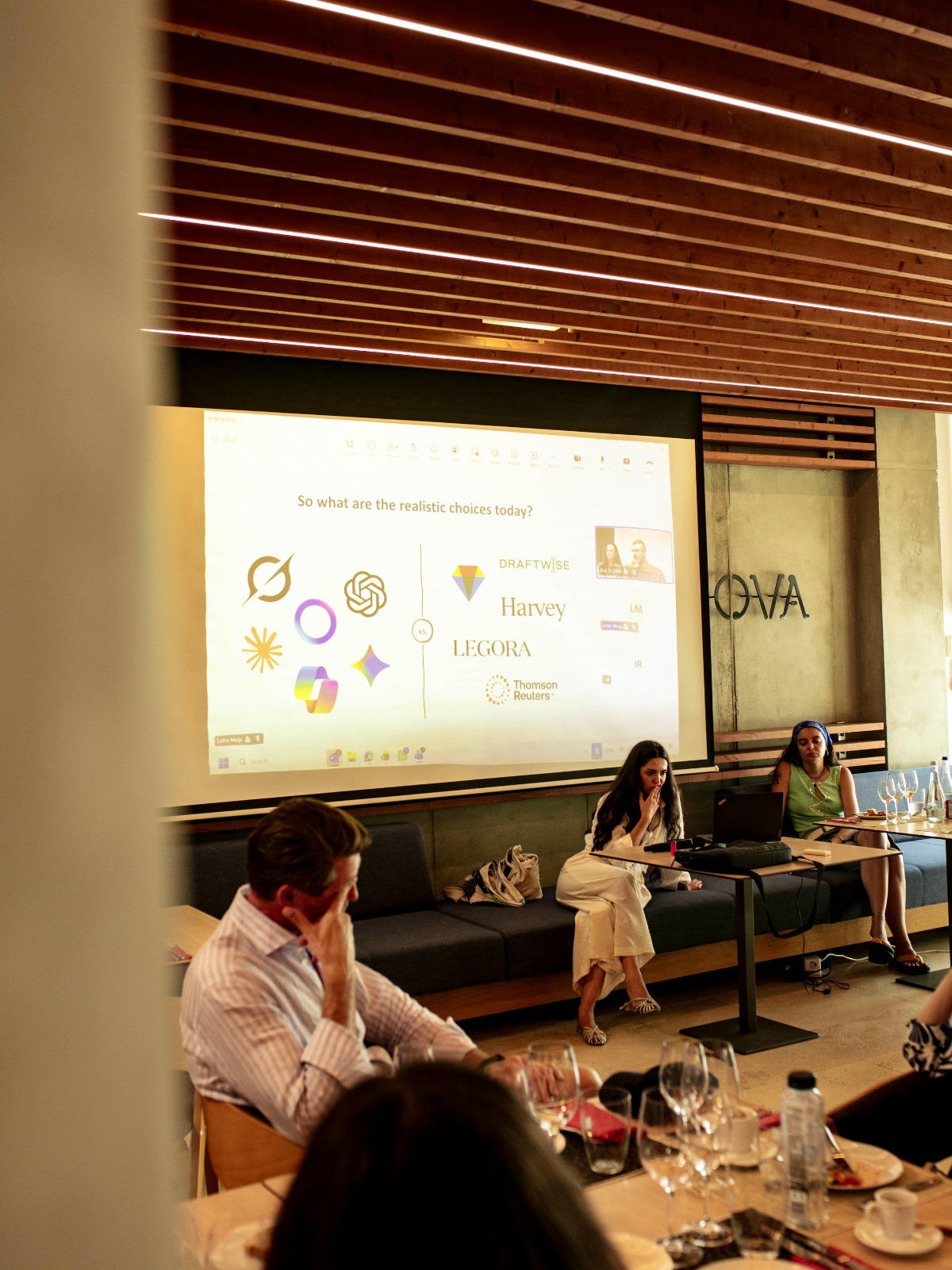
Team offsites usually mean a hike and a dinner. bpv LEGAL spent part of theirs on AI instead, and Lotte Meijs and I, as cofounders of MPL Advisors, were invited to give the talk - beamed onto a projector in a winery, with lawyers from six countries in the room. bpv LEGAL is an alliance of four independent firms, from Brussels to Bucharest, with more than 130 lawyers between them.
We got to talk about the biggest question on the legal tech market today: go the legal-specific vendor road, or build on the general platform? Neither one arrives knowing how your firm reviews a contract, what you always push back on, or which questions you ask a client first. Harvey and Legora don’t come with workflows tailored to your practice any more than Claude does, so that work lands on you either way - and a skill you write for Claude also runs in Copilot or ChatGPT, while the work you do inside Harvey stays inside Harvey.
We were standing between that room and the wine, and they still kept asking questions well past our slot! Thank you bpv GRIGORESCU ȘTEFĂNICĂ for having us!



🎬 Claude’s Latest Microsoft 365 Update for Law Firms
Claude’s Microsoft 365 connector has changed a lot in the past few months. It can now do much more than search Outlook, SharePoint, Teams and your calendar. In this video, I show it drafting emails, adding deadlines, updating the actual document in SharePoint, setting an out-of-office and posting in Teams. Then I go through the controls behind it: what Claude can access, which actions should require approval, which ones I would disable entirely, and how to let Claude draft emails without ever fearing it’s going to send them.
🎙 Better Off Practicing Law
Mike Bittner is a solo attorney in Jacksonville, Florida, running MB Legal as fractional general counsel to a software company and a cybersecurity company. He spent sixteen years at a commercial litigation boutique before going out on his own almost seven years ago, and he’s a CIPP/US privacy lawyer - the one, as he puts it, who turns up to ruin the party for everybody with the cool new tool.
We talked about the skill that runs every Saturday morning and tells him which task he has now done often enough to be worth turning into a skill; the two words he types at the end of a chat, that write the transcript, update the matter file and draft the time entry. His month-end billing went from an hour to ten minutes.
Coming up!
🎙 Next Tuesday at 2pm CET!
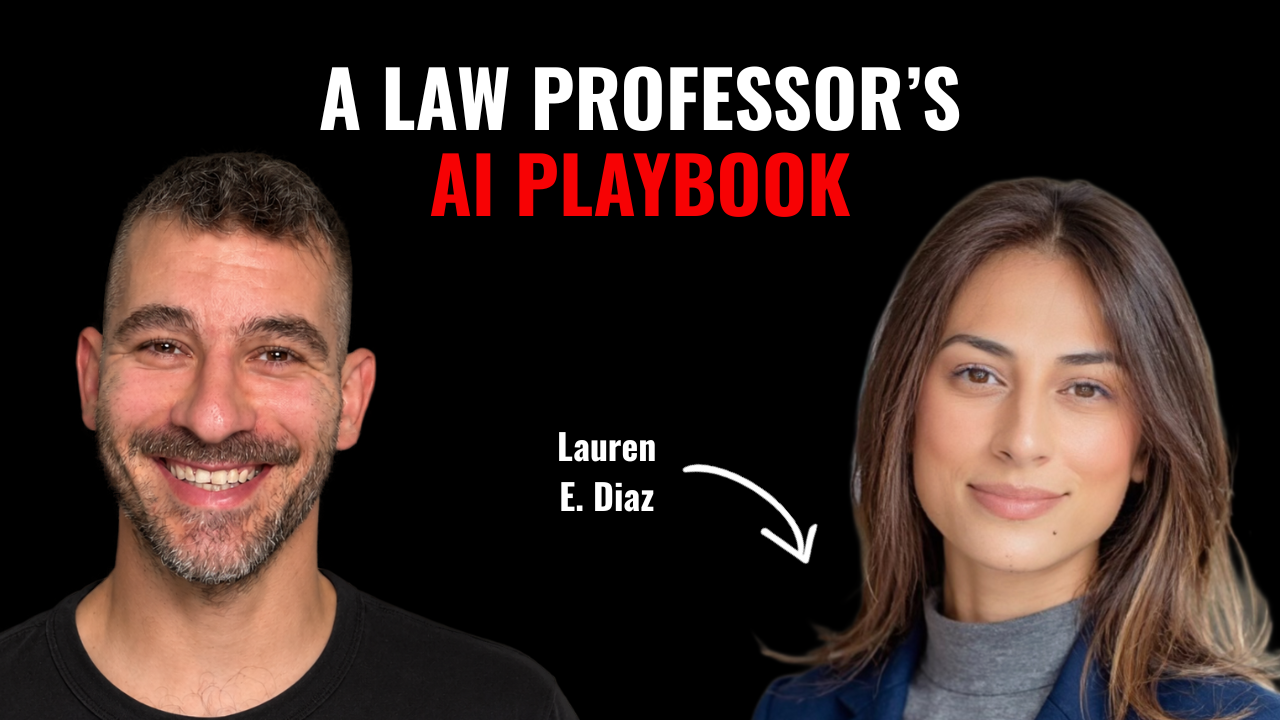
Next week’s guests on Rok’s Legal AI Conversations is Lauren E. Diaz, a law professor who teaches in San Francisco and in Florida, runs a law library and coaches bar exam candidates. She’s the technology and innovation fellow at Nova Southeastern, and she came to AI from intellectual property and forensic psychology.
She trains law students, faculty and practising attorneys, and her answer to most of it is back to the fundamentals. We got into the motion she puts on screen and lets a class praise before showing it redlined; the AI training that turns out to be an hour with a vendor, ticked off a list; and the questions graduates now bring into interviews about which tools a first-year can actually touch.
Each edition of Legal AI Brief brings practical lessons from firms using AI safely.