Three Percent
A&O Shearman announced that it will invest $1.1 billion in AI over the next five years. The firm said that most of that investment will come from its lawyers’ time, because every practice has to spend at least 3% of its time building AI tools for its own area of law.
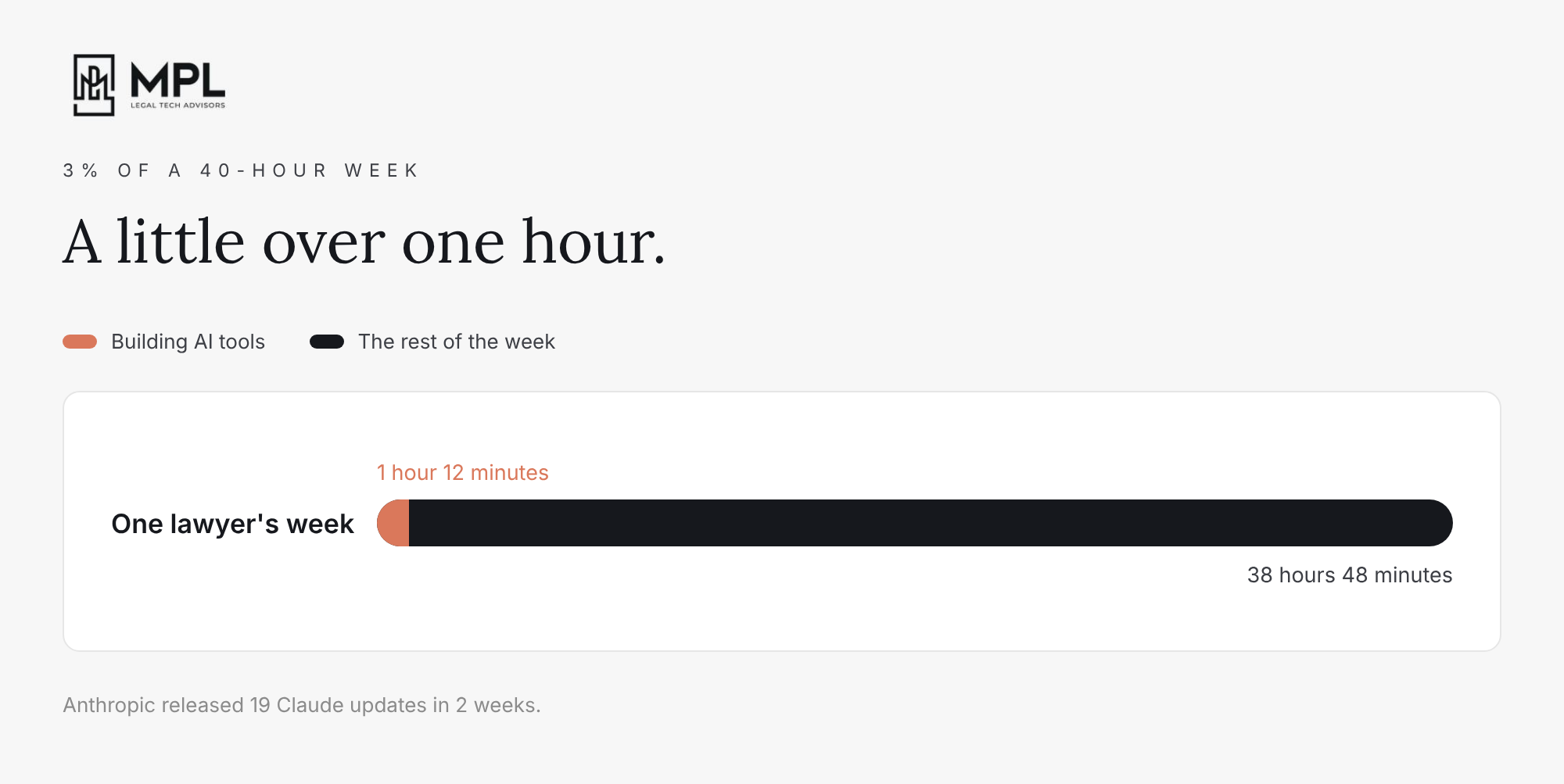
I’ve seen many people on LinkedIn share this as the example every law firm should follow, and I disagree with them. A lawyer who spends 3% of a 40-hour week on AI has a little over an hour for it. Anthropic alone released 19 Claude updates in the past 2 weeks. That lawyer needs the hour to keep up with the updates, and has very little time left to build anything.
Imagine the same plan at a company that isn’t a law firm. A software company tells its engineers to spend 3% of their time on the company’s legal work and build the internal legal capability. No lawyer would take that plan seriously.
Building?
The vast majority of the people at your firm will never build anything in Claude. They will use Claude in their daily work, to summarize medical records, draft a demand letter or prepare for a deposition. Those people need the fundamentals: what Claude does with the documents they give it, how to ask Claude for a piece of work, and how to check the answer before it reaches a client. Your firm should teach those fundamentals to everyone in the initial Claude training.
Usually there is a smaller group of curious people, who want to turn the firm’s way of doing the tasks into something everyone can run in Claude. They need the same fundamentals first, and then more knowledge on top of them, and they need much more than an hour a week. If your firm doesn’t have those people, or can’t spare the time to enable them to actually move the needle, somebody from outside the firm has to do the building for you.
Axiom surveyed 528 in-house legal leaders in 6 countries and asked them what they would do differently if they could start with AI again. 36% said they would build expertise inside their team before deploying AI, and 34% said they would invest more in training at the start. Those respondents work in-house and not law firms, but we see the same regret at the law firms we work with.
The chairman of Polsinelli described the same experience on a Bloomberg Law podcast. He said that a year after ChatGPT came out, his firm had plenty of activity around AI and very little progress. The firm started to make progress after he asked some of its most talented people to treat AI as a business problem and not as a tech problem.
We also see firms that keep improving their training for months before they deliver it. Anthropic changes Claude during those months, so parts of the training are already out of date on the day the firm delivers it. The lawyers and paralegals at the firm have been using AI on client work that whole time, and nobody has shown them how to use it responsibly.
Deliver a good training now and improve it afterwards.
Waiting for Perfect
We’ve worked with firms that asked us, and other vendors, to keep designing and improving the training until it was perfect for their people. We’ve also worked with firms that postponed the training month after month. In both cases their people already had the AI tools, and they used them on client work every day.
Nobody had taught those people what they can give Claude and how to check its answers. Not to mention that some of those firms were also on the wrong plans and moving to the right one was postponed along with the training.
Anthropic keeps changing Claude while those firms wait. In the past few weeks alone, Anthropic made Opus 5.5 the default model on Team plans, added spreadsheets and whiteboards, and released Claude Meetings, which joins your video calls and writes the notes. A training that a firm finished in October explains none of those, and its advice on which model to pick is already wrong. No firm can perfect a training for AI products anymore.
Deliver the fundamentals to your people now. Move your firm to the right plan and set up your settings in the same weeks.
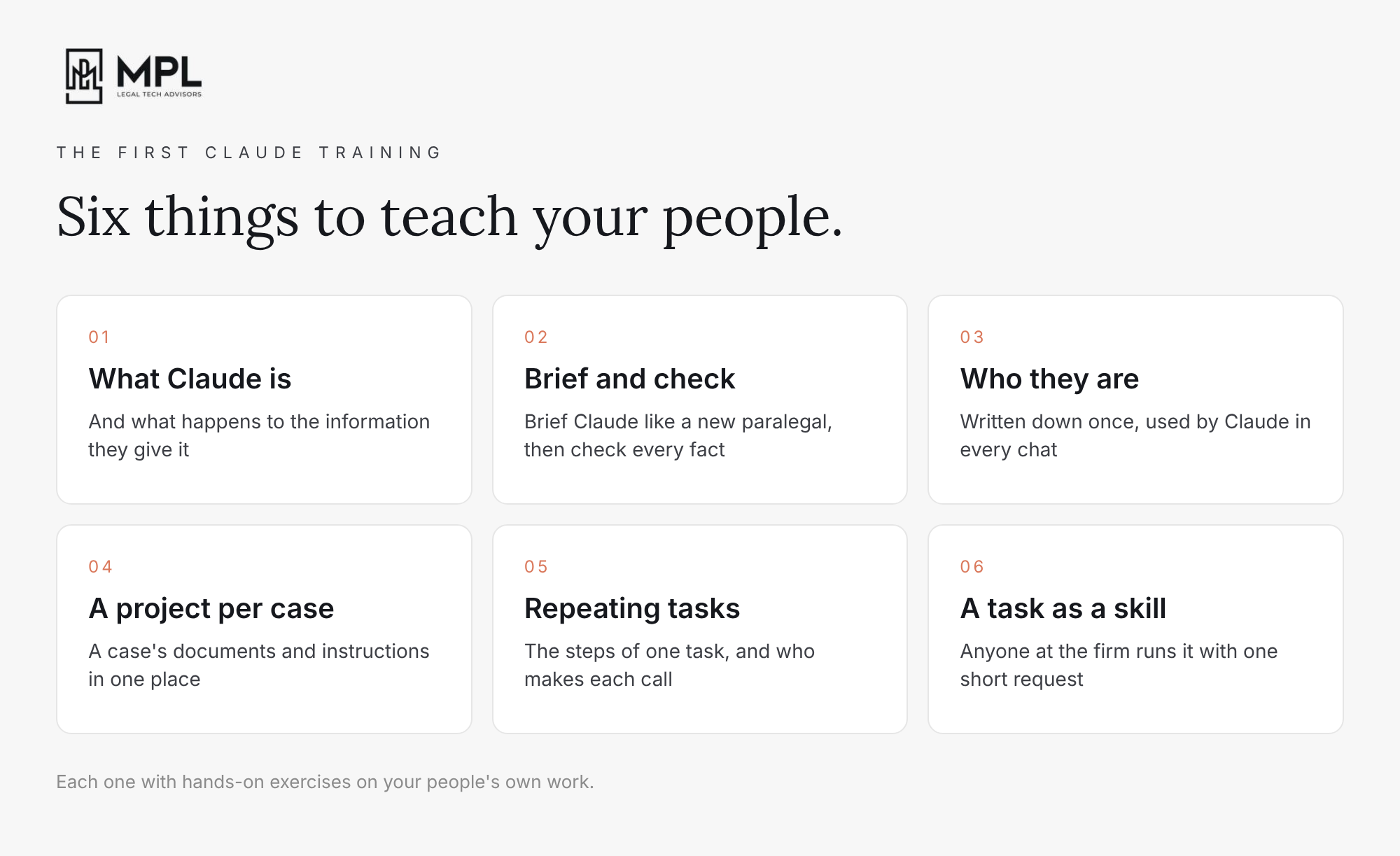
We split those fundamentals into six things your people need to learn in that training. Let’s walk through them.
Six Things to Teach
First, teach your people what Claude is and what happens to the information they give it. Explain why client work belongs only in the firm’s account and never in a personal one. Show them what Claude can do, like search the web, read the firm’s files or keep a case’s documents together, and where to find each of those in Claude.
Second, teach them to brief Claude the way they would brief a new paralegal. Have them tell Claude who it works as, what the task is, what it needs to know about the case, and what the result should look like. Show them how Claude gets things wrong, like a quote from a medical record that isn’t in the record, and teach them to check every fact against its source before the work leaves their desk.
Third, ask each person to write down once who they are, what they work on and how they like their answers, and to save it in Claude’s settings. Claude will use it in every chat, so nobody has to write the same introduction again.
Fourth, have them set up a project for one of their cases. A project keeps a case’s documents and instructions in one place, so your paralegal doesn’t have to upload the same medical records and explain the same case at the start of every chat. Teach them how to prepare and name the files, how to decide who at the firm can see the project, and how to keep it up to date as the case moves on.
Fifth, ask each person to look back at their past weeks and find the tasks they do often and the same way every time, like a medical chronology or a deposition summary. Have them write down the steps of one task in the order they do them, and mark at which steps Claude does the work and at which steps they make the call.
Sixth, show them how to save one of those tasks as a skill, so anyone at the firm can run it with one short request.
Make sure that you include hands-on exercises that your people do on their own work, in their own Claude account, and teach them a few habits that keep them within their usage limits.
Refreshers
Somebody at your firm learned Adobe Acrobat years ago, to Bates stamp, redact and combine medical records into one PDF. Acrobat still works the same way today, and a new paralegal learns it from a colleague in an afternoon. Nobody had to train your team on Acrobat a second time.
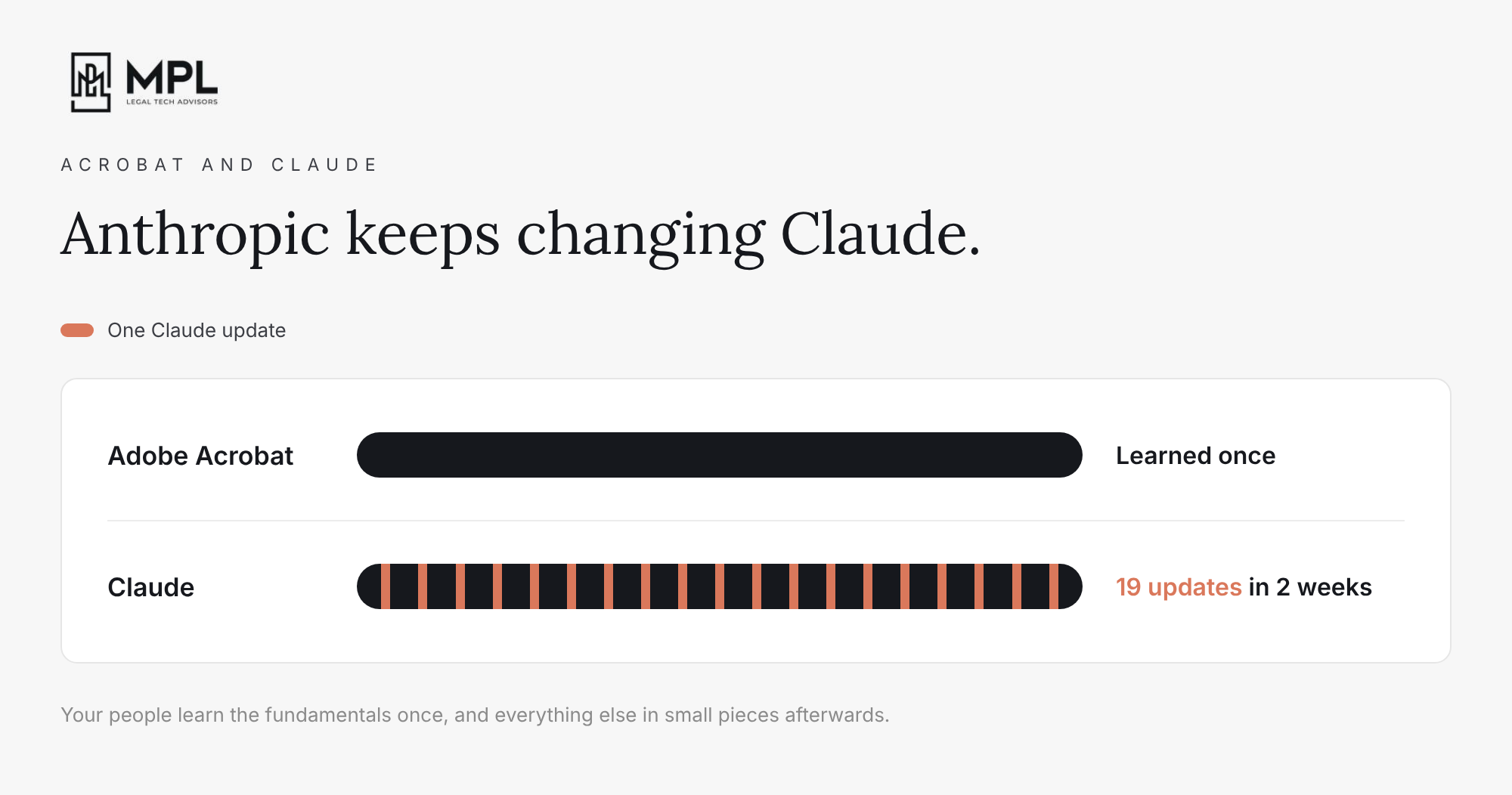
Don’t think of your Claude or any AI training the same way, as something your firm finishes. Your people learn the fundamentals in the training, and they learn everything else afterwards, in small pieces, on their own work.
Give the curious people at your firm the time to keep building after the training. Each time one of them finishes something, like a way to draft a demand letter with one short request, have them show it to their colleagues on a real file. Your people then learn one new thing at a time, from somebody they know, on work they recognize. I think those small sessions do more for your firm than the first training does. I described how to organize them in the 12 November edition, and you can find the earlier editions on our website.
Your team will change too. 3 people may leave your firm next year and 4 new people may join, and those 4 need the same six things. Record the first training, so a new person can go through it on their own in their first weeks, and ask the same curious people, or the people who delivered your training, to update the recording after Anthropic changes Claude.
We call our own training “Trained on your own matters”, and we build its working sessions on your firm’s actual cases. If you’d like it for your team, reply to this email and I’ll send you what we cover.

Anthropic didn’t slow down for Thanksgiving week. They released 4 updates for firms on Team and Enterprise plans, and all 4 let Claude do more in the programs and apps your firm already uses.
1. Claude can now click and type in the programs on your computer on Commercial plans. Anthropic released Computer Use in beta for Team and Enterprise plans, after people on personal plans already had it. Claude can now look at your screen and navigate a program the way a person would. You can ask it to enter 12 expert invoices as case costs in your accounting program, even if Claude has no connection to that program.
Anthropic switched it off by default, and firms on the HIPAA configuration can’t turn it on at all. Claude takes screenshots of everything open on your screen, and it can open, change and delete files through the programs you approve, so your firm should agree on how to use it before anyone turns it on. To turn it on, your Owner opens Organization settings > Capabilities, makes sure Chat and Cowork unified is on, because computer use doesn’t work without it, and switches on Computer use. On Enterprise plans, firms can limit Computer Use to specific roles only.
2. You can now install an Artifact as an app on your Mac or Windows computer. Anthropic released Install as app in beta on every plan, so you can keep the case dashboard your team built in Claude in your Dock, with its own icon and window, next to Word and Outlook. Your team opens it with one click, and you update the app by editing the Artifact.
To install one, open the Artifact in Claude Desktop, right-click it and select “Install as app”. Anthropic switched it on for Team plans, and on Enterprise plans your Owner switches it on under Organization settings > Artifacts. Firms on the HIPAA configuration can’t use it.
3. Claude can now send files to the apps you connected and bring files back. Anthropic released file transfers for Connectors in beta, so you can ask Claude to save the settlement demand it drafted into the client’s folder in your cloud storage, or to pull the police report from that folder into your chat. You no longer have to download the file and upload it yourself.
Anthropic only supports this for apps in its Connectors directory whose developer added file support, so check your app first. On Team and Enterprise plans, your Owner switches it on under Organization settings > Connectors > File transfers. Again, firms on the HIPAA configuration can’t use it.
4. And last but not least, Anthropic gave Connectors 3 new abilities. A Connector can now bring its own skills, so the company behind your software can teach Claude how to do a full task in their app, and you install nothing. A Connector can stop and ask you to confirm in a short form before Claude changes or deletes something in your system. A Connector can also run a long job in the background while you keep working with Claude in the same chat.
You don’t have to set any of this up, because the developer of (the company behind) each Connector adds it. On Team plans, your Owner switches on skills from Connectors, and Anthropic will bring them to Enterprise plans later.

Every time Claude updates an exhibit list, witness list or case tracker, your team needs to check what it changed against the source documents. But Claude normally returns the updated spreadsheet without showing which entries it changed, so your paralegal has to compare the list with the documents again.
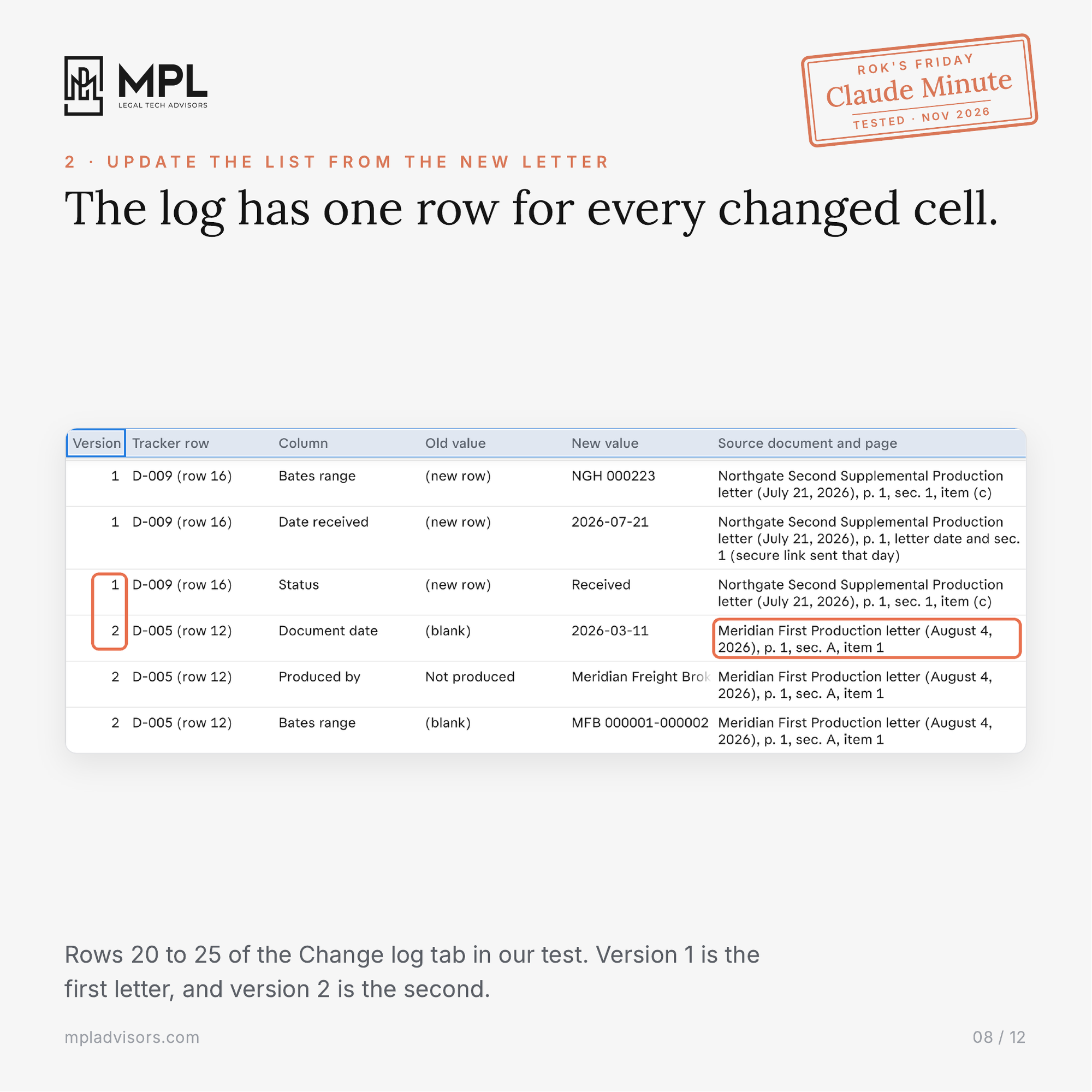
You can make that much easier by asking Claude to keep a change log. It records the old value, new value and source page for every change, so your paralegal knows exactly what to check. We tested this with 13 exhibits and 2 production letters from a made-up trucking case.
1. Keep the tracker and change log in one Sheet
Open your case Project, attach the exhibit list and ask Claude to create a Claude Sheet with two tabs: Tracker and Change log. The second tab should record the changed cell, old value, new value, source document and page, and version number. Your team can then see what changed after each production letter without searching through the entire list.
2. Update the list with each production letter
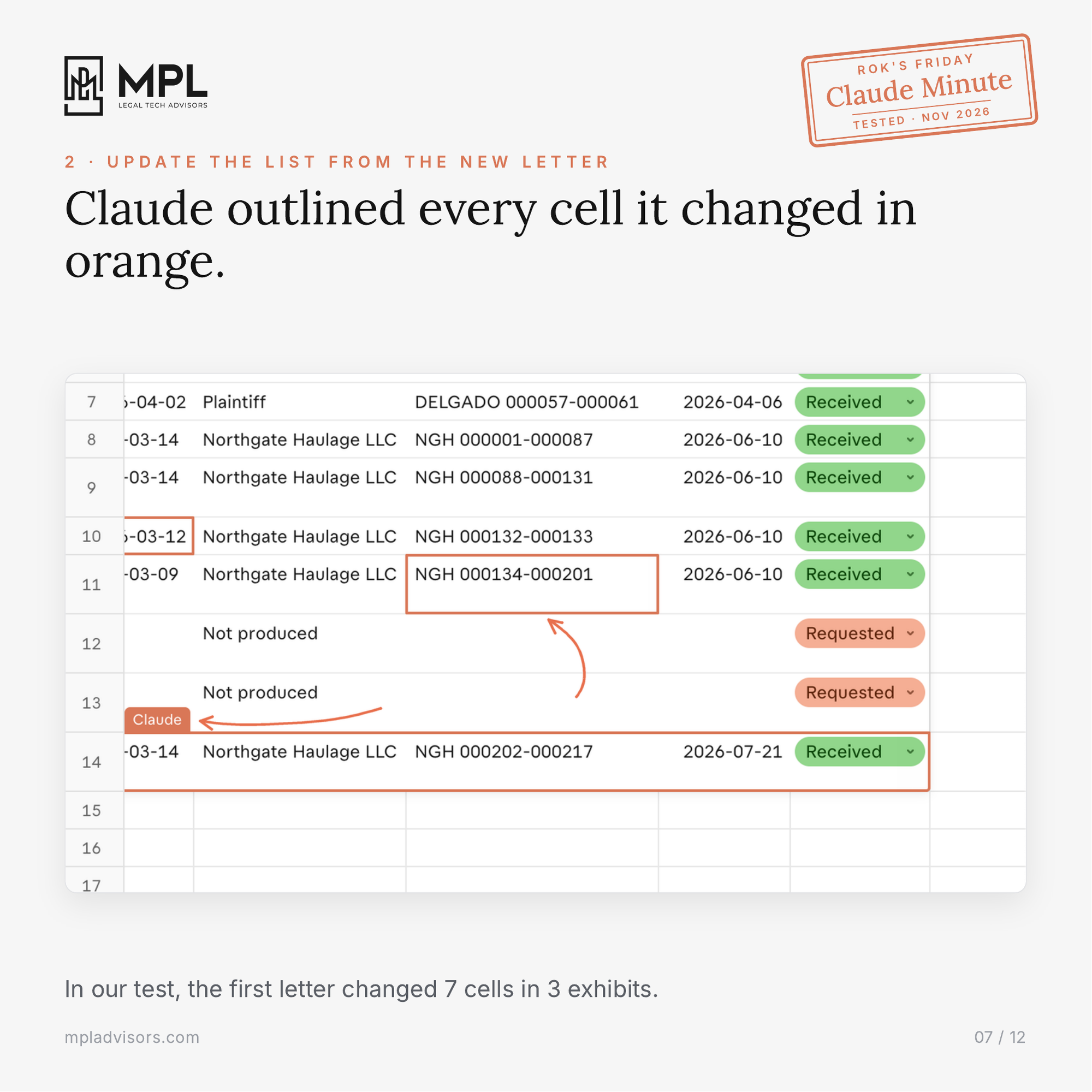
Attach the letter and ask Claude to update the affected entries, add any new exhibits and record every change as version 1. Use version 2 for the next letter, keeping the earlier log entries. In our test, Claude recorded 38 changes across both letters and outlined the changed cells in orange. In my first attempt, it missed two new documents because I hadn’t explicitly told it to add them.
3. Check the log in a second chat
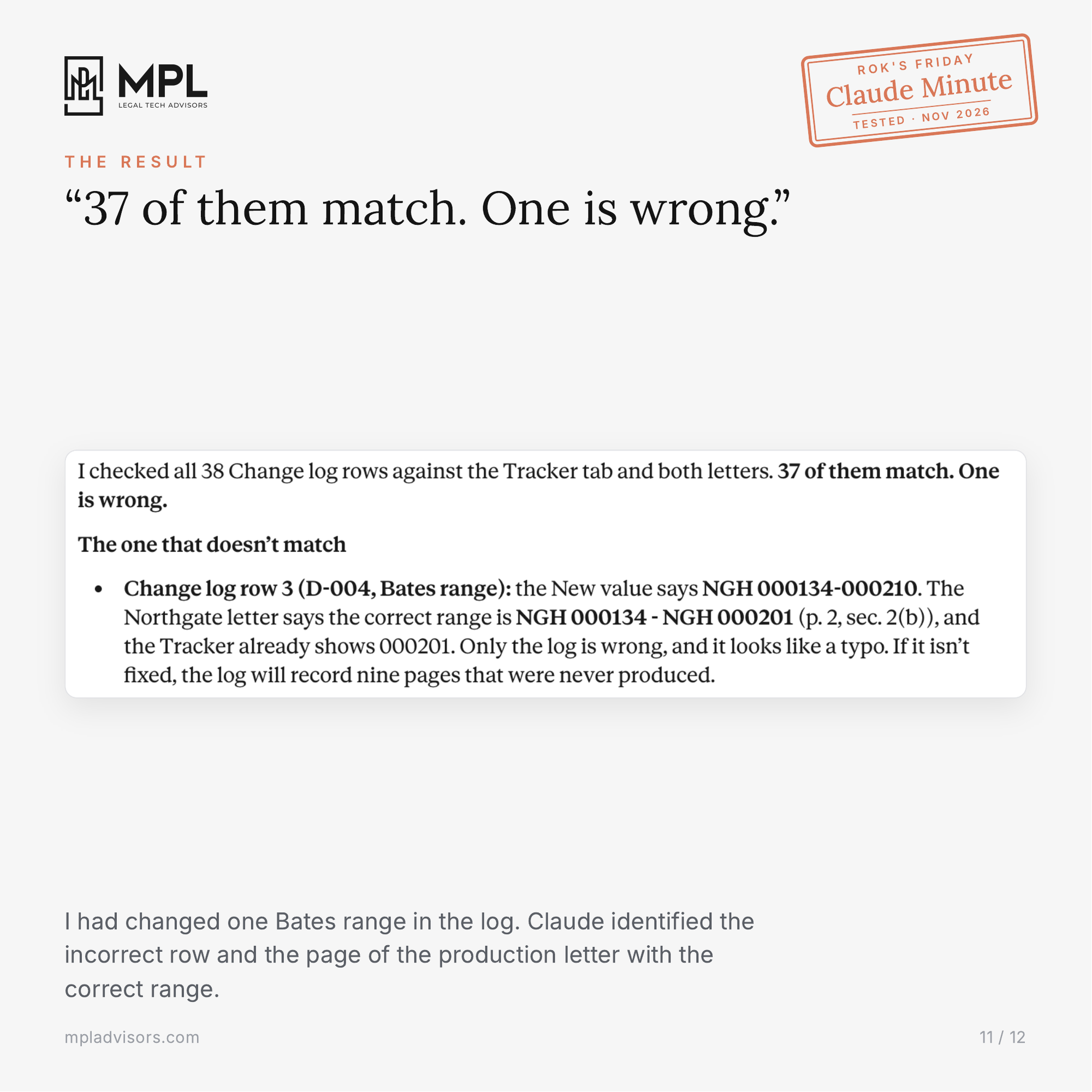
Open a new chat in the same Project, attach both letters and ask Claude to check every change against the Tracker and source documents. I deliberately changed one Bates range in the log, and Claude replied: “37 of them match. One is wrong.” It identified the incorrect row and the page of the letter with the correct range. Claude also raised one false alarm, so your paralegal still needs to verify the changes against the originals.
⬇️ Here is the full 12-page guide with screenshots and all four prompts to copy, a day before it goes out on LinkedIn. Forward it to whoever at your firm maintains the exhibit lists.
Rok’s Friday Claude Minute - Change Log.pdf
Legal AI in Action
🎬 12 Weeks Inside a 26-Person PI Firm
In the video I show what we did at a 26-person personal injury firm in the 12 weeks after their Claude training, week by week. The firm had 24 people in Claude on the day the training ended, 17 of them used it every week and 7 didn’t, and you’ll see how we got those 7 working in it on their own cases. I also show the 10 things we found in the team’s conversations that nobody had mentioned in the survey, and how we turned the way their best people do the tasks into one firm standard for each, that anyone at the firm can run.
🎙 From Harvey to Claude
Gulbabil Kokver is a California attorney at Oguz Law in the Bay Area, where she works with founders and startups, handles immigration cases and runs the firm’s AI operations. Her firm has 53 people working in Claude.
We talked about why her firm used Harvey for a year and then moved everyone to Claude. She also explains how she collects her colleagues’ corrections at the end of a chat to improve each skill, what she learns from one-on-one calls where colleagues show her how they prompt, and how she hands her own research and content to Claude Duet and ChatGPT’s Dots while she does something else.
🎙 Next Tuesday at 11am PDT/ 2pm EDT / 6pm CET
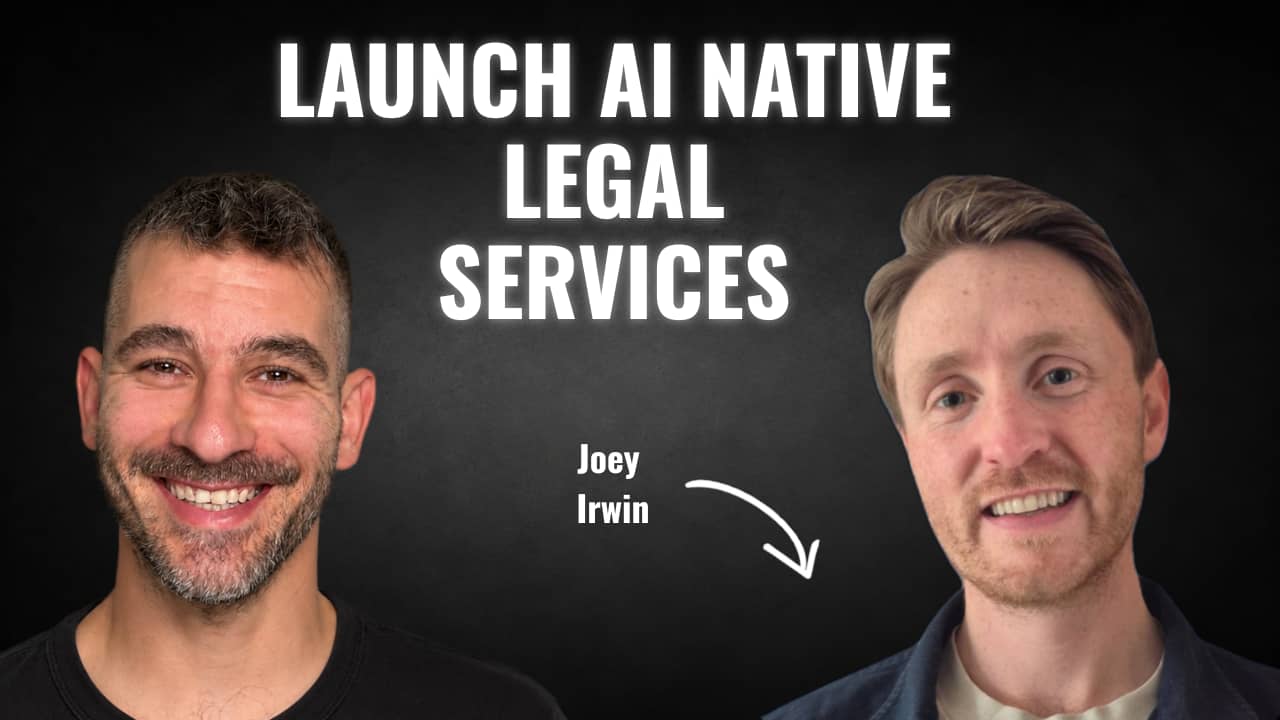
Next week’s guest on Rok’s Legal AI Conversations is Joey Irwin, co-founder of Kyra Law, an AI-native law firm in London that does fixed-fee legal work for startups. He was building contract review software for in-house teams, stopped, and opened a law firm instead.
In our conversation, he explains how his firm saves what its lawyers learn on every piece of work, so its AI agents prepare 80% of the next similar one before a lawyer logs in. He explains how he sets fixed fees, and what the firm does when a job takes longer than quoted. We also get into the clients that Claude and ChatGPT send him, and where he would start at a PI firm.
Each edition of Legal AI Brief brings practical lessons from the frontlines of legal AI by your editor, Rok Popov Ledinski.